✅ Settle Liabilities
Paying out pending liabilities such as fees and redemptions.
Once fees, redemptions, or other costs appear as pending liabilities, you can settle them.
Viewing pending liabilities
Go to Flows > Outflows and open Pending Liabilities. This lists all outstanding items: fees, redemptions, Fume fees, distributions, and any manual liabilities you have added.
Preparing liquidity
Before settling, the fund's smart contract needs enough liquidity. That can come from:
- New subscriptions: When a NAV calculation issues units for new subscriptions, you can keep their capital in the fund contract instead of moving it to the fund wallet, and use it to settle liabilities. The platform offers to settle them right after the NAV. Capital still waiting for a NAV calculation cannot be used.
- Transfer from fund wallet: Move the required amount from your fund wallet back into the smart contract.
Important: The fund contract never pulls money from the fund wallet: the manager sends liquidity into it. Payments out of the contract only go to the recipients of booked liabilities (the fee collection address, investors for redemptions and distributions, and the recipients of manual liabilities), and every one of them is recorded on-chain.

Settling in batch
Click Settle Liabilities, select the liabilities you want to settle, and confirm. A single transaction pays every selected liability: fees to the fee collection address, redemptions to the investors (already net of exit fees), and so on. Once confirmed, the liabilities move to history.
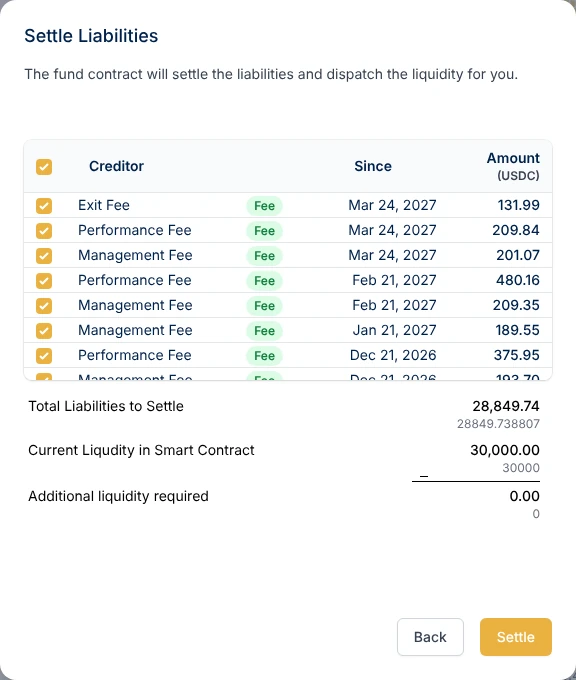
Settling one liability
To settle a single liability, click Pay next to it. For an on-chain liability, this triggers a direct transaction from the fund contract to the recipient, without batching.
Settling off-chain liabilities
If a payment happens outside the blockchain (bank transfer, wire, etc.), click Pay next to the item and confirm that it was paid outside the platform, with the payment date. This tells the smart contract the obligation is fulfilled and removes it from your pending list.
Fund contract liquidity
The Fund Contract Liquidity section shows the current balance in the fund's smart contract: how much is available for settling liabilities without transferring more in.