🔑 Permissions & Roles
Controlling who on your team can do what.
Whether you run a fund solo or with a team, the permissions system controls who can do what.
Roles
There are two roles. Manager: administers the fund, can invite investors, calculate NAV, settle liabilities, manage settings, and perform on-chain operations. Investor: views their investment details, deposits capital, and requests redemptions. Investors cannot access administrative functions.
Inviting additional managers
Go to Settings, open Invite Another Manager, and enter their name and email. They receive an email invitation and get the same access to the platform as you. What their wallet can do on-chain is set separately, with per-function permissions below.
Per-function permissions
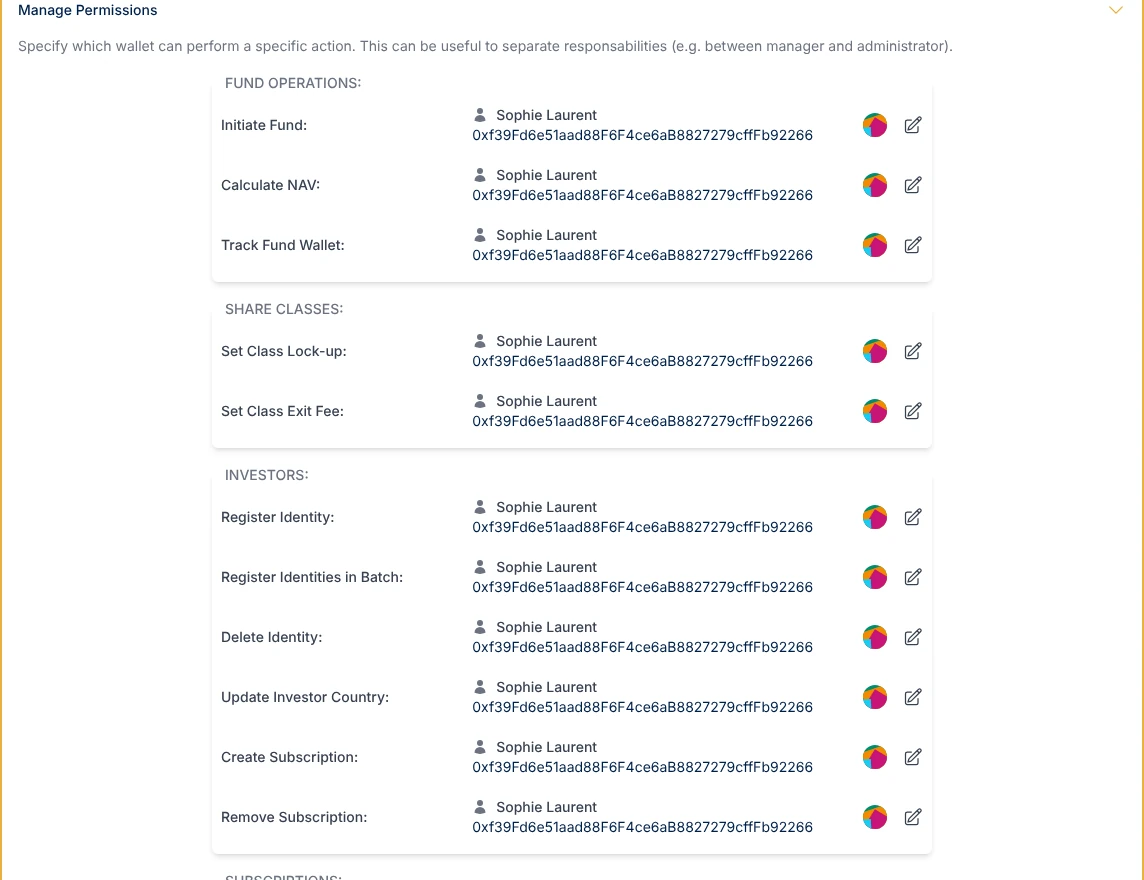
For multi-manager funds, you can control exactly which operations each manager wallet is allowed to perform. From Settings, open Manage Permissions and assign specific smart contract functions to specific wallets. A function with no wallet assigned stays with the fund's governance wallet. For example, one manager whitelists investors and manages subscriptions, another runs NAV calculations and settles fees, a third has read-only access to monitor the fund. This authorization is enforced on-chain. Even if someone accesses the platform, they cannot execute operations their wallet is not authorized for.
What investors see
Investors see a simplified view of the platform. They can check their holdings in each share class they hold, track performance, deposit capital, request redemptions, and add their class token to their own wallet. They only see the share classes they hold or are subscribing to. The sidebar and available actions are filtered by role, so no administrative features are shown.