📑 Reports & Exports
Generating reports for records, audits, and investor updates.
You can generate reports and export data for your records, audits, and investor updates.
Subscription reports
Open a subscription's details (from Investors > Subscriptions, or Investments for the investor) to download a PDF report of that investment on a chosen NAV date: units issued, value, fees and performance. Selectable dates follow the NAV cycle. The report says how many units the subscription issued; those units may since have been redeemed or transferred.
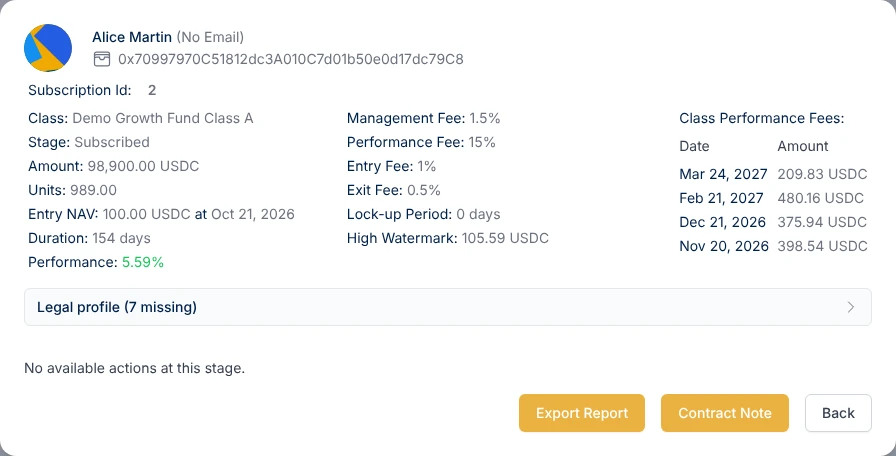
Certificate of subscription
From a subscription's details, a manager can also generate a per-investment Certificate of Subscription for the unitholder. It needs the fund's legal details (Settings > Fund Legal Details) and the investor's legal details; the download stays disabled until both are complete.
Units register
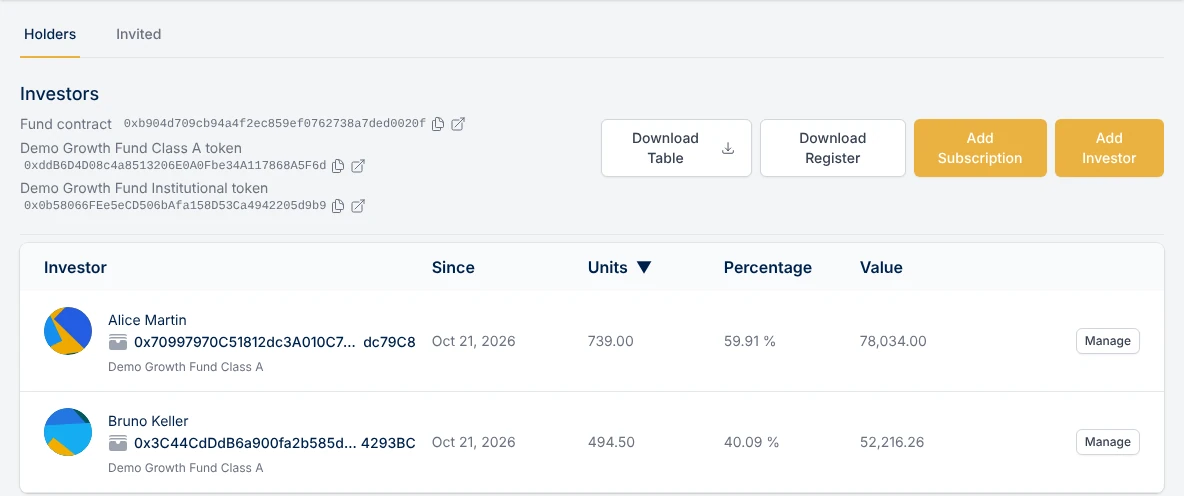
On the Holders tab of Investors > Holders & invited, download the register as a CSV with Download Table, or as a PDF listing every current unitholder with one line per share class held. You can view the register at a past date, which is useful for audits and tax filings. Investors who replaced a lost wallet keep their name and original joining date in the register.
NAV history export
Click Export NAVs on the Overview page to download all NAV calculations, per share class, with dates, NAV per unit, AUM and fee details.
Flows
The Inflows, Outflows and Subscriptions pages each have a Download Table button that exports the list you see as a CSV.