📊 NAV Calculation
Running NAV calculations and understanding what happens at each event.
Every time you run a NAV calculation, the platform prices every share class of the fund, books the fees owed to the manager, updates high-water marks, issues units for pending subscriptions and settles the units of pending redemptions.
First NAV
Every fund starts with a pre-defined initial NAV per unit, set during the fund setup. The very first NAV calculation is simple: it uses that initial value, as there are no assets in the fund yet.
Once the first investors are onboarded (you added their subscriptions and received their deposits), the manager can open the fund:
- Navigate to Overview.
- Click First NAV in the top-right corner. The button is available once the fund has at least one share class and one subscription that has received its capital.
- This action will:
- Issue the first fund units to investors.
- Liberate the capital from the fund contract, moving it to the fund wallet for deployment.
The fund is now live, and the liquidity is ready for deployment according to the manager's investment strategy.
Assets Valuation
After investing the initial liquidity, the next NAV calculations need one key input: the value of the fund's assets.
Valuing the Assets: Determine the total value of the underlying assets in the fund.
The process for reconciling the fund's positions depends on the type of assets being managed.
- For traditional portfolios (stocks, bonds, options), we recommend using portfolio management systems such as Utluna.
- For advanced digital assets strategies, we recommend 1Token, which provides reconciliation across multiple exchanges, wallets (multi-chain), and DeFi protocols.
The liquidity held in the fund contract is automatically included in the calculation, so you do not need to add it manually.
If you wish to outsource this task, reach out to us for customized offers from our partners.
Calculate NAV
Once the total asset value has been defined, you can publish the latest NAV calculation:
-
Navigate to Overview, then click Calculate NAV in the top-right corner, and select the NAV date.
-
Choose one of two calculation methods:
Assets & Liabilities (recommended)
- Input the total value of the fund's assets on the NAV date.
- Liquidity in the fund contract and the fund's pending liabilities (fees, redemptions, manual liabilities) are added from the contract automatically.
- Add any Additional Costs not yet booked (e.g., operational costs outside of fees and redemptions).
Net Equity Only
- Enter your own pre-calculated net equity (total assets minus all liabilities and fees).
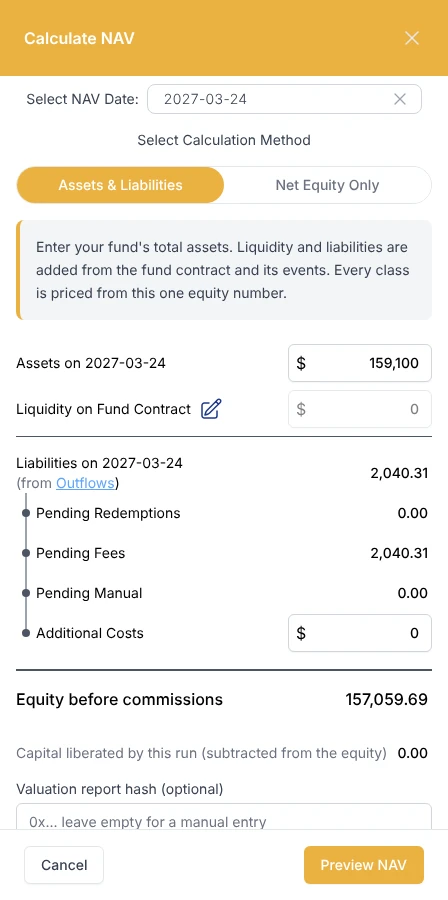
- Optionally add a valuation hash: a fingerprint of your valuation document, recorded on-chain with the NAV.
- Click Preview NAV to review the result before anything is sent: the price of every class after this run, and the management, performance and protocol fees it books (this does not trigger any transaction).
- Once satisfied, submit the NAV to make the calculation official.
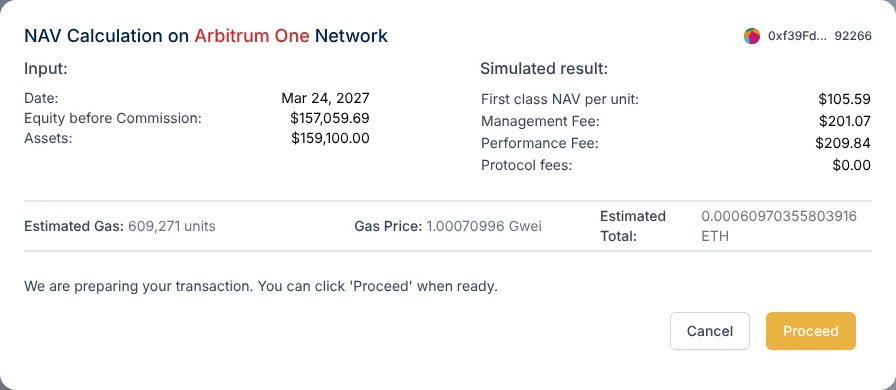
Every class is priced from the same equity figure. Submitting the NAV:
- moves every class's price by the fund's return since the last NAV, less that class's management fee,
- crystallizes the performance fee of a class when its period is due (monthly by default) or when new money enters the class, and moves its high-water mark up,
- issues units for subscriptions that have received their capital, at the class price, and moves their capital to the fund wallet,
- settles the units of pending redemption requests and books what is owed to those investors as liabilities.
One NAV calculation issues at most 30 subscriptions and settles at most 50 redemptions; any extra ones are processed at the next calculation, so no calculation becomes too large for one transaction.
NAV dashboard
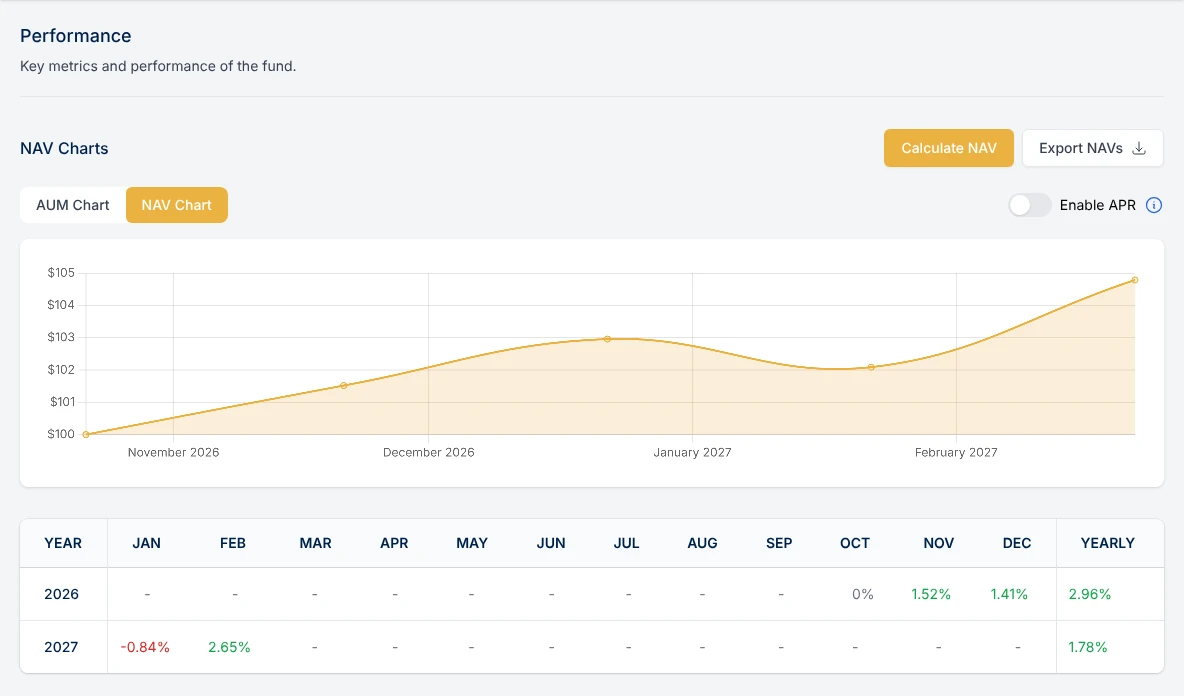
After your first few NAV calculations, the fund's Overview page shows an AUM chart (total Assets Under Management over time), a NAV chart per share class (historical NAV per unit with an optional APR trend line), and a monthly performance table. Investors see only the classes they hold and their own units, with their individual performance.
Exporting NAV data
Download your complete NAV history at any time with the Export NAVs button. The file contains all historical NAV calculations per class and is useful for reporting and audits.
Notifying investors
When you submit a NAV calculation, you can tick Notify Investors by email to send your investors the new NAV.