⛓️ On-chain Subscriptions
Creating an investor, adding their subscription, the investor's deposit, and liberating the capital into the fund wallet.
This section guides fund managers and investors through an on-chain subscription, where the investor pays in the fund's stablecoin from their own wallet. It takes four steps: create the investor, add their subscription, let the investor deposit, and liberate the capital.
Both happen on one page, Investors > Holders & invited, from one Add Investor button. The page has two tabs:
- Holders lists everyone who holds units, with what they hold.
- Invited lists the people you added who hold no units yet, and whether their first subscription is open.
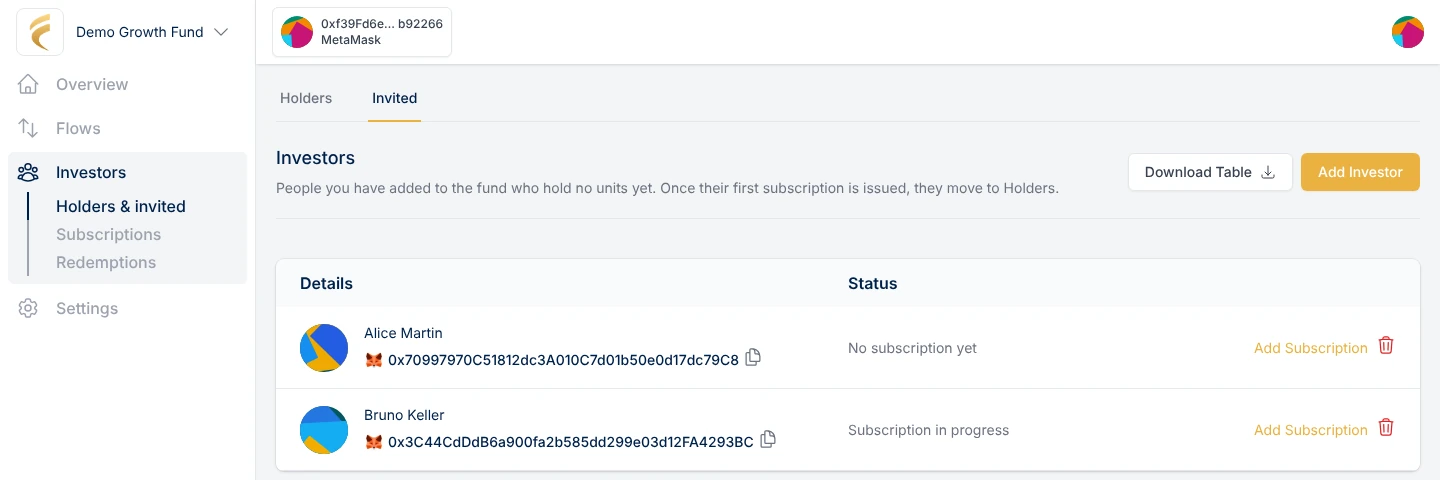
Investors > Holders & invited: the Add Investor button is at the top right.
Create the Investor (as a Manager)
-
Go to Investors > Holders & invited and click Add Investor.
-
Fill in the investor's details:
- Name: The investor's name, which will appear in the fund's unit register.
- Email and/or Wallet Address: Provide at least one. If the investor does not have a crypto wallet, leave the wallet empty and the Tokenization Engine creates a secure embedded wallet for them from their email.
- Share Class: The class this investor will usually subscribe to. It is preselected when you add their subscriptions, and you can still pick another class there.
-
Click Submit. The panel moves straight on to step 2 with this investor selected.
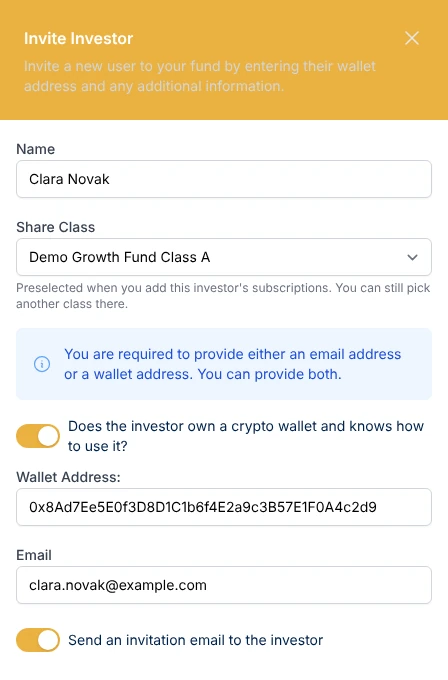
Step 1 of Add Investor: who the investor is.
Creating an investor does not let them invest yet. That happens in the next step. If the amount is not agreed yet, close the panel: the investor stays on the Invited tab, and you can add their subscription later from their row there.
Add the Subscription (as a Manager)
-
Coming from step 1, the investor is already selected. For an investor you added earlier, click Add Subscription on their row in the Invited tab, or on the Holders tab or Investors > Subscriptions, and select the investor.
-
Fill in:
- Class: The share class the investor subscribes to. The form shows that class's terms (management, performance and exit fees, lock-up).
- Amount: The agreed investment amount in the fund's base currency. The investor will be able to deposit exactly this amount.
- Entry Fee: The entry fee for this subscription. It starts from the fund's default entry fee.
-
Tick the option to email the investor if you want them to receive their invitation now.
-
Confirm and sign the transaction.
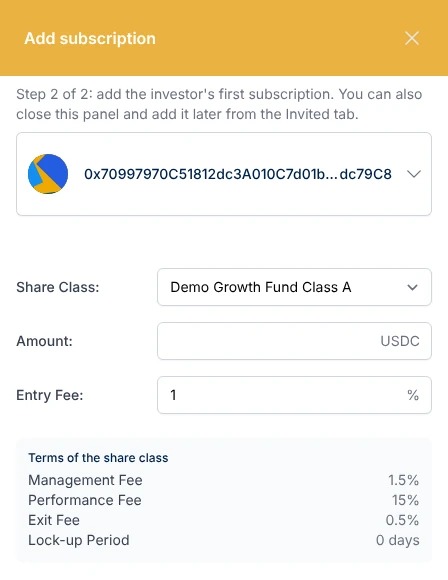
Step 2 of Add Investor: the subscription, with the terms of the chosen class.
Note: Adding the subscription whitelists the investor's wallet on-chain and registers it as a verified wallet of the fund. Make sure the wallet address, the KYC and the due diligence on the origin of funds have been done on your side, and that you comply with the AML/CFT regulations applicable to your investment vehicle. We recommend a cost-effective solution like AMLBot for this purpose.
The investor receives an email with a sign-in link. If they do not have a wallet, Fume has created one for them. They click the link, verify their email, and they are ready to invest. No browser extensions or crypto experience needed.
Until the investor deposits, the subscription shows as Whitelisted in Investors > Subscriptions. You can cancel it there if the investor changes their mind.
Deposit Liquidity (as the Investor)
-
Sign-in: Click the sign-in link received via email to access the platform.
-
Navigate to Investments: Go to the Investments tab on the left-side menu and open the pending subscription.
-
Native Deposit: The deposit takes two transactions:
- Approve: Allows the fund contract to take the agreed amount of the base currency from the investor's wallet.
- Deposit: Transfers the agreed amount from the investor's wallet to the fund contract.
Note: Once the deposit is completed, the investor's job is done. They will receive their fund units at the next NAV calculation.
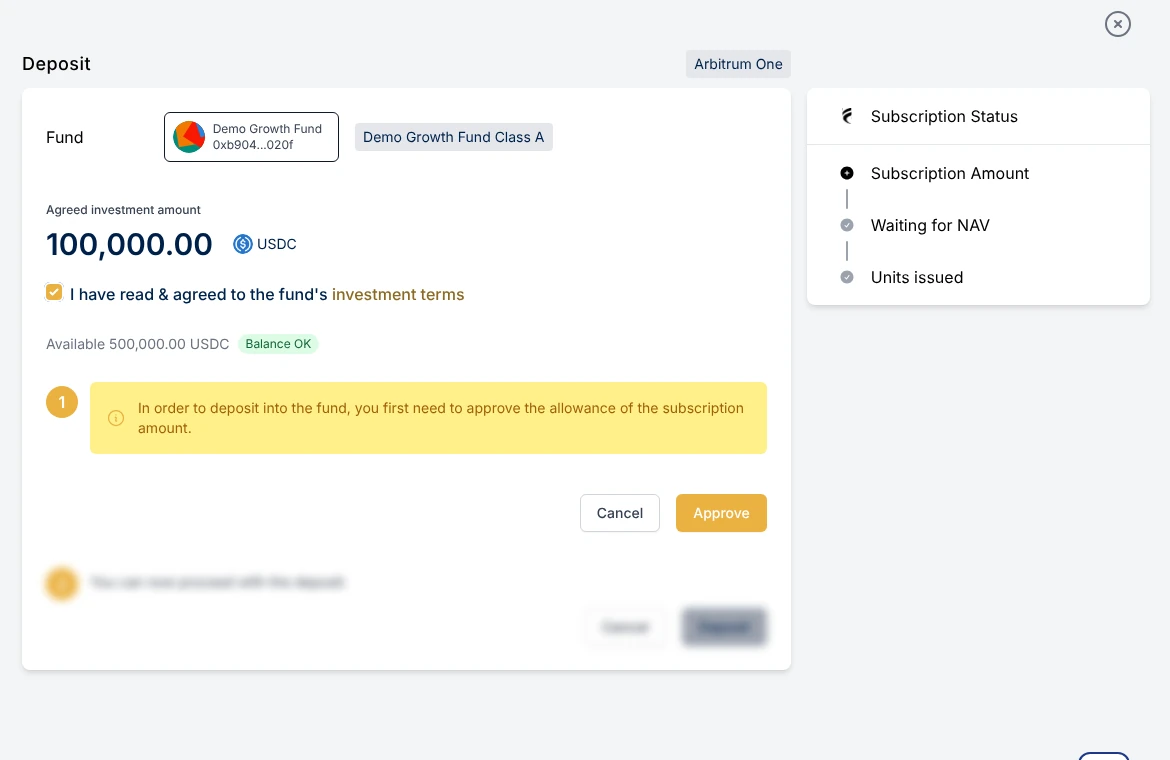
The investor's deposit: approve, then deposit the agreed amount.
If the investor uses an embedded wallet, the platform guides them through each transaction. When the transaction is sponsored, the investor does not need to hold any cryptocurrency for gas fees.
Liberate the Capital (as the Manager)
The deposit is now held in the fund contract. It moves to the fund wallet (the custodian address) in one of two ways:
- At the next NAV calculation: The capital is liberated to the fund wallet, and the investor receives their units.
- Manually: On the Flows > Inflows page, click Liberate Subscriptions to move the capital to the fund wallet before the NAV calculation.
Important: Liberating capital manually does not issue units. The investor receives their units at the next NAV calculation. This is useful if you need the capital right away but are still reconciling your positions for the NAV.
Some funds are configured to forward deposits straight to the fund wallet. On those funds the deposit skips the fund contract, and the investor still receives their units at the next NAV calculation.
Once the capital is in the fund wallet, it is ready to be deployed according to your investment strategy.