📊 NAV Calculation
Every time you run a NAV calculation, the platform determines the value of each fund unit, calculates fees owed to managers, updates high-water marks, and...
Every time you run a NAV calculation, the platform determines the value of each fund unit, calculates fees owed to managers, updates high-water marks, and adjusts all investor positions.
Initiate Fund (Initial NAV)
Every fund starts with a pre-defined initial NAV per unit, set during the fund setup. The very first NAV calculation event is simple,it uses the initial NAV value, as so far there are no investors or assets already in the fund.
Once the initial investors are onboarded (by inviting them and receiving their deposits), the manager can begin fund operations:
- Navigate to "Overview".
- Click "Initiate Fund" in the top-right corner.
- This action will:
- Issue the first fund units to investors.
- Liberate the capital from the on-chain fund, moving it to the fund wallet for deployment.
The fund is now live, and the liquidity is ready for deployment according to the manager's investment strategy.
Assets Valuation
After investing the initial liquidity, it's time to perform the first NAV calculation to assess the fund’s performance and value. The Fume protocol requires only one key input: the Gross Asset Value (GAV).
Valuing the Assets: To calculate the GAV, determine the total value of the underlying assets in the fund.
The process for reconciling the fund’s positions depends on the type of assets being managed.
- For traditional portfolios (stocks, bonds, options), we recommend using portfolio management systems such as Utluna.
- For advanced digital assets strategies, we recommend 1Token, which provides reconciliation across multiple exchanges, wallets (multi-chain), and DeFi protocols.
The current liquidity held in the fund wallet is automatically included in the calculation, so you do not need to add it manually.
If you wish to outsource this task, reach out to us for customized offers from our partners.
Note: In upcoming product releases, we're planning to integrate such solutions directly into Fume for smoother fund manager experience.
Calculate NAV
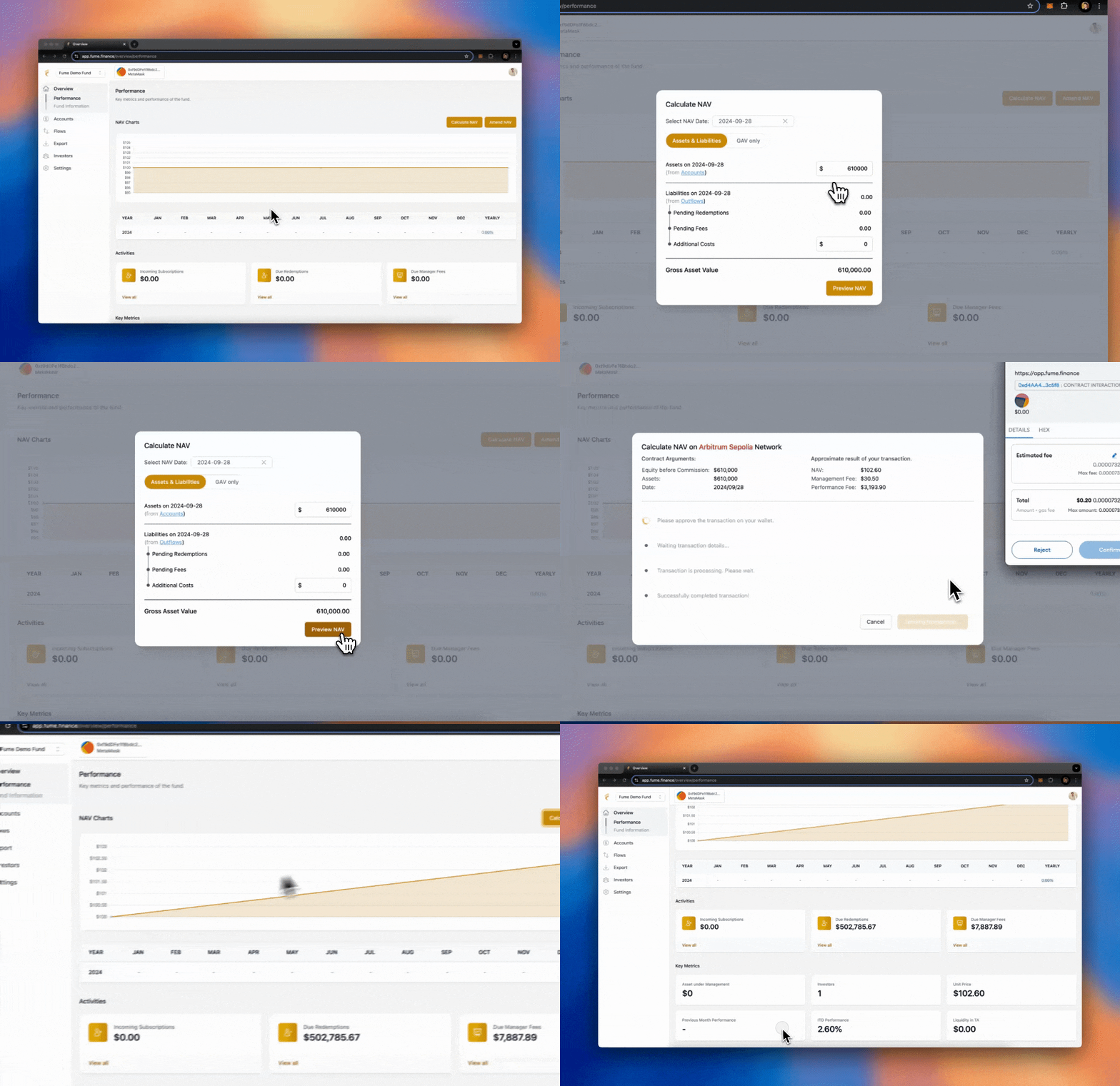
Once the total asset value has been defined, you can proceed with publishing the latest NAV calculation:
-
Navigate to "Overview", then click "Calculate NAV" in the top-right corner.
-
You have two methods to calculate NAV:
Method 1 (Recommended): Using Assets & Liabilities.
- Input the total value of the assets (as discussed in the previous section).
- Add any additional costs in the costs field (e.g., operational costs outside of fees and redemptions).
Method 2: Using the GAV Directly.
- For more flexibility, compute the GAV manually (assets - liabilities) and input the final figure directly.
-
Click "Preview NAV" to review the calculation and see an estimation of the updated fund value (this action does not trigger any transactions).
-
Once satisfied, submit the NAV to make the calculation official. This will update the fund's NAV, issue new units, register any new applicable fees, and equalize the investments among all investors.
-
You can also upload an Excel spreadsheet with your asset data. Fume parses the spreadsheet and calculates the NAV from it. You can preview the results before confirming. The platform shows you an estimated gas fee before you submit.
NAV dashboard
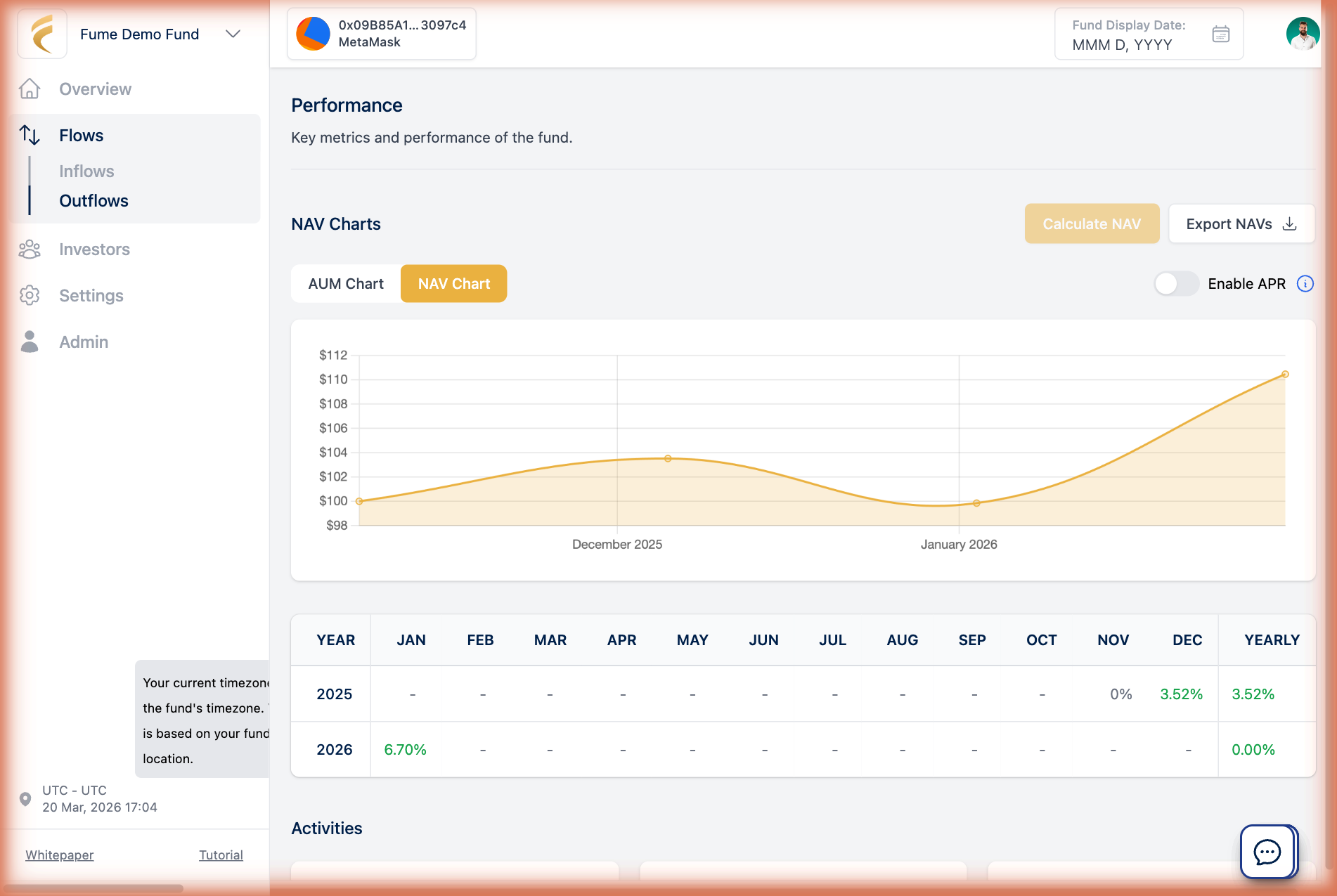
- After your first few NAV calculations, the fund's Overview page shows an AUM Chart (total Assets Under Management over time), a NAV Chart (historical NAV per unit with an annualized return overlay), performance tracking for each NAV event, and total outstanding units in circulation. Investors see a filtered version showing only their own investment, including individual performance and an estimate for the next NAV.
-
Exporting NAV data
- Download your complete NAV history at any time with the Export NAVs button. The file contains all historical NAV calculations and is useful for reporting and audits.
-
Notifying investors
- After completing a NAV calculation, you can notify your investors by email. You can send immediately or schedule for a later time, for example if you want to review the numbers or add a personal note first. Emails are sent in batches for reliable delivery, even with a large number of investors.
Accounting methods
During each NAV event, Fume adjusts investor positions using one of two approaches, chosen during fund setup:
- Equalization-Based: Fume adjusts all unit positions so that every investor's holding reflects the correct value, no matter when they entered. This is the default and handles different entry prices, high-water marks, and performance fees without extra configuration.
- Series-Based: Each group of investors who subscribed at the same time is tracked as its own "series" with independent entry price, high-water mark, and fee calculations. When conditions align (e.g., after a fee crystallization event), series can be merged. Better for funds that need per-cohort tracking.