# Fume: Full Site Content (Markdown)
Source of truth for AI assistants. Concatenates marketing pages, documentation, and blog posts. Investor-only pages are excluded by policy. Canonical URL: https://www.fume.finance
---
# Marketing Pages
# Fume, AI agents for investment funds
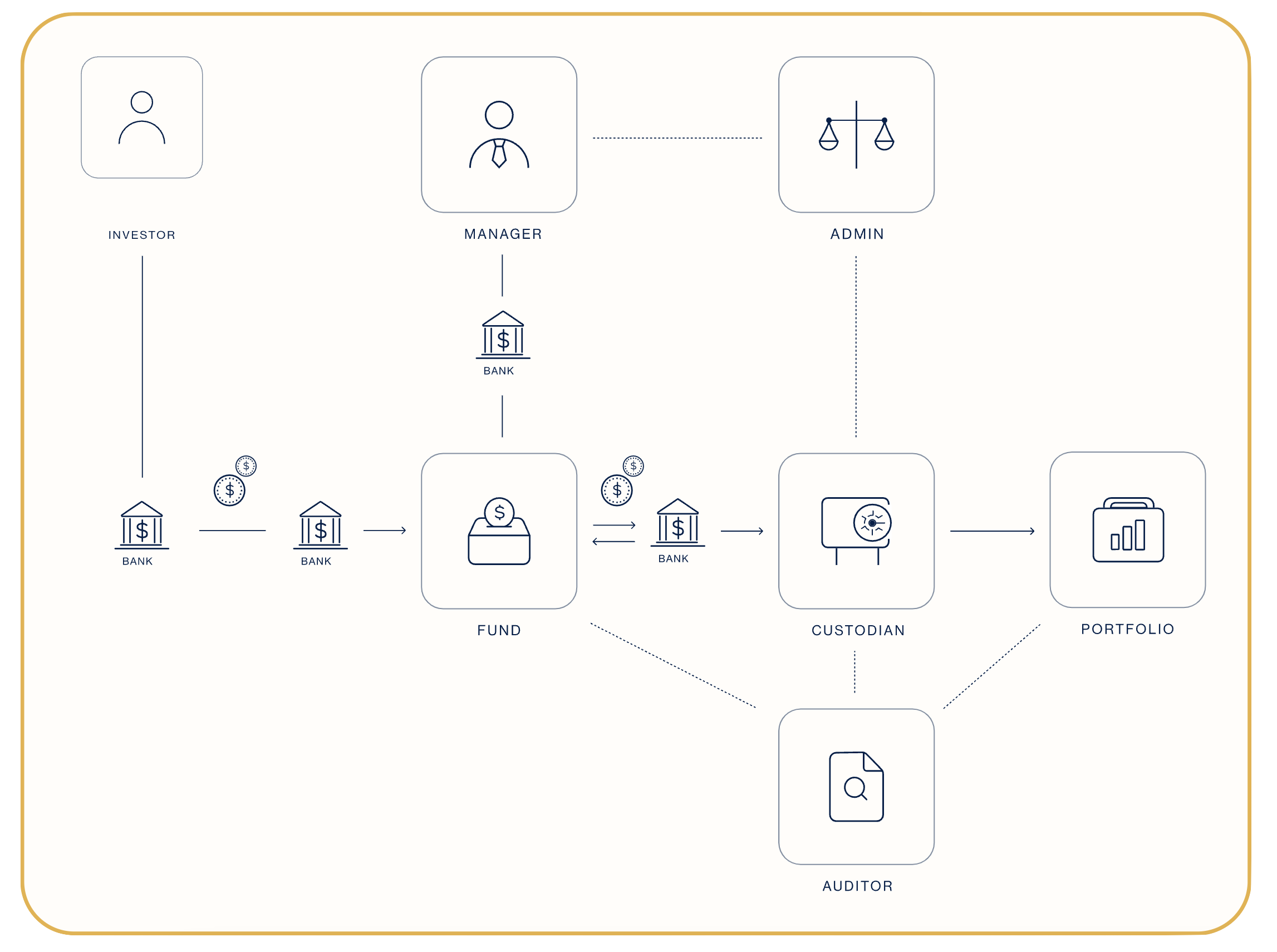
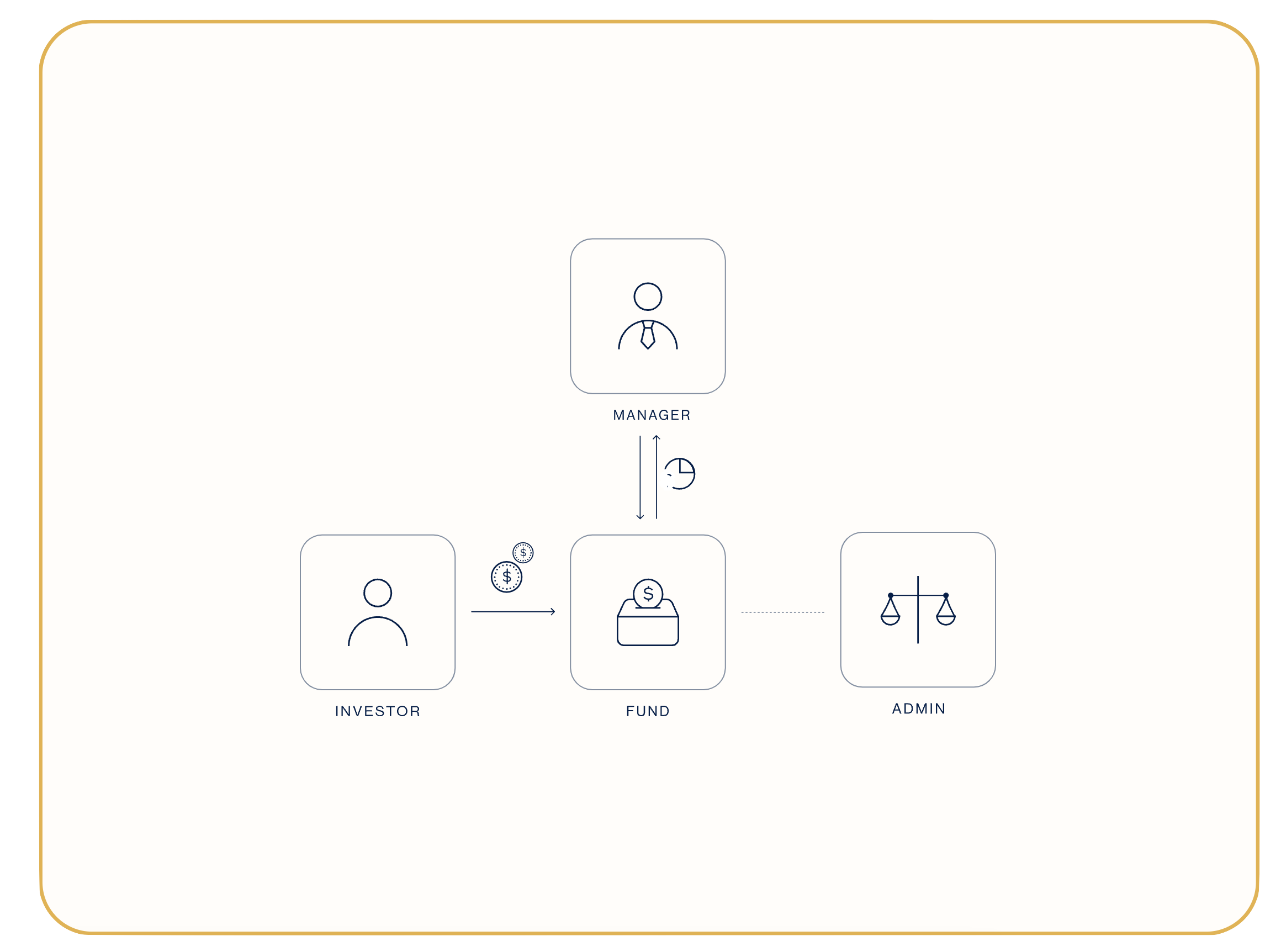
Fume delivers and manages AI agents for fund administrators, fund managers, and family offices. Built and run by FumeX AG (Locarno, Switzerland). The agents take over the manual work in fund operations, at 20% of what the work costs by hand, so the same team can serve more funds and more AUM.
## The core offering: managed AI agents
We find what's eating the week, build an agent that takes it over, and manage the agent while it runs the task on its own. Typical agents cover compliance monitoring, document processing, NAV workflows, risk monitoring, and investor communication. Agents plug into the fund admin, custody, and trading systems your team already uses. Private deployments on your own infrastructure are available (open-source models, on-prem or private cloud). See [solutions](https://www.fume.finance/solutions) for the patterns we've built, and [AI agents for funds](https://www.fume.finance/ai-agent-funds).
## A separate product line: the tokenization platform
You can tokenize a fund without using the agents, and hire the agents without tokenizing anything. The platform:
- **Tokenization Engine**: Free fund tokenization using the ERC-6909 standard on Ethereum, Arbitrum, Base, and selected EVM chains. Live cap table, programmable share classes, automated NAV.
- **OmniClear**: Stablecoin settlement infrastructure. Subscriptions and redemptions clear in the same block. Multi-currency in, multi-currency out.
- **Tokenized Fund Registry**: Public, open registry of tokenized investment funds with onchain verification. Discover funds, compare terms, and connect with managers.
- **Fund Builder**: Interactive questionnaire that maps your fund profile to the legal, fund admin, custody, exchange/broker, audit, and AIFM partners that fit. Generates a tailored stack and a one-page PDF you can act on.
## Who Fume is for
Fund administrators, fund managers, and family offices. Built by fund operators, for fund operators.
## Headline links
- See what we've built: https://www.fume.finance/solutions
- Get started: https://www.fume.finance/fund-builder
- Tokenize an existing fund for free: https://www.fume.finance/tokenize-free
- Browse tokenized funds: https://www.fume.finance/registry
- Book a call: https://www.fume.finance/resources/book-a-call
# Tokenization Engine, Free Fund Tokenization
Tokenization has been commoditized. Fume does it for free. What matters is what comes next: stablecoin subscriptions, onchain admin, and a live cap table, all of it callable, so an AI agent can run the whole thing. Fume is the tokenization engine an agent can actually drive: the first fund infrastructure built for software to operate, not just for a person to click through.
## Pricing
**Free forever — Tokenization ($0):**
- Drag-and-drop fund tokenization
- ERC-6909 tokenized shares onchain
- Onchain stakeholder register
- Fund Registry listing
**Fume Platform ($179/month):** full onchain administration — automated NAV, fees, payouts, and stablecoin subscriptions and redemptions, with an agent-ready API and MCP server and a built-in onchain audit trail. A protocol fee of up to 0.1% applies to subscription and redemption flows by default; no AUM cut, no management or performance fee. Special pricing is available for smaller funds. Just ask.
## What tokenization gets you
Traditional fund shares sit in transfer agents and spreadsheets. Tokenized shares live in smart contracts. The difference shows up everywhere.
- **Secondary liquidity**: Tokenized shares transfer between whitelisted investors onchain. Frozen commitments become positions that move.
- **Live cap table**: Your stakeholder register updates in real time with every subscription, redemption, and transfer, so there is no spreadsheet to reconcile.
- **Programmable terms**: Lockups, transfer restrictions, and fee schedules live in the smart contract. They enforce themselves.
## Operations: fund admin that runs itself
When your fund runs on smart contracts, the manual work disappears.
1. **Automated NAV**: Enter your gross asset value and the protocol works out fees, high-water marks, and equalizations in seconds.
2. **Instant payouts**: Smart contracts calculate management fees, performance fees, and investor distributions, then pay them out without a manual step.
3. **Built-in audit trail**: Every subscription, transfer, and payout lands onchain, one source of truth that nobody has to maintain by hand.
## Capital in: accept subscriptions in any currency
Stablecoins, fiat, or both. Investors subscribe the way they already pay, and the money settles into your fund in minutes.
- **Native stablecoin subscriptions**: Investors connect their wallet and deposit USDC or USDT directly into your fund's smart contract. Only whitelisted wallets get through, and AML checks are built in.
- **Fiat still works**: Wire transfers, bank deposits, or any other subscription method alongside crypto.
- **Minutes, not days**: Subscriptions settle when the transaction confirms instead of waiting on correspondent banks and SWIFT queues.
## Agent-native: built for agents
Most tokenization platforms hand an agent a dashboard and a login. Fume hands it an API and an MCP server any agent can plug into. Every action in the engine is callable and every output is machine-readable, so an agent can run the whole fund lifecycle rather than the slice a vendor chose to expose.
- **Every action is an API call**: Tokenize, mint, whitelist, run NAV, distribute. No action is portal-only. An agent stands up a fund and operates it start to finish, the same calls a human would make, minus the human.
- **Machine-readable cap table**: The onchain stakeholder register is live, structured data. Agents read positions, subscriptions, and transfers straight from the chain instead of scraping PDFs.
- **Built on open standards**: ERC-6909 shares with standard RPC and REST endpoints, plus an MCP server. An agent that knows the standards already knows how to drive the fund, and there is no proprietary SDK to learn.
- **Guardrails enforced onchain**: Whitelisting, AML checks, lockups, and fee schedules live in the smart contract. Agents move fast inside the limits you set once, and the rules can't be skipped.
See also: [AI Agents for Funds](https://www.fume.finance/ai-agent-funds) and [OmniClear](https://www.fume.finance/omniclear) for the settlement layer.
# For Asset Managers
Tokenize your fund. Accept subscriptions. Automate payouts. All from one platform.
## What you can do with Fume
- Accept subscriptions of any kind (stablecoins, fiat wires)
- Tokenize your fund shares (ERC-6909)
- Simplify NAV calculation
- Automate payouts (management fees, performance fees, distributions)
- Invest in any asset (equities, crypto, real estate, private credit)
## Two paths to launch
### Path 1, SaaS: Power your fund with Fume
Use Fume's smart contracts to run your fund operations. Keep full control over compliance with your existing fund license or set up a new one (e.g. a Delaware fund).
**Best for:** Asset managers with an existing license or resources to set up their own fund structure.
### Path 2, FaaS: Launch with Fund-as-a-Service
Outsource compliance and fund setup to us. Operate under our established fund structure (e.g. rent our AIFM license in Luxembourg) by creating a dedicated compartment for your fund.
**Best for:** Asset managers who want to go live quickly without setting up their own fund structure.
# For Fund Administrators
Fume is the on-chain layer for fund administrators. Automate the manual work that slows you down: subscription processing, NAV calculation, fee distribution, and audit trail. Plug into your existing accounting and reporting stack.
## What Fume does for fund admins
- Automatic shareholder register and cap table maintenance
- Onchain settlement of subscriptions and redemptions
- Programmable NAV calculation with high-water marks and equalizations
- Smart-contract-driven fee extraction (management, performance, distributions)
- Full audit trail by construction, every transaction is verifiable onchain
- API integration with custodians and accounting systems
## Why fund admins partner with Fume
Tokenization is a tailwind for the fund admin business, onchain funds need someone to handle reporting, regulatory filings, and investor relations. Fume gives admins the operational rails to serve those funds without building blockchain infrastructure in-house.
White-label and revenue-share arrangements available.
# Free Fund Tokenization
Not tokenized yet? List on the Registry in 10 minutes.
Tokenize your fund shares with ERC-6909 at zero cost. Get an automatic listing on the Tokenized Fund Registry, full onchain auditability, and no lock-in.
## Three steps to tokenized shares
1. **Upload shareholder register**: Share your existing investor list. We map it to ERC-6909 token positions.
2. **Review token terms**: Confirm share classes, denominations, and transfer restrictions before minting.
3. **Deploy**: Your tokens go live onchain and your fund appears in the Registry automatically.
## What you get
- Free ERC-6909 tokenization of fund shares
- Automatic listing on the Tokenized Fund Registry
- No lock-in on fund admin or custody
- Supports Ethereum, Arbitrum, and Base
- Onchain audit trail from day one
## What's included, and what's not
Free tokenization covers share representation only (mint ERC-6909 tokens against your existing shareholder register). For automated subscriptions, redemptions, NAV calculation, and fee extractions in stablecoins, upgrade to Fume Platform (paid, $179/month).
## Frequently asked questions
**What does free tokenization actually include?**
Free tokenization covers share representation only, we mint ERC-6909 tokens against your existing shareholder register. You get tokenized fund units, an automatic Registry listing, and a public onchain record.
**What does it NOT include?**
Automated subscriptions, redemptions, NAV calculation, and fee extraction in stablecoins are part of Fume Platform, a paid product. Free tokenization is the share representation layer only.
**Is there a catch? Why is it free?**
Tokenization is the wedge. We want every fund in the world to have tokenized shares. When you're ready for full onchain fund administration, Fume is the natural upgrade. There's no obligation to upgrade.
**Which blockchains are supported?**
Ethereum mainnet, Arbitrum One, and Base. We can support any EVM-compatible chain on request.
**What token standard do you use?**
ERC-6909, a multi-token standard optimised for representing multiple share classes within a single contract. It's gas-efficient and auditor-friendly.
**Do I need to change my fund admin or custodian?**
No. Free tokenization is compatible with any custody or admin setup. Your existing service providers stay in place.
**How long does the process take?**
Most funds are tokenized within one business day after we receive the shareholder register and confirm terms.
**Will my fund appear on the Registry?**
Yes. Every fund tokenized through Fume gets an automatic, verified listing on the Tokenized Fund Registry with the "Powered by Fume" badge.
# OmniClear, Stablecoin Settlement for Funds
Stablecoin settlement for every fund. Accept any currency, settle any way.
## Bridging two worlds
OmniClear sits between traditional finance and onchain finance.
- **Traditional finance side**: Wire transfers, SWIFT payments, fiat currencies, traditional custody.
- **Onchain side**: Stablecoins (USDC, USDT), smart contract settlement, instant transfers, onchain custody.
OmniClear converts, routes, and settles between the two automatically.
## Use cases
- **Accept crypto investors**: Traditional funds can receive stablecoin subscriptions and automatically convert to fiat for custody with their existing banking partners.
- **Accept traditional investors**: Onchain funds can receive fiat wire transfers from traditional investors and settle subscriptions in stablecoins onchain.
- **Cross-border settlement**: Global settlement without correspondent banking delays. Send and receive across jurisdictions in minutes, not days.
## How it works
1. **Investor sends funds**: Fiat wire, USDC, USDT, or any supported stablecoin.
2. **OmniClear converts and settles**: Conversion, compliance checks, and routing in the background.
3. **Fund receives in preferred currency**: Stablecoins onchain or fiat in a bank account, whichever the fund prefers.
# The Tokenized Fund Registry
The open registry of tokenized investment funds. Compare terms, verify onchain, and connect with fund managers directly.
The Registry is a public directory of investment funds with tokenized shares. Each entry shows the strategy, AUM, jurisdiction, fund administrator, and the chain(s) the shares live on. Funds tokenized through Fume get an automatic, verified listing with onchain proof.
## What you can do on the Registry
- Browse tokenized funds across strategies, jurisdictions, and chains
- View detailed fund pages with onchain contract addresses, audit information, and service-provider stack
- Request fund documents directly from the manager
- Verify share existence and supply onchain via the linked block explorer
## How to get listed
Tokenize your fund through Fume and you're listed automatically. See [free tokenization](https://www.fume.finance/tokenize-free) for the no-cost path.
## See all funds
Full table view: https://www.fume.finance/registry/list
# AI Agents for Funds
AI agents, delivered and managed. Instead of selling software, Fume delivers the finished task: we find the process that eats your team's hours, build an agent for it, deploy it into your stack, and manage it while it runs on its own.
## How it works
1. **Find the process**: We sit with the people who actually do the work and map every manual step. The process that eats the most hours is where the first agent goes.
2. **Build and deploy the agent**: We build the agent around how your team already works and wire it into your existing systems. No migration, no new platform to learn.
3. **Let it run**: The agent performs the task on its own, every cycle. The output lands in the drive, inbox or platform your team already opens.
4. **We maintain it**: We monitor every run, fix issues before they reach you, and ship upgrades as your tools evolve. You get the result of the work, not another tool to babysit.
## Not a chatbot
ChatGPT and Copilot are useful, and they still leave the work with your team. An agent has access to your systems, a defined task, and permission to complete it end to end. Your team reviews the output instead of producing it.
## Where we start: the NAV lifecycle
Four examples across the NAV lifecycle. Wherever data moves by hand in your operation, an agent can take it over.
1. **Ingest agent**: Pulls data from brokers, banks, email inboxes, and onchain transactions every morning. Manual logins and exports disappear.
2. **Structure agent**: Takes any statement format and turns it into structured transactions, across crypto and traditional assets, in the exact layout your platform expects.
3. **Push NAV agent**: Pushes structured data into Paxus, NTAS, Geneva, Investran, or any NAV engine. The platform runs the calc, the agent returns NAV, fees, and the cap table.
4. **Tokenize agent**: Feeds NAV results, payouts, and the latest unit register into Fume's tokenization engine, fully onchain and end to end.
## More agents we build
- **Compliance agent**: Monitors regulatory changes across jurisdictions and flags issues before they become problems.
- **Document agent**: Reads legal documents, term sheets, and investor reports. Summarizes, extracts, and flags the terms that matter.
- **Risk agent**: Live risk assessment across your portfolio. Spots concentration, correlated exposures, and unusual patterns before they hit.
- **Communication agent**: Drafts investor updates, quarterly reports, and responses to common questions in a consistent voice, in a fraction of the time.
Need something else? Fume builds bespoke agents wired to your stack.
## How we build agents
- **Wired into your stack**: Works with your custodian, admin platform, trading venues, and data providers. No forced migration, no rip-and-replace.
- **Bespoke, not off-the-shelf**: We write, deploy, and hand over custom agents built around your process. No 200-page reports, no generic product.
- **Guardrails that hold**: Agents act inside limits you set. Every action is logged and auditable, so your compliance team can trace each run.
- **Managed by us**: We monitor every run, catch the edge cases, and keep improving the agent over time. You get the result, not a maintenance burden.
## Built to pass your compliance review
- **Paperwork before data**: We sign a data processing agreement and share a security overview of the exact setup before any client data flows.
- **Certified infrastructure**: Client data runs on a short list of ISO 27001 and SOC 2 certified providers, hosted EU-first and encrypted in transit and at rest.
- **Your data never trains models**: Model calls run with zero data retention. The processing is transient, and nobody stores your data or trains on it.
- **Humans stay in the loop**: Every run is logged and auditable, the output goes to your team for review, and your manual process keeps running as the fallback.
Full details: [Security documentation](https://www.fume.finance/docs/company/security).
## Fully private: agents that run locally
Some funds can't send data to a public AI cloud, and they shouldn't have to. Fume deploys the same agents on open-source models that run entirely inside your own infrastructure, with the same guardrails and audit logs. The only difference is that no data ever leaves.
- **On your infrastructure**: Open-source models run on your own servers or in your private cloud. Investor data, positions, and documents stay inside your firewall.
- **No third-party AI cloud**: Your data never touches a public model API, and nobody trains on it. Since there's no AI vendor in the chain, compliance has nothing new to review.
- **Proven in production**: Fume already runs fully on-prem deployments for managers: Docker stacks on their own infrastructure, with their own keys, monitoring, and database.
## The Fume stack for AI
Every part of Fume is built for programmatic access, so the agents we deliver can lean on each layer. Agents on the other side of the table use the same stack to browse, subscribe, and invest.
- **Fund Builder**: Agents pick legal, admin, custody, and audit providers through the Fund Builder.
- **Tokenization Engine**: Free tokenization. Agents get programmable ERC-6909 shares they can issue and distribute.
- **OmniClear**: Instant stablecoin settlement. Subscriptions and redemptions clear in the same block.
- **Fund Registry**: A public directory of tokenized funds. Agents browse, evaluate, and invest.
# Fund Builder
Interactive tool to assemble a complete fund stack, answer a short questionnaire and get matched with the right legal, fund admin, custody, exchange/broker, audit, and AIFM providers for your specific situation.
## How it works
1. **Answer 5-6 questions**: License, domicile, investor type, AUM, strategy. Most users finish in under two minutes.
2. **See your matched stack**: Pre-selected providers across all relevant categories. Each card opens a panel with details, pricing, and rationale.
3. **Swap any pick**: Browse alternatives in the Partner Directory and replace recommendations with providers you prefer.
4. **Get a one-pager**: Enter an email and we send a PDF summary of the recommended stack plus introductions to the providers.
## Categories covered
- Legal counsel
- Fund administration
- Custody
- Exchange / broker
- Audit (or AIFM, depending on your license)
## Partner Directory
Browse every provider in the Fume catalog at https://www.fume.finance/fund-builder/providers, search and filter by category, jurisdiction, and pricing. Click any provider for a detailed page with their services, contact, and an option to request an introduction.
## Get listed
Service provider for funds? Apply to join the directory at https://www.fume.finance/fund-builder/providers (use the "Get listed" button).
# About Fume
Fume is built and run by FumeX AG, registered in Locarno, Switzerland (CHE-342.025.757). The team came together around a single observation: fund operations are still mostly manual, and the people who actually run funds know exactly which parts are broken.
## What drives the company
- **Built by fund operators, for fund operators.** Every product decision starts with a problem we've watched a fund manager or admin struggle with.
- **AI as the through-line.** From automated NAV to bespoke ops agents, AI is how Fume turns operational drudgery into infrastructure.
- **Open standards.** ERC-6909, public registries, raw markdown for every page, your data and your stack are not locked in.
## Team
- Riccardo Conti, Chief Executive Officer
- Marc Bickel, Chief Technology Officer
- Raphael Maibach, Head of Legal
## Get in touch
- info@fume.finance
- https://www.fume.finance/resources/contact-us
- https://www.fume.finance/resources/book-a-call
---
# Documentation
# 🏠 Overview (/docs)
Fume is an AI company specializing in the fund industry. We build and run software for investment funds and the people who serve them: fund managers, fund administrators, and family offices. Some of it is productized, some of it is built around one client's exact process, but all of it exists to take manual work off fund teams.
These docs are organized by product. Each section below stands on its own.
## AI agents, delivered and managed [#ai-agents-delivered-and-managed]
Instead of selling software, we deliver the finished task. We find the process that eats your team's hours (broker reports pulled by hand, statements re-typed, data pushed between systems), build an agent for it, deploy it into the tools you already run, and manage it while it runs on its own.
## Tokenization Platform [#tokenization-platform]
The Fume Tokenization Engine handles fund administration and tokenization on-chain: fund setup, investor onboarding, NAV calculations, subscriptions, redemptions, and settlement, for both traditional and digital asset funds.
## OmniClear [#omniclear]
Stablecoin settlement for every fund. OmniClear converts and routes between traditional rails (wire, SWIFT, fiat) and on-chain rails (USDC, USDT), so a fund can accept any currency and settle in the one it prefers.
## The rest of Fume [#the-rest-of-fume]
Not everything we build has its own docs section yet. These live on the main site:
## Developers and agents [#developers-and-agents]
The public API, the OpenAPI specification, and how to read any page on this site as markdown.
## Company [#company]
# 🧰 Agent Catalog (/docs/ai-agents/agent-catalog)
This catalog is inspiration, not a menu. Every agent we ship is built around one fund's exact process, but these are the shapes that come up again and again. Wherever data moves by hand in your operation, an agent can take it over.
## Where we start: the NAV lifecycle [#where-we-start-the-nav-lifecycle]
Four agents that together take a fund from raw broker data to a published, tokenized NAV. We wrote up how this pipeline works in [Automating NAV calculation with AI agents](/resources/blog/automating-nav-calculation-with-ai-agents).
1. **Ingest agent**: pulls data from brokers, banks, email inboxes, and onchain transactions every morning, so nobody logs into portals or exports statements by hand anymore.
2. **Structure agent**: takes any statement format and turns it into structured transactions, across crypto and traditional assets, in the exact layout your platform expects.
3. **Push NAV agent**: pushes structured data into Paxus, NTAS, Geneva, Investran, or any NAV engine. The platform runs the calc, the agent returns NAV, fees, and the cap table.
4. **Tokenize agent**: feeds NAV results, payouts, and the latest unit register into Fume's [Tokenization Engine](/docs/tokenization/whitepaper), fully onchain and end to end.
## Operations agents [#operations-agents]
The NAV lifecycle is the starting point. These run alongside it, plugged into how your fund actually works:
* **Compliance agent**: monitors regulatory changes across jurisdictions and flags issues before they become problems.
* **Document agent**: reads legal documents, term sheets, and investor reports. It summarizes, extracts, and flags the terms that matter.
* **Risk agent**: watches risk across your portfolio and spots concentration, correlated exposures, and unusual patterns before they hit.
* **Communication agent**: drafts investor updates, quarterly reports, and responses to common questions in a consistent voice, in a fraction of the time.
Need something else? [Tell us what you need](/resources/book-a-call).
# ⚙️ How It Works (/docs/ai-agents/how-it-works)
Every engagement follows the same shape: we find the right process, build an agent around it, and keep running it after it ships. We are your drop-in AI specialists, so your team can focus on review.
## 1. Find the process [#1-find-the-process]
We sit with the people who actually do the work and map every manual step: broker reports pulled by hand, statements re-typed, data pushed between systems. We watch how the team actually does the work, exceptions included, and rank the processes by hours saved. The process that eats the most hours is where the first agent goes.
## 2. Build and deploy the agent [#2-build-and-deploy-the-agent]
We build the agent around how your team already works and wire it into your existing systems: email, Excel, your accounting platform. Each agent lives in its own dedicated virtual machine and can use frontier models or [local open-source models](/docs/ai-agents/private-ai), so it runs wherever your data needs it. No migration, no new platform to learn: your formats and your controls stay untouched.
## 3. Let it run [#3-let-it-run]
The agent performs the task on its own, every cycle, with a watchdog checking every run. The output lands in the drive, inbox, or platform your team already opens, so your team checks results instead of logs.
## 4. We maintain it [#4-we-maintain-it]
We monitor every run, fix issues before they reach you, and ship upgrades as your tools evolve. When an exception comes up, we handle it ourselves and fold the fix back into the agent, so the fleet keeps improving. You get the result of the work without new IT hires.
## Why not rules-based automation? [#why-not-rules-based-automation]
Fund administration is like self-driving a car: fixed rules never got there. Red light? Stop. Dotted line? Cross. Then come roadworks, fog, and a cat on the road, and ten thousand rules later there are still too many exceptions. Scripted bots and RPA hit the same wall. The automation works until a broker changes their PDF layout, then it breaks and a human gets paged.
Self-driving only worked once AI started learning from how humans drive, exceptions included. Fund administration is the same road: our agents learn from your team and work like your team, without a rulebook.
## How we build agents [#how-we-build-agents]
Four principles hold across every agent we ship:
* The agent is wired into your stack: custodian, admin platform, trading venues, data providers. You are not forced to migrate anything.
* It is bespoke. We write, deploy, and hand over a custom agent built around your process, not a generic product or a 200-page report.
* Guardrails hold. The agent acts inside limits you set, and every action is logged so your compliance team can trace each run.
* We manage it. We monitor every run, catch the edge cases, and keep improving the agent over time. You get the result without the maintenance burden.
## Subscriptions, not consulting [#subscriptions-not-consulting]
We target the same output, from the same tools, at 80% less than the cost of the manual labor the fleet replaces. Everything about the engagement is built around hitting that number:
1. **Start.** A fully refundable down payment in agent credits gets the engagement going.
2. **Build.** The first agent goes live in production within about 30 days, and we roll out further agents across the lifecycle from there.
3. **Subscribe.** A recurring monthly subscription priced as a share of the labor cost the fleet replaces, which is how the roughly 80% saving lands in your budget month after month.
We are not paid to implement. We are paid for the usage and maintenance of the fleet. [Book a call](/resources/book-a-call) for a tailored offer.
## The Fume stack for AI [#the-fume-stack-for-ai]
Every part of Fume is built for programmatic access, so the agents we deliver can lean on each layer. Agents on the other side of the table use the same stack to browse, subscribe, and invest:
* [Fund Builder](/fund-builder): agents pick legal, admin, custody, and audit providers.
* [Tokenization Engine](/docs/tokenization/whitepaper): programmable on-chain shares that agents can issue and distribute.
* [OmniClear](/docs/omniclear): instant stablecoin settlement for subscriptions and redemptions.
* [Fund Registry](/registry): a public directory of tokenized funds that agents can browse, evaluate, and invest in.
# 🤖 AI Agents (/docs/ai-agents)
Instead of selling you software, we deliver the finished task. We find the process that eats your team's hours, build an agent for it, deploy it into your stack, and manage it while it runs on its own. Think of the agents as digital employees. They work the same tools and the same flows as your team, which is why the same team can serve a multiple of the assets.
We work with investment funds, asset managers, family offices, and fund administrators. The agents plug into whatever you already run: your custodian, your admin platform, your NAV engine, your inboxes. Systems of record like Paxus, Geneva, or Carta stay exactly where they are; the agents work on top of them, so nothing migrates and your team keeps the software it knows.
## The problem: humans are the integration layer [#the-problem-humans-are-the-integration-layer]
Fund operations do not lack tools. The accounting system, the portfolio system, Excel, email, and broker PDFs all exist. What connects them is people. Someone exports, copies, pastes, and reconciles until the NAV pack, the investor report, and the compliance file are done. From our direct discussions with fund administrators:
* **5+ hours** of manual data work per fund, per NAV cycle
* **20+ data formats** re-keyed before any checks can run
* **Over half of team time** spent gathering data rather than judging it
That manual layer is what our agents take over, and we target doing it at 80% less than the cost of the manual labor it replaces. The output stays the same and the tools stay the same. What changes is who does the re-keying.
## This is not a chatbot [#this-is-not-a-chatbot]
ChatGPT and Copilot are already inside most back offices, and they still leave the work with your team: someone pastes a broker PDF into the chat, gets a wall of text back, and carries the result into the accounting system by hand. Every step waits for a prompt, so the task is still yours.
An agent is different. It has access to your systems, a defined task, and permission to complete it end to end. On a typical morning run, an agent pulls the overnight broker reports from the inbox, files the statements, structures the trades into the layout your platform expects, pushes them into the accounting system, and delivers the computed NAV before the team logs in. Your team reviews the output instead of producing it.
New to agents? Start with the [complete guide to AI agents for fund operations](/resources/blog/ai-agents-for-fund-operations) or the [agent vs. chatbot vs. RPA breakdown](/resources/blog/ai-agents-vs-chatbots-vs-rpa-fund-administration).
## In this section [#in-this-section]
## Which process should go first? [#which-process-should-go-first]
Tell us what's eating your team's week. We'll tell you if an agent can take it over and what it would save; the target is around 80% of the labor cost of that process. [Book a consultation](/resources/book-a-call).
# 🔒 Private & Local AI (/docs/ai-agents/private-ai)
Some funds can't send data to a public AI cloud, and they shouldn't have to. We deploy the same agents on open-source models that run entirely inside your own infrastructure, with the guardrails and audit logs you'd get from any Fume deployment. The only difference is that no data ever leaves.
Every Fume agent lives in its own dedicated virtual machine, so it can run wherever your data needs it. For most funds that machine sits in a managed deployment and uses frontier models. For funds with stricter requirements, the same machine sits on your own servers and runs local models instead.
## On your infrastructure [#on-your-infrastructure]
Open-source models run on your own servers or in your private cloud. Investor data, positions, and documents stay inside your firewall.
## No third-party AI cloud [#no-third-party-ai-cloud]
Your data never touches a public model API, and nobody trains on it. Since there's no AI vendor in the chain, compliance has nothing new to review.
## Proven in production [#proven-in-production]
We already run fully on-prem deployments for managers: Docker stacks on their own infrastructure, with their own keys, monitoring, and database.
***
Handling data that can't go to the cloud? [Talk to us about a local deployment](/resources/book-a-call).
# 🏢 About Fume (/docs/company/about-fume)
Fume was founded in 2023 and is headquartered in Ticino, Switzerland. The company was born out of the frustration we faced while managing our own investment fund in traditional finance: hefty fees paid to intermediaries for tasks that could easily be automated, reliance on too many middlemen, and a lack of transparency.
We started by building the [Tokenization Engine](/docs/tokenization/whitepaper) to eliminate those inefficiencies: it automates fund administration on-chain and removes intermediaries. Applying automation to fund operations didn't stop there: today we also [deliver and manage AI agents](/docs/ai-agents) that take over the manual work inside funds and fund administrators, and build the settlement and distribution rails around them, like [OmniClear](/docs/omniclear).
Fume is built by a team with deep expertise in blockchain, finance, and law, with the backing of a fintech VC, a family office, and established asset managers.
## Get in touch [#get-in-touch]
* [Book a call](/resources/book-a-call): the fastest way to talk to us.
* [Contact us](/resources/contact-us)
* [All solutions](/solutions): what we've already shipped for the fund industry.
# 🏢 Company (/docs/company)
What applies across everything Fume ships, and the company behind it.
# 🛡️ Security (/docs/company/security)
Security principles at Fume are shared across products: restrict access to the minimum each party needs, make every sensitive action traceable, and keep data where it belongs. This page covers the AI agents first, then the Tokenization Engine.
## AI agents [#ai-agents]
Agents act inside limits you set, and every action is logged and auditable, so your compliance team can trace each run. We monitor every run in production and handle the edge cases rather than leaving them to your team.
Agent engagements run under a written information security and data protection policy with a named executive owner, and we share it with clients so they can assess our posture directly. Before any client data flows, we sign a data processing agreement, and each engagement gets its own security overview describing how data moves through the solution, where it is processed, and how long it is kept.
We keep the attack surface small. Client data processing runs on a short list of established infrastructure providers holding ISO 27001 or SOC 2 certification, with EU-first hosting, encryption in transit and at rest, least-privilege access, and multi-factor authentication on every account that can reach client data. Where a language model reads a document, the call goes through an AI gateway with zero data retention enforced: processing is transient, and client data is never used to train models, ours or anyone else's.
Retention is bounded, and at the end of an engagement client data is deleted or returned, at the client's choice. Agents work from written, version-controlled instructions derived from the client's own documented process. Their output goes to a human for review, and an agent that hits something its instructions do not cover stops and escalates rather than improvising. Automations also start out running alongside the client's existing manual process, so a documented fallback is always in place.
For funds whose data can't touch a public AI cloud, we deploy the same agents on open-source models entirely inside your own infrastructure. See [Private & Local AI](/docs/ai-agents/private-ai).
## Tokenization Engine [#tokenization-engine]
Everything from here down is about the Tokenization Engine and the platform around it.
The protocol is designed so that underlying liquidity stays in secure, segregated custody, and only interacts with the protocol at key moments: subscriptions, redemptions, and fee management. After a fund is deployed, only authorized parties can interact with its smart contract: the fund manager, and investors the manager has whitelisted. This drastically reduces the on-chain attack surface.
We engaged [ChainSecurity](https://www.chainsecurity.com/), one of the leading smart contract auditors, to review the protocol. [Read the report](https://www.chainsecurity.com/security-audit/limited-review-fume-finance-smart-contracts).
For the full picture (implementation practices, testing, upgradability, and the catch-up mechanism), see [Security & Risk Mitigation](/docs/tokenization/whitepaper/technical/security-and-risk-mitigation) in the whitepaper.
### Authentication and data handling [#authentication-and-data-handling]
There are no passwords on the Tokenization Engine. Users sign in with a one-time code sent to their email, powered by [Privy](https://www.privy.io/) ([security details](https://www.privy.io/security)). Logging in gives a read-only view; any action that moves money or changes a fund requires wallet approval from the fund manager, and we recommend multi-signature solutions like Safe Wallet or Fireblocks for the governance wallet.
We store nothing on-chain that could be considered personal or sensitive data. That data lives on our servers, protected by industry-standard security and encryption. All wallets with important responsibilities on the Fume side are multisig smart wallets.
# Agent Access to Fume (/docs/developers/agent-access)
Fume is an AI company, so this site is built to be read by programs as well as people. Nothing here requires a key, a crawl allowance, or a scraper.
## Ask for markdown, get markdown [#ask-for-markdown-get-markdown]
Every documentation page and every canonical marketing page has a markdown twin. Two ways to reach it:
**Content negotiation.** Send `Accept: text/markdown` to the canonical URL:
```bash
curl -sH "Accept: text/markdown" https://www.fume.finance/docs/ai-agents
```
**An explicit URL.** Append `.mdx` to any `/docs` path, or use the raw route directly:
```bash
curl -s https://www.fume.finance/docs/ai-agents.mdx
curl -s https://www.fume.finance/llms.mdx/marketing/home/content.md
```
Both representations carry `Vary: Accept`, so a shared cache between you and us will not hand you the wrong one.
## Bulk ingestion [#bulk-ingestion]
* [`/llms.txt`](https://www.fume.finance/llms.txt) — an annotated index of the site: what Fume does, the key pages, and where the machine-readable content lives. Start here.
* [`/llms-full.txt`](https://www.fume.finance/llms-full.txt) — every marketing page, documentation page and blog post concatenated into one markdown file. One request, whole corpus.
* [`/sitemap.xml`](https://www.fume.finance/sitemap.xml) — every canonical URL, with real content dates.
Investor-only pages are excluded from both `llms-full.txt` and search indexing by policy. They are reachable by link, and marked `noindex`.
## Structured data [#structured-data]
Every page carries schema.org JSON-LD in the server-rendered HTML, not injected after hydration — so it is there with JavaScript disabled. The home page declares the `Organization` (including postal address and contact point), the `WebSite`, and the `SoftwareApplication`.
## Catalog data as JSON [#catalog-data-as-json]
Two catalogs are published as JSON rather than only as HTML:
```bash
curl -s https://www.fume.finance/api/registry/funds
curl -s https://www.fume.finance/api/fund-builder/providers
```
See the [Fume API reference](/docs/developers/api-reference), or read [`/openapi.json`](https://www.fume.finance/openapi.json) directly.
## When you guess wrong [#when-you-guess-wrong]
A URL that does not exist returns a real `404`, and the body tells you where to go instead — as HTML for a browser, and as markdown when you ask for it:
```bash
curl -sH "Accept: text/markdown" https://www.fume.finance/does-not-exist
```
Under `/api`, an unknown path returns the same JSON error envelope every other endpoint uses, with `code: "unknown_endpoint"` and a `docs` field pointing at the specification.
Paths that moved are permanently redirected, so a 404 means the path was never valid — not that you missed a migration.
## Crawling [#crawling]
`robots.txt` allows every major AI crawler by name (GPTBot, ClaudeBot, PerplexityBot, Google-Extended, Applebot-Extended, CCBot and others) across the whole site, and allows the public read endpoints under `/api`. There is no rate limit beyond platform defaults; the read endpoints are edge-cached for an hour, so polling faster than that returns cached data.
Questions, or something you need that is not published? Email `info@fume.finance`.
# Fume API Reference (/docs/developers/api-reference)
The machine-readable version of this page is the OpenAPI 3.1 document at [`/openapi.json`](https://www.fume.finance/openapi.json) (mirrored at `/api/openapi.json`). It is the source of truth; this page is the readable summary.
Base URL: `https://www.fume.finance`. No authentication. Read endpoints allow any origin and are cached at the edge for an hour.
## Read the tokenized fund registry [#read-the-tokenized-fund-registry]
### `GET /api/registry/funds` [#get-apiregistryfunds]
Lists the funds in the [Tokenized Fund Registry](/registry) with strategy, AUM, chain, token standard, fees, jurisdiction and named service providers.
| Parameter | Type | Notes |
| -------------- | ------- | --------------------------------------------------------------------- |
| `chain` | string | Exact match, case-insensitive. `Ethereum`, `Base`, … |
| `status` | string | `Open`, `Closed`, `Upcoming`, `Soft Close`, `Hard Close`, `Launching` |
| `assetClass` | string | Exact match, case-insensitive |
| `jurisdiction` | string | Exact match, case-insensitive |
| `q` | string | Substring search over name, manager, issuer, strategy, description |
| `limit` | integer | Default 50, max 200. Out-of-range values are clamped, not rejected |
| `offset` | integer | Default 0 |
```bash
curl -s "https://www.fume.finance/api/registry/funds?chain=Base&status=Open&limit=5" | jq '.total, .funds[].name'
```
Returns `{ total, limit, offset, funds[] }`. Every fund carries `url`, the canonical page to cite, and `dataSource`, which says whether the record was verified onchain, taken from a public filing, or self-reported.
### `GET /api/registry/funds/{id}` [#get-apiregistryfundsid]
One fund by its registry slug — the same slug as `/registry/{id}`.
```bash
curl -s https://www.fume.finance/api/registry/funds/blackrock-buidl | jq .name
```
Unknown ids return 404 with `code: "fund_not_found"`.
## Read the fund service provider catalog [#read-the-fund-service-provider-catalog]
### `GET /api/fund-builder/providers` [#get-apifund-builderproviders]
Every provider listed in [Fund Builder](/fund-builder): legal counsel, fund administrators, custody, exchanges and brokers, auditors, management companies and insurance.
| Parameter | Type | Notes |
| ---------- | ------- | -------------------------------------------------------------------------- |
| `category` | string | `legal`, `fund-admin`, `custody`, `broker`, `auditor`, `aifm`, `insurance` |
| `q` | string | Substring search over name, description, specialty, tags, jurisdictions |
| `limit` | integer | Default 100, max 200 |
| `offset` | integer | Default 0 |
```bash
curl -s "https://www.fume.finance/api/fund-builder/providers?category=custody" | jq '.providers[].name'
```
Returns `{ total, limit, offset, categories[], providers[] }`. The `categories` array is always the full list, so one call is enough to discover every valid `category` value.
### `GET /api/fund-builder/providers/{id}` [#get-apifund-builderprovidersid]
One provider by its catalog slug. Unknown ids return 404 with `code: "provider_not_found"`.
## Search the documentation [#search-the-documentation]
### `GET /api/search?query=…` [#get-apisearchquery]
Full-text search over `/docs`, returning ranked page, heading and text fragments. For bulk ingestion prefer [`/llms-full.txt`](https://www.fume.finance/llms-full.txt), which is the entire corpus in one request.
## Submission endpoints [#submission-endpoints]
These deliver a message to the Fume team. They accept `POST` with a JSON body and return `{ "success": true }`.
| Endpoint | Required fields |
| ---------------------------------------- | ------------------------------------------------------- |
| `/api/contact` | `name`, `email`, `message` |
| `/api/newsletter` | `email` |
| `/api/consulting-inquiry` | `name`, `email` |
| `/api/fund-builder/stack-submission` | `email` |
| `/api/fund-builder/introduction-request` | `email`, `providerName` |
| `/api/fund-builder/partner-listing` | `companyName`, `email`, `category` |
| `/api/registry/document-request` | `fundId`, `name`, `email` |
| `/api/registry/list-fund` | `fundName`, `contactName`, `email`, `strategy`, `chain` |
In production each one also requires a `captchaToken` — a Google reCAPTCHA v3 token, which only a browser session can produce. They exist for the forms on this site. **If you are an agent trying to reach us, email `info@fume.finance`.** The full field list for each endpoint is in [`/openapi.json`](https://www.fume.finance/openapi.json).
## Status codes [#status-codes]
| Status | `code` | Meaning |
| ------ | --------------------------------------- | --------------------------------------------------------- |
| 400 | `missing_required_field` | A required field was absent |
| 400 | `invalid_email` | The `email` field is not a valid address |
| 400 | `invalid_json` | The body did not parse as JSON |
| 404 | `fund_not_found` / `provider_not_found` | No record with that id |
| 404 | `unknown_endpoint` | No such endpoint under `/api` |
| 405 | `method_not_allowed` | Wrong method; the `Allow` header names the right one |
| 500 | `upstream_error` | The request was fine, a downstream service was not. Retry |
Every one of them returns the same JSON envelope described in the [developer overview](/docs/developers).
# 🛠️ Developers (/docs/developers)
Everything Fume publishes for people is also published for programs. This section is the map: what the Fume API exposes, where the OpenAPI specification lives, and how to read any page on this site as markdown instead of HTML.
There is no signup, no API key and no SDK to install. Every endpoint documented here is public and unauthenticated.
## Start here [#start-here]
## The short version [#the-short-version]
| Resource | URL |
| -------------------------------------- | ------------------------------------------------------------------------------------ |
| OpenAPI 3.1 specification | [`/openapi.json`](https://www.fume.finance/openapi.json) |
| Tokenized fund registry, as JSON | [`/api/registry/funds`](https://www.fume.finance/api/registry/funds) |
| Fund service provider catalog, as JSON | [`/api/fund-builder/providers`](https://www.fume.finance/api/fund-builder/providers) |
| Index written for language models | [`/llms.txt`](https://www.fume.finance/llms.txt) |
| Whole site as one markdown file | [`/llms-full.txt`](https://www.fume.finance/llms-full.txt) |
| Sitemap | [`/sitemap.xml`](https://www.fume.finance/sitemap.xml) |
Point a tool at the specification and the rest follows:
```bash
curl -s https://www.fume.finance/openapi.json | jq '.paths | keys'
```
## What the Fume API is, and is not [#what-the-fume-api-is-and-is-not]
It is a **read API over public catalog data**. The Tokenized Fund Registry and the fund service provider directory are already published as HTML; the endpoints return the same records as JSON so you do not have to scrape them. They are cacheable, CORS-open, and safe to call from a browser or an agent.
It is **not** a way to operate a fund. Tokenization, NAV runs, subscriptions and redemptions happen in the Fume application, behind authentication, and are not part of this specification. If that is what you are looking for, [book a call](/resources/book-a-call).
The remaining endpoints are the website's own forms — contact, newsletter, provider introductions, registry listings. They are documented for completeness, but production protects them with a captcha, so they expect a browser. An agent that wants to reach a human should email `info@fume.finance` instead.
## Every error looks the same [#every-error-looks-the-same]
Any non-2xx response from any endpoint, including a 404 or a 405, returns this envelope:
```json
{
"error": "A valid email address is required.",
"code": "invalid_email",
"message": "A valid email address is required.",
"hint": "Send a syntactically valid address in the `email` field, e.g. \"jane@example.com\".",
"status": 400,
"docs": "https://www.fume.finance/openapi.json"
}
```
Branch on `code`, show `message`, follow `hint`. `error` carries the same text as `message` and exists because the site's own forms already read that key.
# ⚙️ How It Works (/docs/omniclear/how-it-works)
## The settlement flow [#the-settlement-flow]
1. **Investor sends funds**: the investor sends funds however they want: fiat wire, USDC, USDT, or any supported stablecoin.
2. **OmniClear converts and settles**: OmniClear handles conversion, compliance checks, and routing in the background.
3. **Fund receives in its preferred currency**: the fund receives the subscription in its base currency, whether that is stablecoins on-chain or fiat in a bank account.
## Works for any fund structure [#works-for-any-fund-structure]
* **Accept crypto investors.** Traditional funds can receive stablecoin subscriptions and automatically convert to fiat for custody with their existing banking partners.
* **Accept traditional investors.** Onchain funds can receive fiat wire transfers from traditional investors and settle subscriptions in stablecoins on-chain.
* **Cross-border settlement.** Global settlement without correspondent banking delays. Send and receive across jurisdictions in minutes, not days.
## OmniClear and the rest of Fume [#omniclear-and-the-rest-of-fume]
OmniClear pairs naturally with the [Tokenization Engine](/docs/tokenization/whitepaper): subscriptions and redemptions on tokenized funds can clear in stablecoins in the same block, while investors and managers keep operating in the currencies they already use. It is also one of the rails the [agents we deliver](/docs/ai-agents) can settle through.
# 💱 OmniClear (/docs/omniclear)
OmniClear is Fume's settlement layer for funds. It converts and settles between traditional rails and on-chain rails, so a fund can accept subscriptions in any currency and receive them in the one it prefers, in minutes instead of days.
## Bridging two worlds [#bridging-two-worlds]
Fund money still lives in two separate systems that don't talk to each other:
* **Traditional finance**: wire transfers, SWIFT payments, fiat currencies, traditional custody.
* **Onchain**: stablecoins (USDC, USDT), smart contract settlement, instant transfers, on-chain custody.
OmniClear sits between them and does three things: **convert, route, settle**. A traditional fund can take stablecoin subscriptions without touching crypto operationally; an on-chain fund can take fiat wires without opening a banking stack.
## Status [#status]
OmniClear is in early access. [Book a call](/resources/book-a-call) to talk about integration.
# 🪙 Tokenization Platform (/docs/tokenization)
The Fume Tokenization Engine handles fund administration and tokenization on-chain: fund setup, investor onboarding, NAV calculations, subscriptions, redemptions, and settlement, for both traditional and digital asset funds. Tokenization itself is free; the platform charges a [protocol fee](/docs/tokenization/whitepaper/protocol-fee) on flows.
## In this section [#in-this-section]
## Elsewhere on the site [#elsewhere-on-the-site]
# 🔌 Connect to the Tokenization Engine (/docs/tokenization/user-guides/connect-to-fume)
How you access Fume depends on whether you are a fund manager or an investor.
### Sign in with email [#sign-in-with-email]
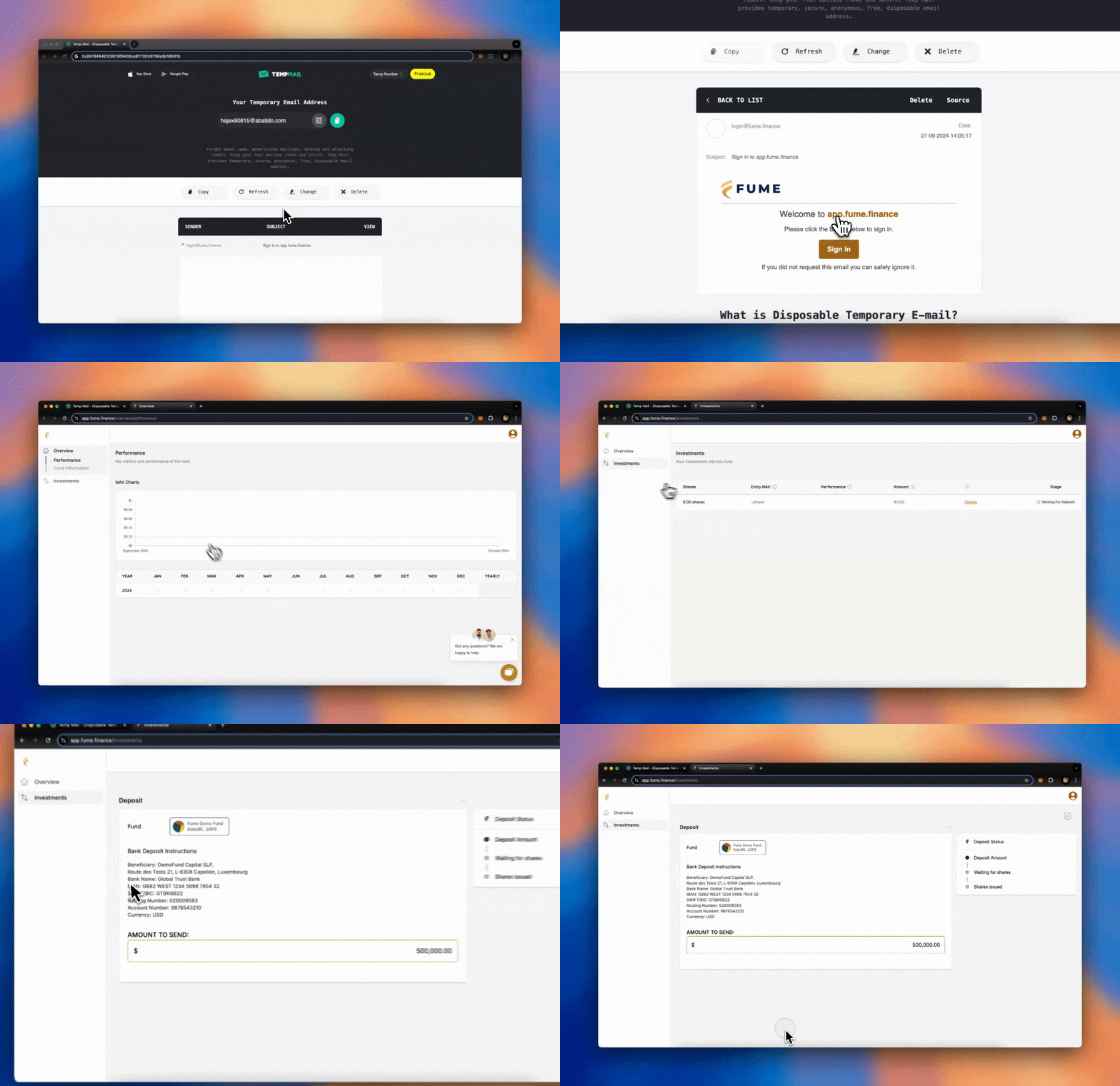
The quickest way in is with your email address. When a fund manager invites you, you receive an email with a link to the platform. Click the link, enter the verification code, and you are in.
Fume creates a wallet for you automatically, no extensions or private keys to deal with. This works on any device with a browser and is the recommended approach for most investors.
### Embedded wallets [#embedded-wallets]
When you sign in with email, Fume creates an embedded wallet for you. This wallet lives inside the platform and handles your interactions with the fund's smart contract (depositing capital, redeeming units, etc.). You do not need to manage it yourself.
If you are a fund manager, each investor gets their own embedded wallet the moment you send the invitation. Your investors can participate without any prior crypto experience.
### Sponsored transactions [#sponsored-transactions]
Fume often covers blockchain transaction fees ("gas fees") on your behalf. When this applies, you will see a sponsored label next to the wallet in the connection interface. You can interact with the fund without holding any cryptocurrency for fees.
### Connect an external wallet [#connect-an-external-wallet]
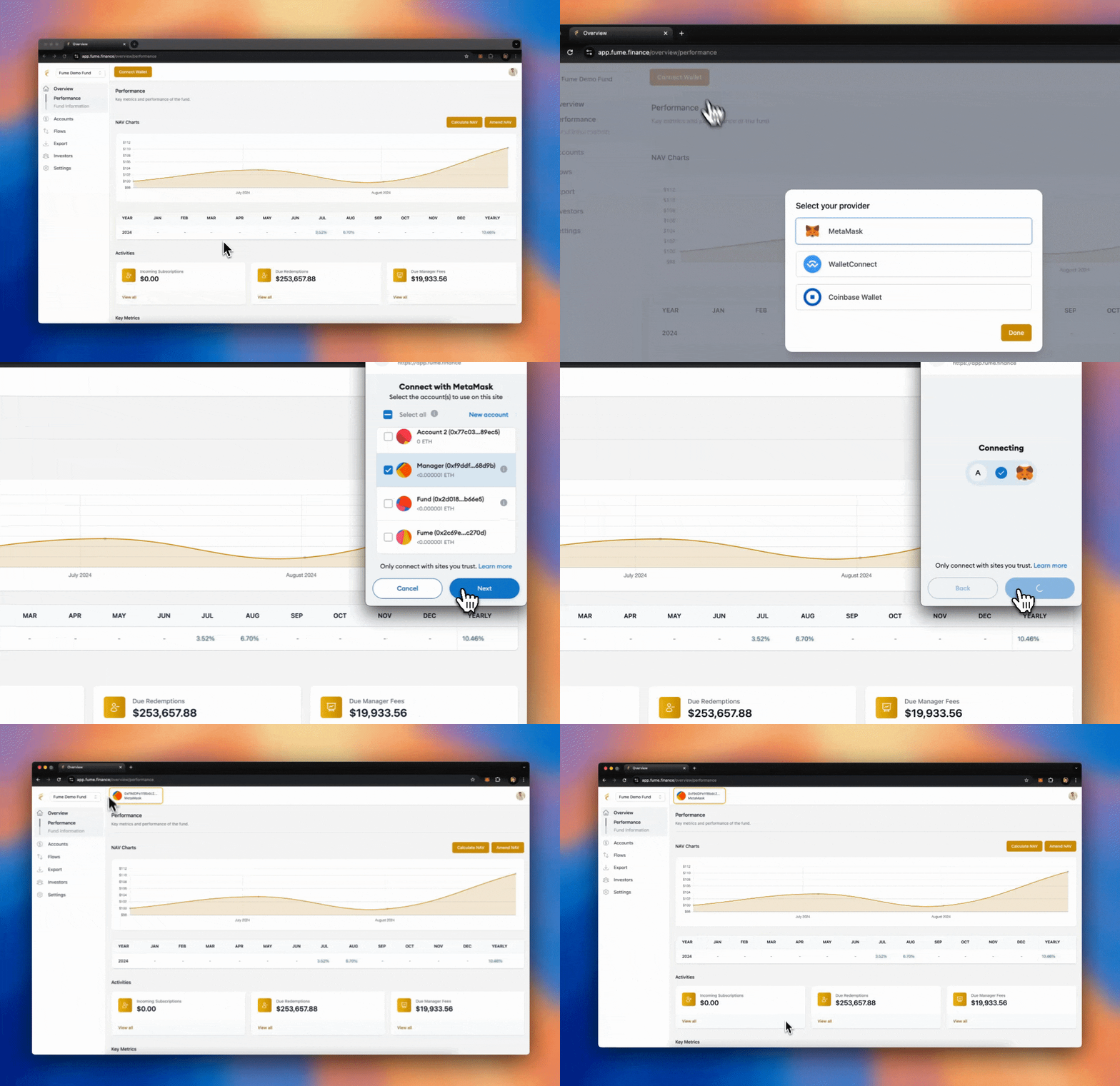
Fund managers and advanced users can also connect their own wallet. The Tokenization Engine supports MetaMask, WalletConnect, and Coinbase Wallet, which between them cover most wallets on the market.
## **Metamask** [#metamask]
Metamask is one of the most popular wallets for interacting with web3 applications. It is available as a browser extension for chromium-based browsers (like Chrome, Brave, and Edge) and also has a mobile app. To connect, simply click **Connect via Metamask** on the Tokenization Engine, and the Metamask browser extension will open to confirm the connection.
## **Rabby** [#rabby]
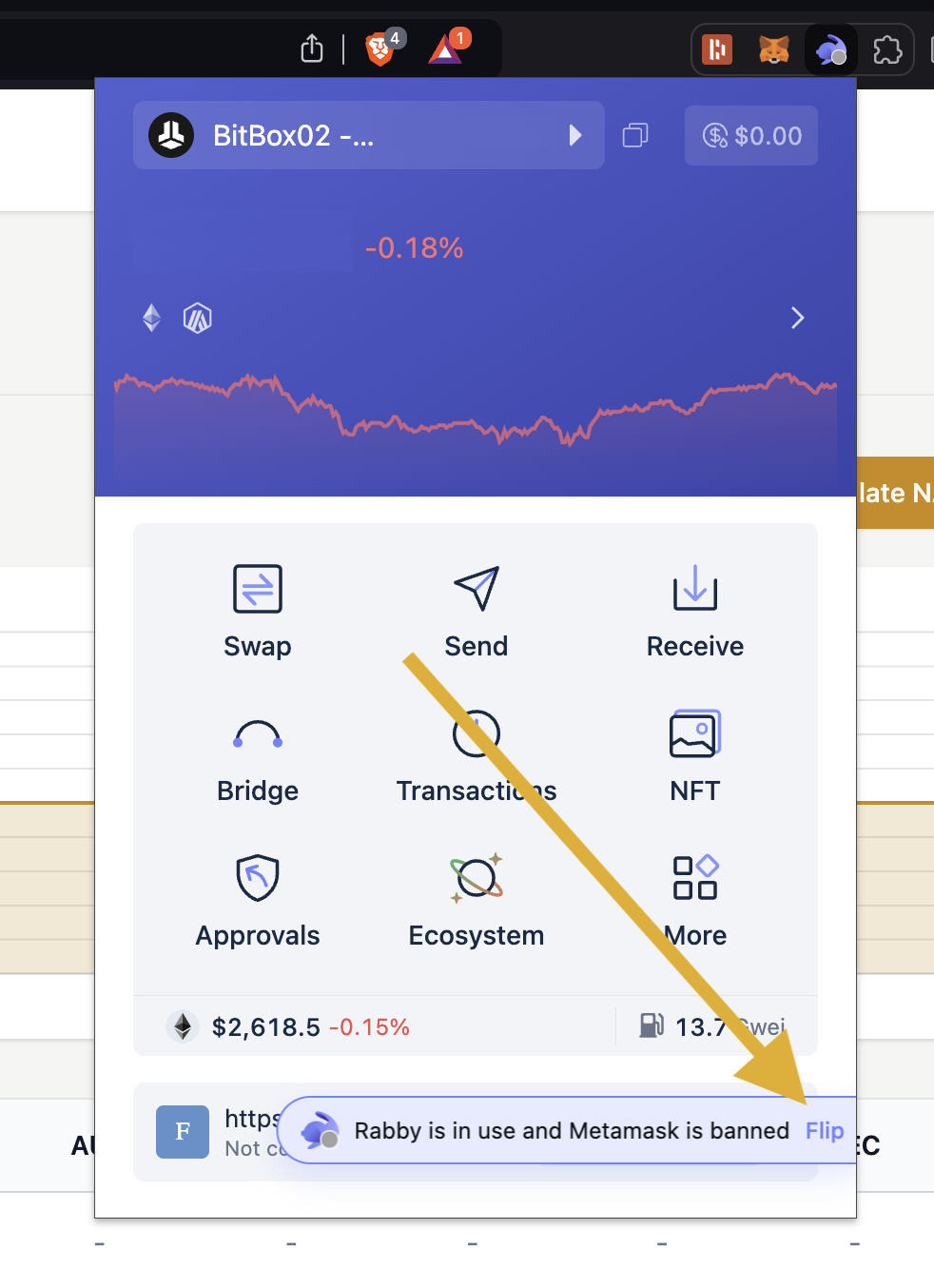
Rabby is a recent and popular alternative to Metamask, especially favored for interacting with web3 apps using hardware wallets like Ledger. It is also available as a chromium browser extension. If you have both Metamask and Rabby installed on the same browser, make sure to switch the primary connection to **Rabby** so Fume connects to the right extension.
## **Safe Wallet (formerly Gnosis Safe)** [#safe-wallet-formerly-gnosis-safe]
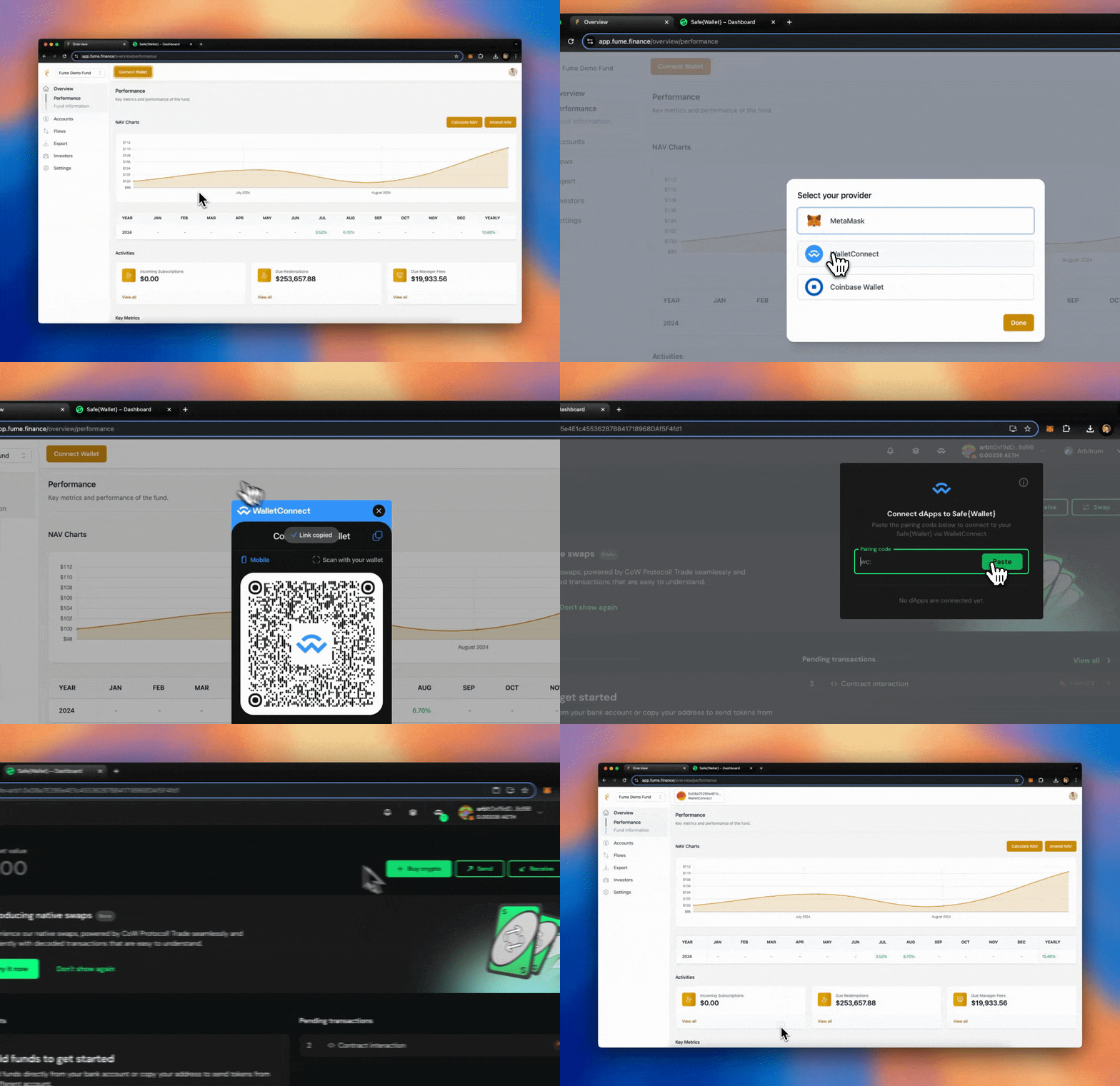
We highly recommend **Safe Wallet** for fund managers. It is a multi-signature wallet, meaning it requires multiple signatures for fund operations, significantly enhancing security. Safe is free to use and ideal for fund management. To connect it to Fume:
1. Choose **WalletConnect** as the connection method.
2. Copy the code that appears.
3. Open your Safe Wallet by visiting [Safe](https://app.safe.global/welcome).
4. Click on **WalletConnect** in the top right corner and paste the code.
## **Exodus** [#exodus]
You can connect **Exodus** using both the mobile app and the Chrome extension:

* **Mobile Version**: To connect using WalletConnect, tap the right-most tab in Exodus, select the **Web3** button, and tap the QR code icon in the top right corner. Then, scan the WalletConnect code displayed on the Tokenization Engine.
* **Chrome Extension**: For the Exodus Chrome extension, connect using the **Metamask** option. If you have the Exodus extension installed, it will automatically open and ask for confirmation to connect to the Tokenization Engine.
## **Trust Wallet** [#trust-wallet]

To connect **Trust Wallet** via WalletConnect:
1. Open the Trust Wallet mobile app.
2. Tap the settings icon in the top left.
3. Select **WalletConnect**.
4. Scan the QR code from the WalletConnect screen on the Tokenization Engine.
## Using Hardware Wallets [#using-hardware-wallets]
Hardware wallets such as **Ledger** and **Trezor** can also be used to interact with the Tokenization Engine for added security. These wallets can be connected through software interfaces like **Metamask** or **Rabby**.
> **Note**: To use Ledger devices, you should first enable [blind signing](https://support.ledger.com/article/4405481324433-zd).
## Moving funds between wallets [#moving-funds-between-wallets]
You can transfer funds between your wallets within the platform. For example, moving assets from a smart wallet to an embedded wallet does not require an external transfer.
# 🎨 Fund Customization (/docs/tokenization/user-guides/customization)
Customize your fund's appearance on the platform and how you communicate with investors.
### Branding [#branding]
From the Settings page, set primary and accent colors to match your brand. These apply across the platform wherever your investors interact with the fund. You can also upload your fund's logo. It appears on the platform and in emails.
### Email settings [#email-settings]
Fume sends investor notifications (subscription confirmations, NAV updates, etc.). You can control the Sender Name (the name that appears in the "From" field), the Reply-To Address (where investor replies go, so they reach you instead of a generic address), and which email templates your fund sends. Emails go through a queuing system with automatic rate limiting and retries, so delivery is reliable even with many investors.
### Investor messaging [#investor-messaging]
Display custom messages on your fund's page for announcements or notices. Messages can also trigger email notifications.
### Live support [#live-support]
Enable a Telegram widget on your fund's page. A chat icon appears, letting investors reach you directly with questions.
### Subscription plans [#subscription-plans]
Fume has a single plan, **Fume Platform**, at $179/month with self-serve checkout. Manage your subscription from Settings. If your subscription expires, you will see a prompt to renew.
# 🏗️ Fund Setup (/docs/tokenization/user-guides/fund-setup)
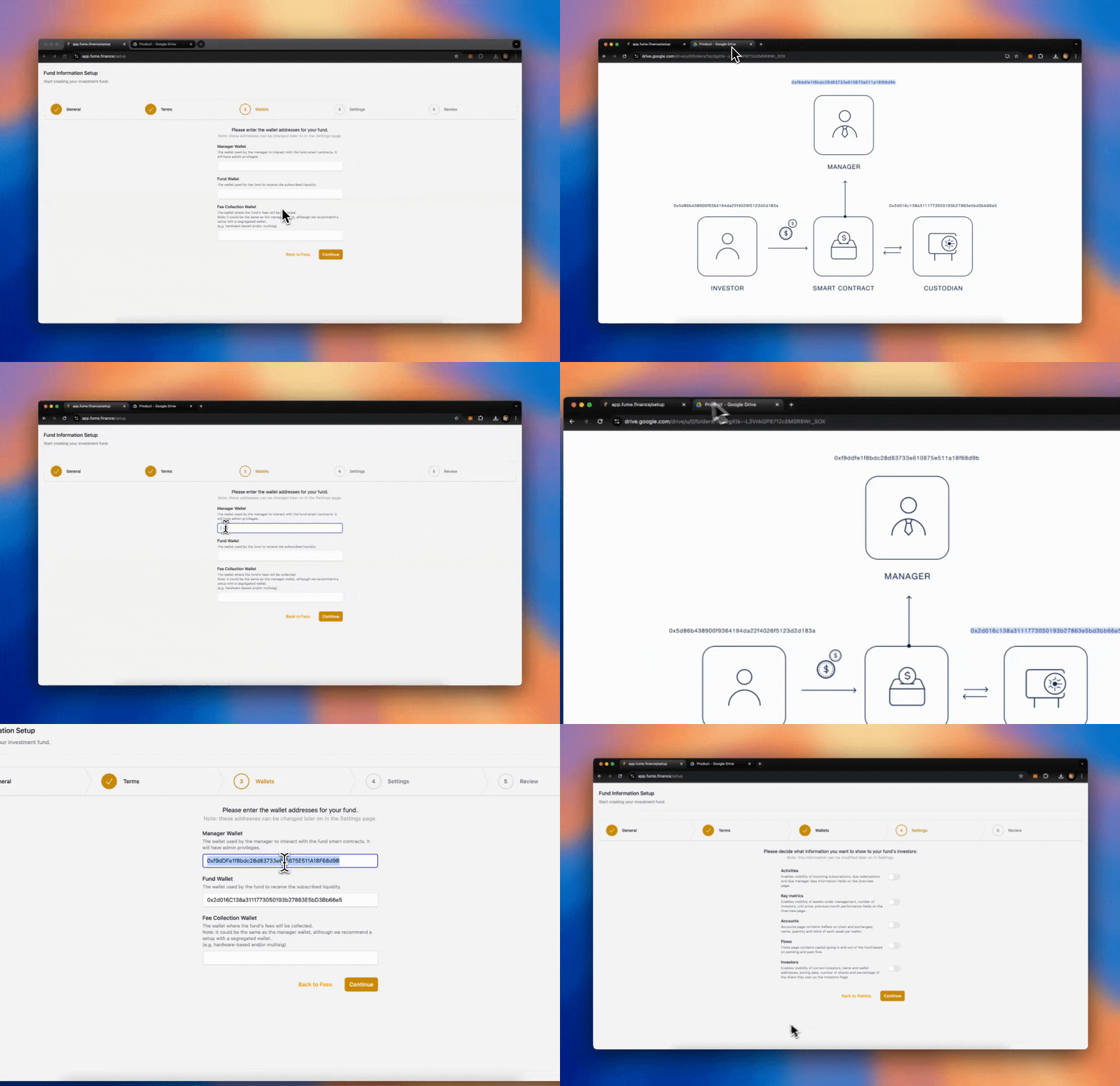
Setting up your on-chain fund in the Tokenization Engine is straightforward. Follow the steps below to configure your fund's essential details, fees, wallets, and settings.
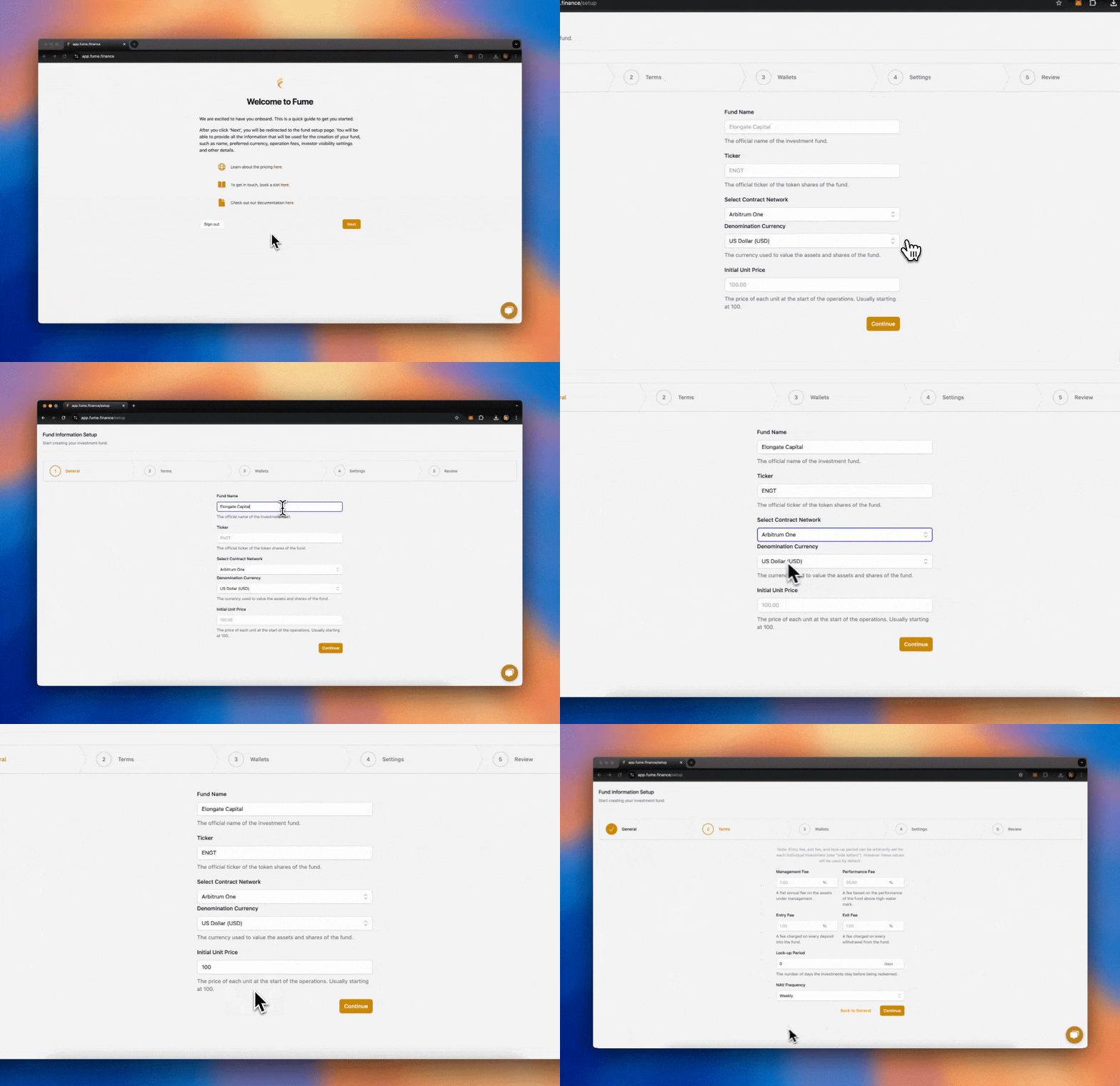
## **General Information** [#general-information]
The first step is to define the core details of your fund:
* **Fund Name**: This is the name of your fund.
* **Ticker**: The ticker is the symbol associated with your tokenized fund units. Hover over the info icon next to this field for guidance on choosing a ticker.
* **Base Currency**: The stablecoin used for accounting and subscriptions. Common choices include USDC and USDT.
* **Blockchain Network**: The network on which your fund's smart contract will be deployed. The Tokenization Engine supports Ethereum, Arbitrum One, Base, and BNB Smart Chain (BSC). We recommend Arbitrum One for its lower costs and faster transactions.
* **Initial NAV**: The starting Net Asset Value per unit. This is the price at which the first units are issued to your early investors. It is commonly set to **100.00**.
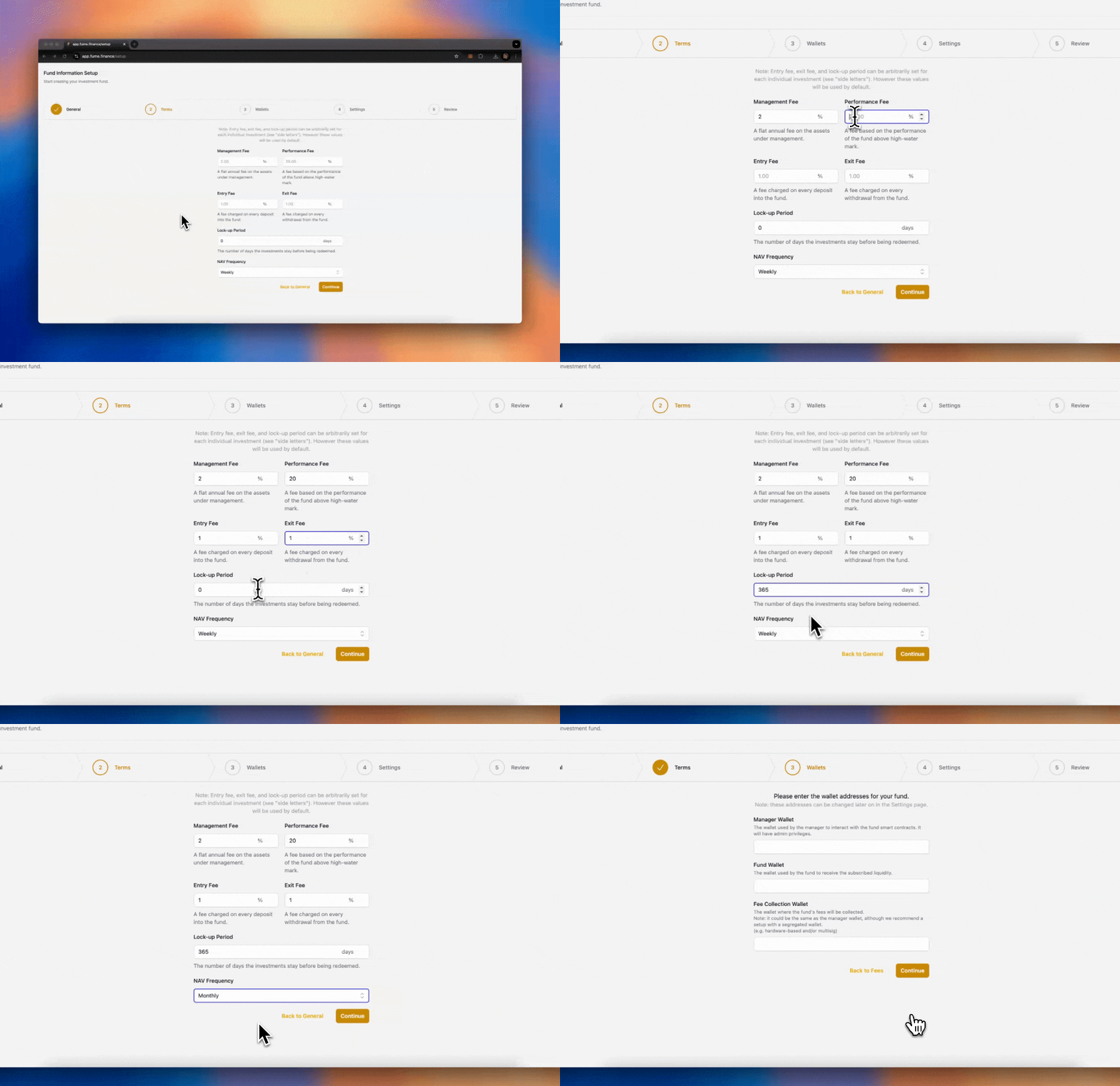
## **Fees** [#fees]
Now, define the fee structure of the fund. These fees will apply to investor transactions:
* **Management Fee**: Typically a percentage of the fund's total value.
* **Performance Fee**: A percentage of profits (above the high-water mark).
* **Entry Fee**: This is the fee applied to new subscriptions into the fund.
* **Exit Fee**: This is the fee applied when investors redeem their shares.
* **Lockup Period**: The lockup period defines how long investors must wait before they can redeem their shares.
* **NAV Frequency**: Define how frequently the NAV should be calculated and updated.
*Note: The entry and exit fees, as well as the lockup period, can be adjusted later on and even customized on a per-investor basis.*
## **Wallets** [#wallets]
Next, you need to configure three wallets for your fund:
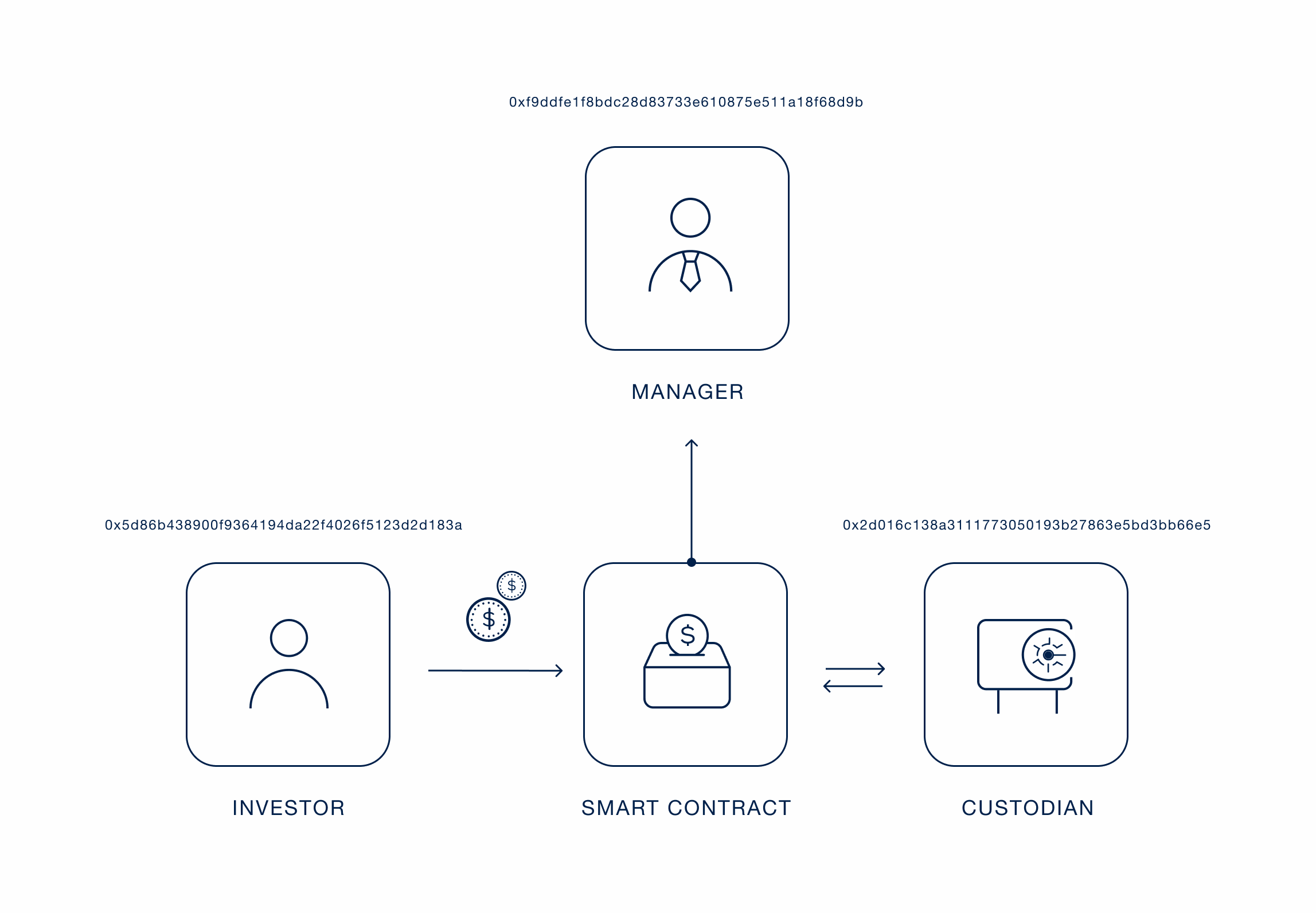
* **Governance Wallet**: This is the wallet that the fund manager uses to control the on-chain fund. The manager can whitelist investors, interact with the fund, move liquidity, and manage fee payments. For example, you can use a MetaMask wallet or a more secure solution such as a multisig like **SAFE** or **Fireblocks**.
* **Custodian Address**: This is the wallet where the liquidity for the fund is stored. The fund manager can connect any custody solution here, such as a multisig, MPC, or even a centralized exchange. This wallet holds the underlying assets of the fund.
* **Fee Collection Address**: This is where the management, performance, entry, and exit fees are collected. In some cases, the fund manager might use the same address for both the governance wallet and fee collection.
*Note: These wallets can be updated later on.*
Example of wallets for an On-chain Fund
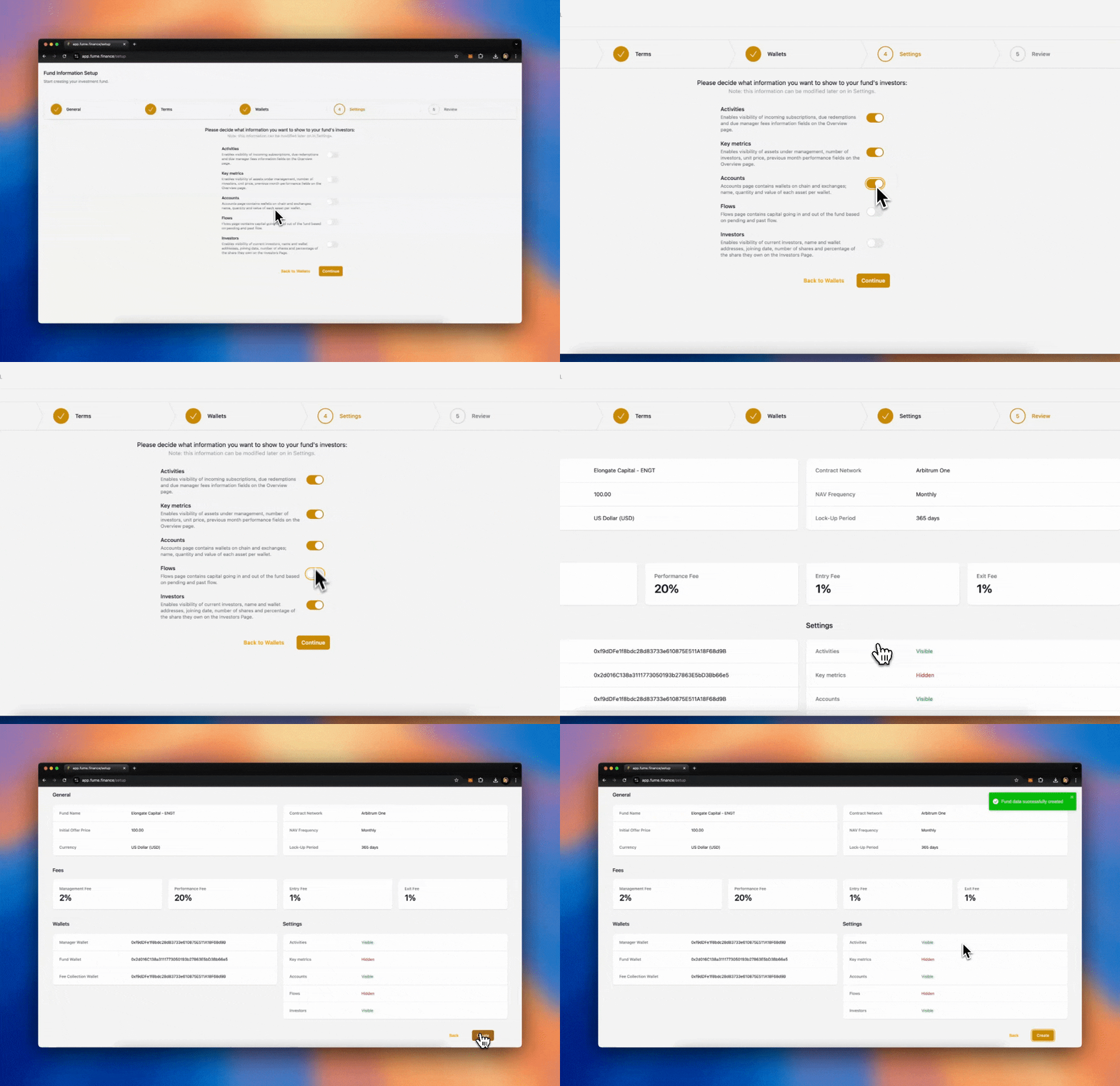
## **Transparency** [#transparency]
Finally, you can configure the transparency settings for your fund. Decide how much information you want to make visible to investors. You can choose to provide full transparency or limit access to specific metrics. You may allow investors to see:
* **Key Metrics**: NAV, performance, fees.
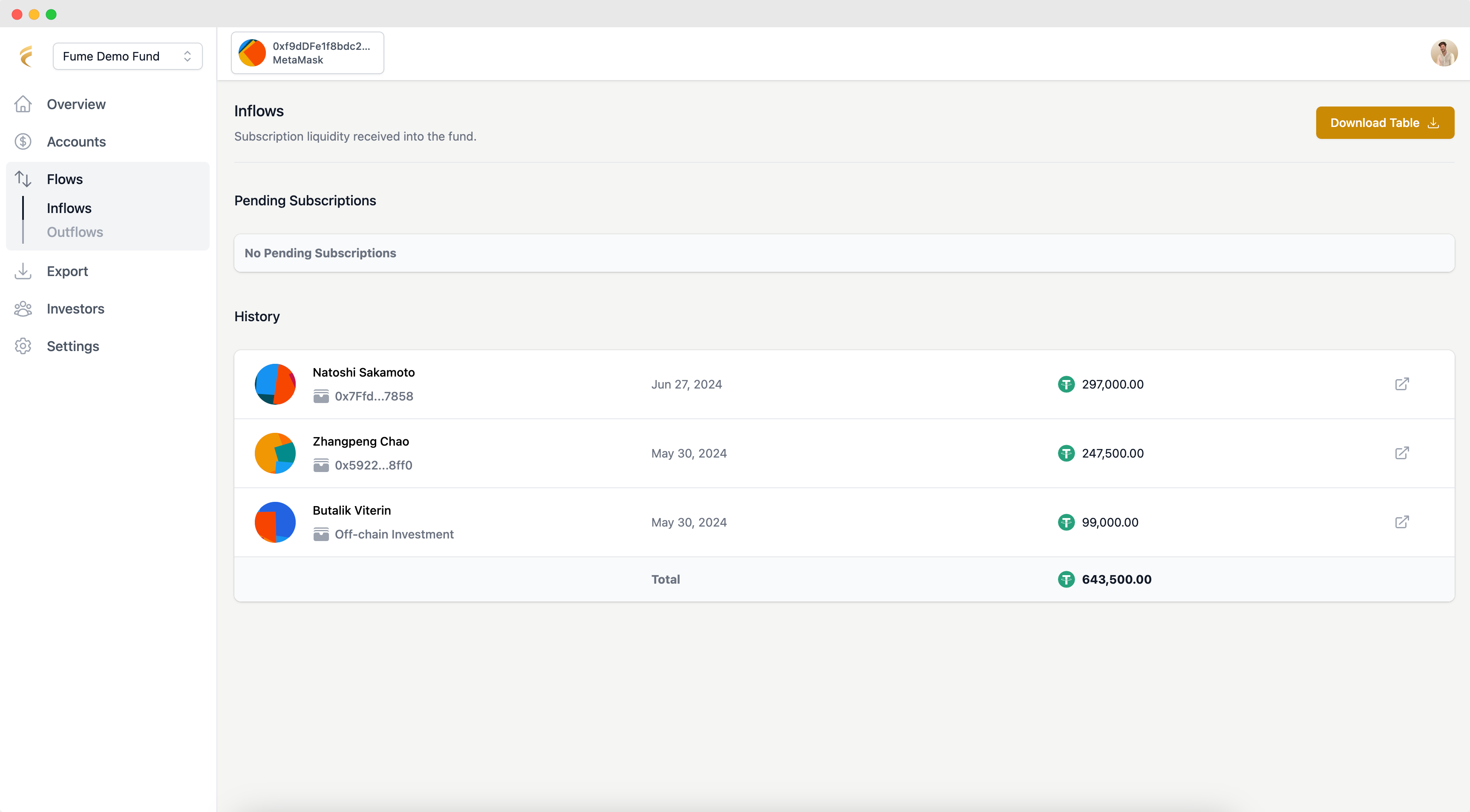
* **Flows**: Inflows and outflows of capital.
* **Shareholder Registry**: Information about other investors in the fund.
You can fully customize these settings to match your preferences. You may decide not to show certain details, like the underlying assets or specific flows, while still making other information available.
### Accounting method [#accounting-method]
Choose how the fund handles investor positions during each NAV calculation. Equalization-Based (the default) adjusts all investor positions at each NAV event so everyone is treated fairly, regardless of when they invested. Series-Based tracks each group of investors who enter at the same time as its own series, with its own entry price, high-water mark, and fee calculations. When conditions align, series can be merged.
### Unit classes [#unit-classes]
If you need to offer different terms to different groups of investors (for example, a lower management fee for early backers or a different lockup period for institutional investors), you can create multiple unit classes within the same fund. Each unit class operates as its own set of terms (fees, lockup, etc.) while sharing the same underlying portfolio and NAV calculation. You can set up unit classes during the initial fund creation or add them later from the Settings page.
### Customization [#customization]
Pick primary and accent colors that match your brand, and upload your fund's logo. It appears across the platform wherever your investors interact with the fund. Both can be changed later from the Settings page.
# 📖 User Guides (/docs/tokenization/user-guides)
These guides cover the day-to-day operations of running a fund, from initial setup, through investor onboarding, to NAV, redemptions, and reporting.
# 📊 NAV Calculation (/docs/tokenization/user-guides/nav-calculation)
Every time you run a NAV calculation, the platform determines the value of each fund unit, calculates fees owed to managers, updates high-water marks, and adjusts all investor positions.
## **Initiate Fund (Initial NAV)** [#initiate-fund-initial-nav]
Every fund starts with a pre-defined **initial NAV per unit**, set during the fund setup. The very first NAV calculation event is simple: it uses the initial NAV value, as so far there are no investors or assets already in the fund.
Once the initial investors are onboarded (by inviting them and receiving their deposits), the manager can begin fund operations:
1. Navigate to **"Overview"**.
2. Click **"Initiate Fund"** in the top-right corner.
3. This action will:
* **Issue the first fund units** to investors.
* **Liberate the capital** from the on-chain fund, moving it to the fund wallet for deployment.
The fund is now live, and the liquidity is ready for deployment according to the manager's investment strategy.
***
## **Assets Valuation** [#assets-valuation]
After investing the initial liquidity, it's time to perform the first **NAV calculation** to assess the fund's performance and value. The Tokenization Engine requires only one key input: the **Gross Asset Value (GAV)**.
**Valuing the Assets**: To calculate the GAV, determine the **total value of the underlying assets** in the fund.
The process for reconciling the fund's positions depends on the type of assets being managed.
* For traditional portfolios (stocks, bonds, options), we recommend using portfolio management systems such as [**Utluna**](https://www.utluna.com/).
* For advanced digital assets strategies, we recommend [**1Token**](https://1token.tech/), which provides reconciliation across multiple exchanges, wallets (multi-chain), and DeFi protocols.
The current liquidity held in the fund wallet is automatically included in the calculation, so you do not need to add it manually.
If you wish to outsource this task, [reach out](https://www.fume.finance/resources/book-a-call) to us for customized offers from our partners.
> *Note: In upcoming product releases, we're planning to integrate such solutions directly into Fume for smoother fund manager experience.*
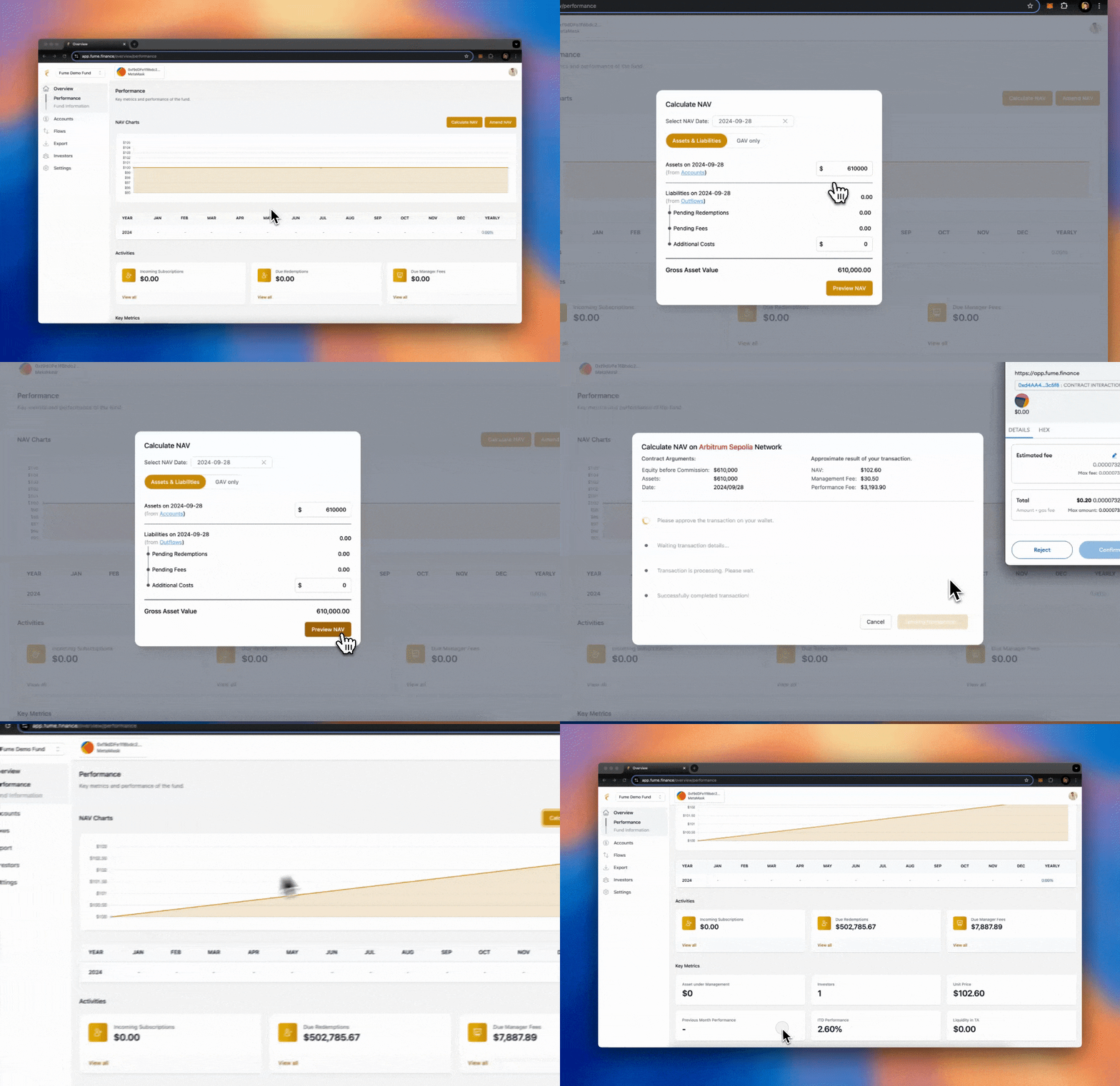
## **Calculate NAV** [#calculate-nav]
Once the total asset value has been defined, you can proceed with publishing the latest NAV calculation:
* Navigate to **"Overview"**, then click **"Calculate NAV"** in the top-right corner.
* You have two methods to calculate NAV:
**Method 1 (Recommended)**: Using **Assets & Liabilities**.
* Input the total value of the assets (as discussed in the previous section).
* Add any additional costs in the **costs field** (e.g., operational costs outside of fees and redemptions).
**Method 2**: Using the **GAV Directly**.
* For more flexibility, compute the GAV manually (assets - liabilities) and input the final figure directly.
* Click **"Preview NAV"** to review the calculation and see an estimation of the updated fund value (this action does not trigger any transactions).
* Once satisfied, **submit** the NAV to make the calculation official. This will update the fund's NAV, issue new units, register any new applicable fees, and equalize the investments among all investors.
* You can also upload an Excel spreadsheet with your asset data. Fume parses the spreadsheet and calculates the NAV from it. You can preview the results before confirming. The platform shows you an estimated gas fee before you submit.
### NAV dashboard [#nav-dashboard]
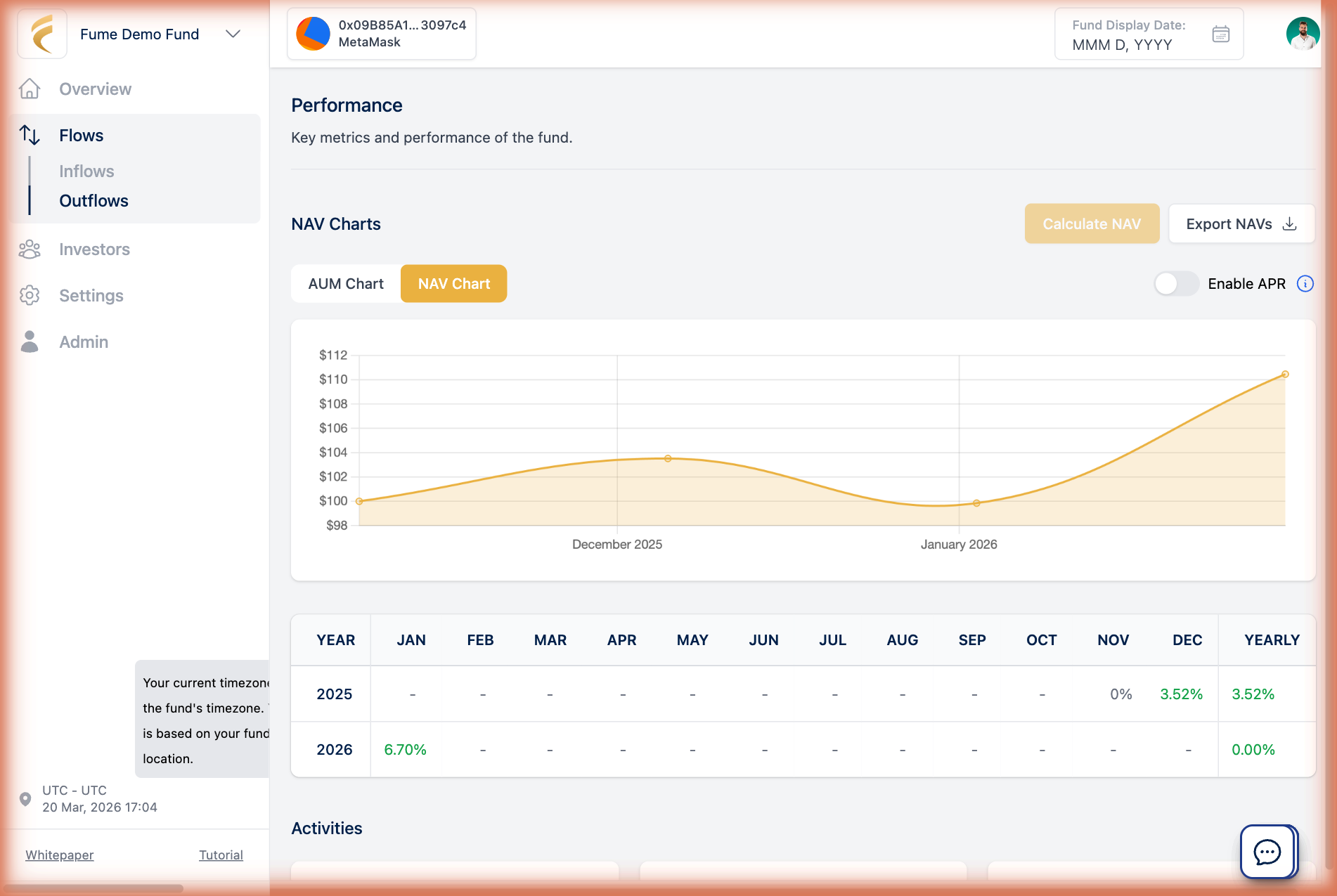
After your first few NAV calculations, the fund's Overview page shows an AUM Chart (total Assets Under Management over time), a NAV Chart (historical NAV per unit with an annualized return overlay), performance tracking for each NAV event, and total outstanding units in circulation. Investors see a filtered version showing only their own investment, including individual performance and an estimate for the next NAV.
#### Exporting NAV data [#exporting-nav-data]
Download your complete NAV history at any time with the Export NAVs button. The file contains all historical NAV calculations and is useful for reporting and audits.
#### Notifying investors [#notifying-investors]
After completing a NAV calculation, you can notify your investors by email. You can send immediately or schedule for a later time, for example if you want to review the numbers or add a personal note first. Emails are sent in batches for reliable delivery, even with a large number of investors.
## Accounting methods [#accounting-methods]
During each NAV event, Fume adjusts investor positions using one of two approaches, chosen during fund setup:
* **Equalization-Based**: Fume adjusts all unit positions so that every investor's holding reflects the correct value, no matter when they entered. This is the default and handles different entry prices, high-water marks, and performance fees without extra configuration.
* **Series-Based**: Each group of investors who subscribed at the same time is tracked as its own "series" with independent entry price, high-water mark, and fee calculations. When conditions align (e.g., after a fee crystallization event), series can be merged. Better for funds that need per-cohort tracking.
# 🔑 Permissions & Roles (/docs/tokenization/user-guides/permissions)
Whether you run a fund solo or with a team, the permissions system controls who can do what.
### Roles [#roles]
There are two roles. Manager: administers the fund, can invite investors, calculate NAV, settle liabilities, manage settings, and perform on-chain operations. Investor: views their investment details, deposits capital, and requests redemptions. Investors cannot access administrative functions.
### Inviting additional managers [#inviting-additional-managers]
Go to Settings and invite a manager by email. You choose which wallet they will use for on-chain interactions, or let Fume create an embedded wallet for them. They receive an email invitation to join.
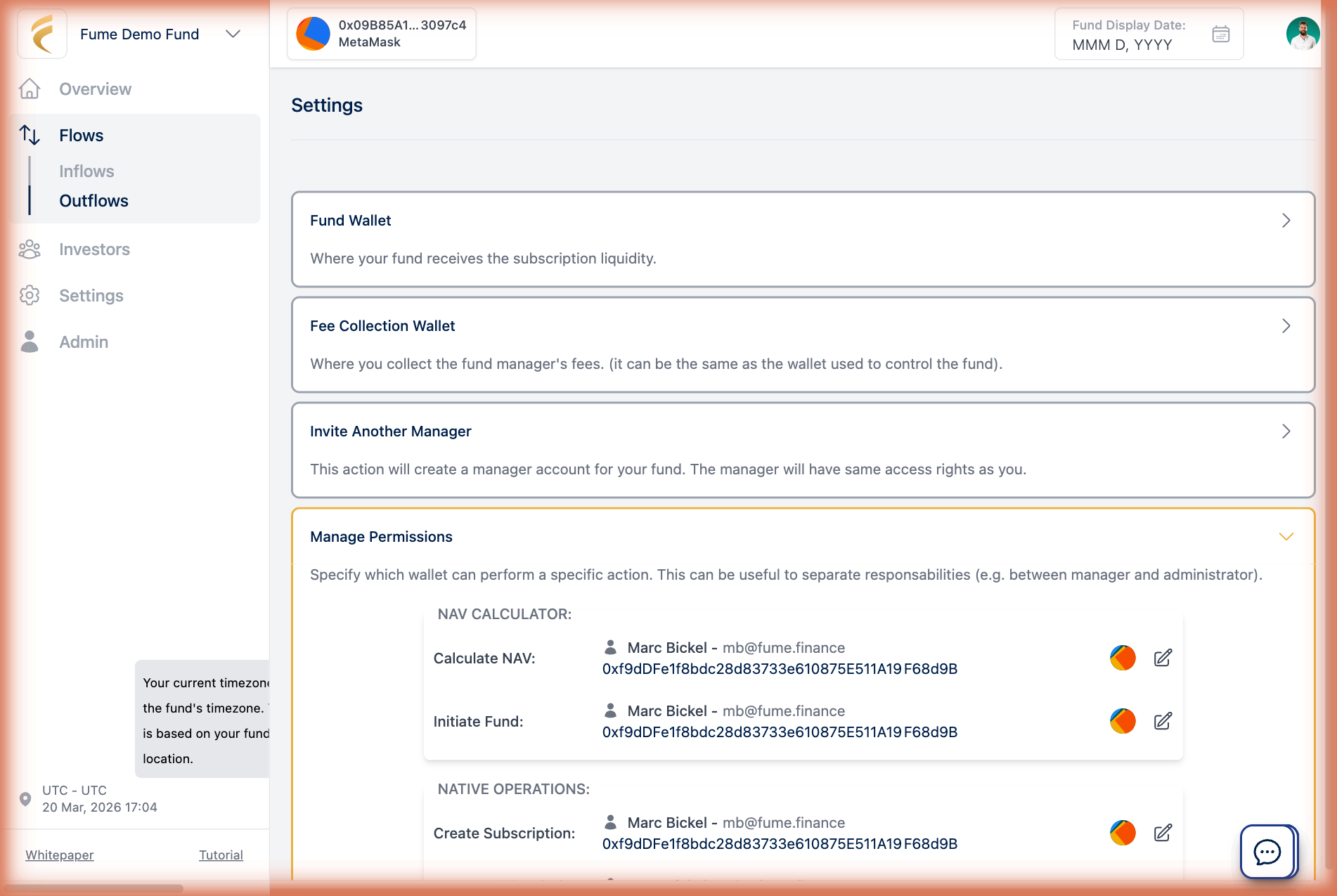
### Per-function permissions [#per-function-permissions]
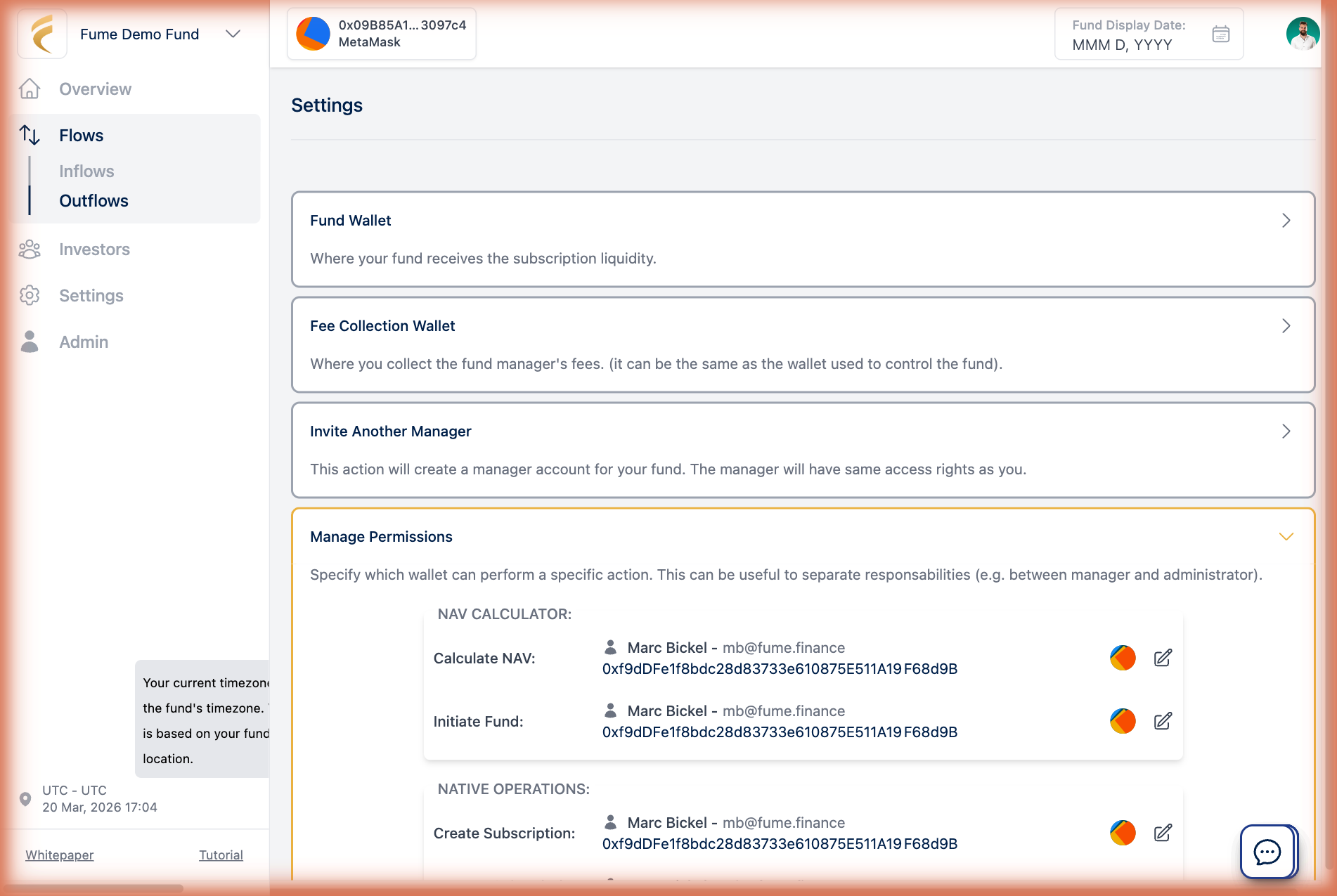
For multi-manager funds, you can control exactly which operations each manager wallet is allowed to perform. From Settings > Permissions, assign specific smart contract functions to specific wallets. For example, one manager whitelists investors and manages subscriptions, another runs NAV calculations and settles fees, a third has read-only access to monitor the fund. This authorization is enforced on-chain. Even if someone accesses the platform, they cannot execute operations their wallet is not authorized for.
### What investors see [#what-investors-see]
Investors see a simplified view of the platform. They can check their investment, track performance, deposit capital, and request redemptions. The sidebar and available actions are filtered by role, so no administrative features are shown.
# 💧 Prepare Liquidity (/docs/tokenization/user-guides/prepare-liquidity)
Before subscribing to a fund on the Tokenization Engine, investors need to make sure they have enough liquidity in their wallet. Most fund managers choose a stablecoin like USDC or USDT as the base currency. The important thing is that the liquidity must be available on the same blockchain network where the fund is deployed (for example, Arbitrum, Ethereum, Base, or BNB Smart Chain).
## **Option 1. Buy Liquidity from an Exchange** [#option-1-buy-liquidity-from-an-exchange]
The easiest way to prepare liquidity is by purchasing stablecoins (e.g., USDT or USDC) directly from a centralized exchange such as Coinbase, Binance, or Kraken. After purchasing, withdraw the stablecoins to your wallet on the **correct network**. This method is simple and requires a low level of technical expertise.
* Select the correct network (e.g., Arbitrum, Ethereum, Base, or BNB Smart Chain) during the withdrawal so it matches the fund's network.
### Example - Kraken and Metamask on Arbitrum One [#example---kraken-and-metamask-on-arbitrum-one]
Let's walk through an example where:
* The fund is deployed on **Arbitrum One**.
* The stablecoin used for the fund is **USDC**.
* The exchange used to buy USDC is **Kraken**.
* The wallet used for interacting with the Tokenization Engine is **Metamask**.
#### **Buy or Deposit USDC on Kraken** [#buy-or-deposit-usdc-on-kraken]
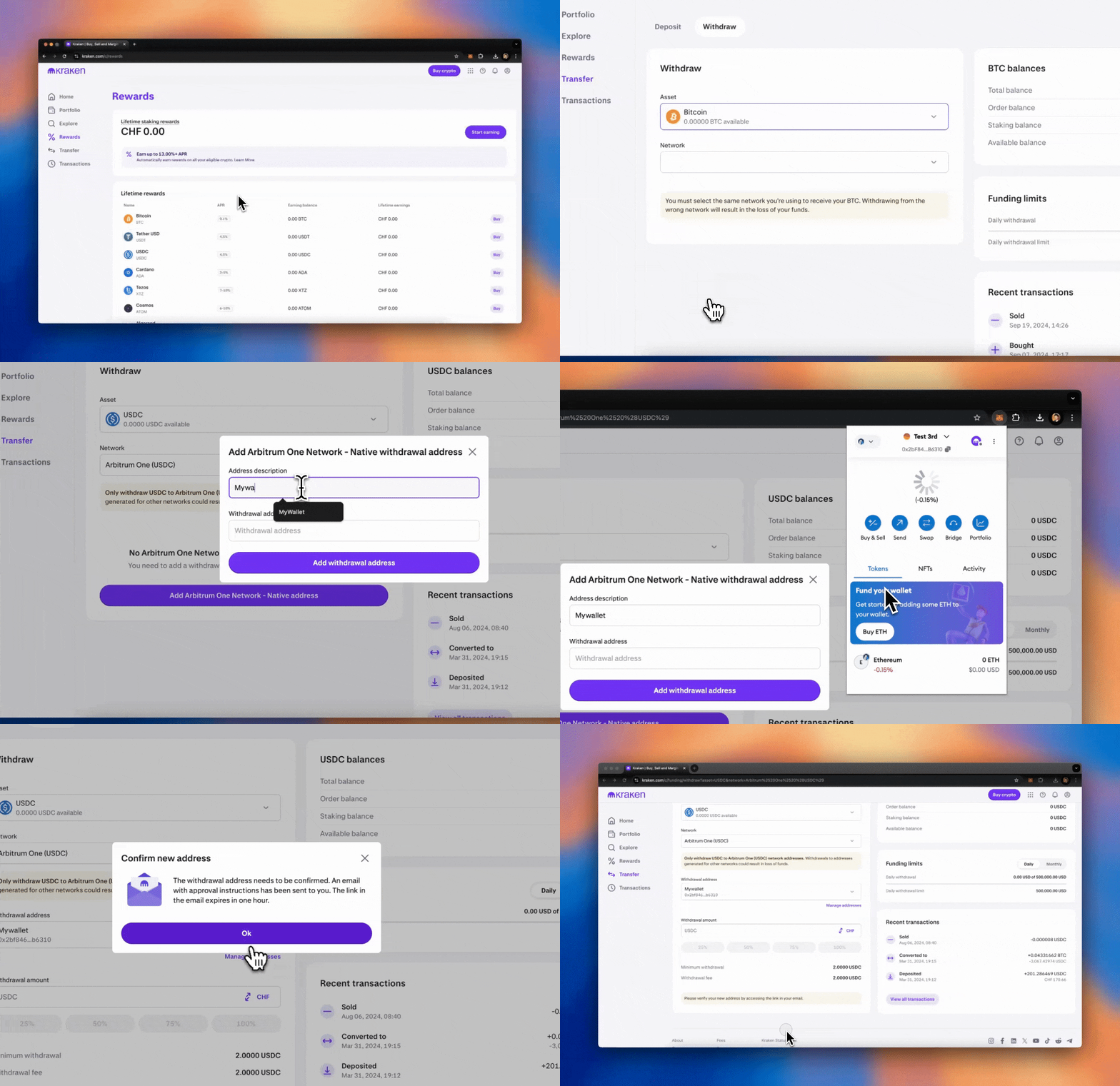
* **Log in** to your **Kraken** account.
* If you don't have USDC already, go to the **Buy Crypto** section and purchase the necessary amount of **USDC**. If you already have USDC in your Kraken account, you can skip this step.
* Alternatively, if you need to deposit USDC from another source into Kraken, use the **Deposit** feature in Kraken to fund your account.
#### **Withdraw USDC to Metamask on Arbitrum One** [#withdraw-usdc-to-metamask-on-arbitrum-one]
* Navigate to the **Transfer** section in Kraken.
* **Select Withdraw, then USDC** as the asset to withdraw.
* In the **Network** options, **choose Arbitrum One** as the chain to withdraw your USDC.
* Open **Metamask** and switch the network to **Arbitrum One** (you can do this by clicking the network dropdown at the top-left of the Metamask interface).
* **Copy your Metamask wallet address** (on the Arbitrum One network) and paste it into the **withdrawal address field** on Kraken.
* Confirm the withdrawal address by email if it's a new wallet and submit the transaction.
Kraken will now send your USDC to your Metamask wallet on the **Arbitrum One** network. Once the transaction is confirmed, you will see your USDC in your Metamask wallet.
#### **Get Some ETH for Gas Fees** [#get-some-eth-for-gas-fees]
To interact with the Tokenization Engine and complete the investment, you will need a small amount of **ETH** in your Metamask wallet to cover transaction ([gas](https://www.investopedia.com/terms/g/gas-ethereum.asp)) fees on the **Arbitrum One** network.
If you don't have any ETH on **Arbitrum One**, follow these steps:
* On **Kraken**, go to the **Buy Crypto** section and purchase a small amount of **ETH**. Around **0.002 ETH** is enough for basic transactions.
* Go to the **Withdraw** section and select **ETH**.
* In the withdrawal options, choose **Arbitrum One** as the network.
* **Paste your Metamask wallet address** (the same one you used for USDC).
* Submit the transaction, and once confirmed, you will have the ETH in your Metamask wallet to cover gas fees.
Now that you have both **USDC** and **ETH** in your Metamask wallet on the **Arbitrum One** network, you are ready to invest in the on-chain fund via the Tokenization Engine.
While this example uses Arbitrum One, the same process works for any supported network. Simply select the matching network when withdrawing from the exchange and when configuring your wallet.
## **Option 2. Bridge Liquidity Across Networks** [#option-2-bridge-liquidity-across-networks]
If you already have liquidity in your wallet but on the **wrong network**, you can use a **bridge** to transfer the funds to the correct one.
* **Built-in Swaps**: Some wallet apps offer a built-in swap or bridge function that allows you to easily move assets between networks.
* **Native Bridges**: Alternatively, you can connect to a native blockchain bridge like [**Arbitrum Bridge**](https://bridge.arbitrum.io/?destinationChain=arbitrum-one\&sourceChain=ethereum) to transfer your stablecoins to the correct network.
### Recommended Approach [#recommended-approach]
For most investors, the most straightforward way is to purchase stablecoins from a centralized exchange and withdraw them directly to your wallet on the target network. This minimizes the risk of errors and makes sure your liquidity is ready when you subscribe.
# 📑 Reports & Exports (/docs/tokenization/user-guides/reports-and-exports)
You can generate reports and export data for your records, audits, and investor updates.
### Investor PDF statements [#investor-pdf-statements]
Generate a PDF statement for any investor from their details page. The statement covers subscription history, current units held, performance, and redemption details. Go to the investor's profile and click Export PDF. The file downloads immediately. Useful for quarterly/annual reporting or when an investor asks for a position summary.
### Units register export [#units-register-export]
Download the full unit register as a CSV from the Register page. You can filter by date to get a snapshot of holdings at any point in time, which is useful for audits and tax filings.
### NAV history export [#nav-history-export]
Click Export NAVs on the Overview page to download all NAV calculations. The file includes dates, NAV per unit, AUM, and fee details.
### Transfer agent transactions [#transfer-agent-transactions]
Export all transactions processed by the Transfer Agent (subscriptions, redemptions, liabilities, distributions) with dates and amounts. Use the Export button in the relevant section.
# 🎬 Demo (/docs/tokenization/whitepaper/demo)
# ❓ FAQ (/docs/tokenization/whitepaper/faq)
## General [#general]
What is Fume, and how does it work?
Fume is a web-based platform that uses blockchain to automate fund administration. It removes the need for traditional intermediaries like registrars and transfer agents by replacing them with smart contracts. Fund managers can create on-chain funds and run subscriptions, redemptions, NAV calculations, and fee management there, all while maintaining compliance with regulatory standards.
Why should I use the Fume Tokenization Engine instead of a traditional fund administration platform?
Unlike traditional platforms that add layers of complexity, Fume simplifies fund administration by moving the entire process on-chain. This removes intermediaries, reduces costs, increases transparency, and allows for faster, more efficient operations. Fume is particularly suited for funds managing digital assets but also supports traditional asset management strategies.
Is Fume a financial intermediary?
No, Fume is not a financial intermediary. It provides a software tool to automate the administration of a fund but does not control the underlying assets. The liquidity remains in a secure, segregated custody defined by the fund manager. Fume's role is purely administrative, and it never holds or touches the assets.
What kind of funds can I set up using Fume?
The Tokenization Engine supports a wide range of fund types, including but not limited to:
* **Digital Asset Funds**: Funds investing in cryptocurrencies, tokens, and NFTs.
* **Feeder Funds**: On-chain feeders that collect capital in stablecoins and convert it to fiat for investment in traditional funds.
* **Money Market Funds**: Low-risk, liquid strategies for conservative investors, with hybrid on-chain and off-chain subscriptions.
* **Hybrid Funds**: Combining both traditional financial assets and digital assets, with flexibility to manage both on-chain and off-chain assets.
Do I need a fund license?
Unless you operate below a threshold (e.g. small AUM or a few investors), you should either use an existing fund vehicle or rely on our trusted partners to set up a new investment fund.
## Investments [#investments]
How does Fume handle fund subscriptions and redemptions?
Fume's protocol automates fund subscriptions and redemptions using smart contracts. Investors can subscribe to a fund by sending digital assets (like USDC or USDT) or traditional fiat currency. After a Net Asset Value (NAV) calculation, tokenized fund units are issued. Redemptions are handled similarly: when investors redeem their shares, the tokenized units are burned, and the liquidity is transferred back to the investor's wallet.
Can my fund receive in-kind subscriptions?
Absolutely. In fact, our on-chain transfer agent fully automates the subscription and redemption procedures for in-kind subscriptions (e.g. stablecoin).
Can my fund receive fiat subscriptions?
We also leave the door open for investors who are still coming from the traditional financial system. The on-chain transfer agent keeps a record of fiat subscriptions as well.
What can an on-chain fund invest in?
Although the administration is performed on-chain via smart contracts, there are no limitations on the underlying assets class. Therefore you can invest in stocks, digital assets, real estate and more.
## Technical [#technical]
Which blockchains does Fume support?
Fume currently supports **Ethereum**, **Arbitrum One**, **Base**, and **BNB Smart Chain**. However, the underlying assets of the fund are not limited to these blockchains. Fund managers can hold assets on **any blockchain** or even **off-chain** with traditional custodians, centralized exchanges, or brokers, depending on their investment strategy. This flexibility allows for managing a wide range of asset types, from cryptocurrencies to traditional financial instruments like stocks or private equity.
What are tokenized fund units?
Tokenized fund units are digital representations of investors' ownership in a fund, issued on the blockchain. Unlike traditional securities, these units are automatically issued, transferred, and managed via smart contracts. Fume keeps these tokenized units compliant with regulatory standards: only whitelisted wallets (those approved through KYC checks) can hold or transfer them.
What is ERC-6909, and why does Fume use it instead of ERC-20?
ERC-6909 is a minimal, gas-efficient token standard that allows Fume to manage multiple token types within a single contract. It provides a simplified alternative to the ERC-1155 multi-token standard. ERC-6909 is better suited for fund units because fund units are not always fungible due to differences in entry/exit fees, lock-up periods, and high-water marks for performance fees. This flexibility lets the protocol treat each investor fairly.
[Read more here](https://www.fume.finance/resources/blog/deep-dive-into-the-new-erc6909-token-standard).
How does Fume handle security?
Fume's protocol has been designed with **security by design** principles. Only the fund manager and whitelisted investors can interact with the smart contracts, which sharply reduces the risk of unauthorized access. Additionally, all operations are logged on-chain for full transparency. The platform uses multi-signature wallet solutions, rigorous code testing (including 100% code coverage and fuzzy testing), and re-entrancy guards to protect against common vulnerabilities.
What custody solutions are supported?
Fume is flexible when it comes to custody solutions. To receive subscriptions, fund managers can connect any custody service, including self-hosted wallets (e.g., physical hardware wallets), multi-signature wallets (e.g., Safe Wallet), MPC (Multi-Party Computation) solutions, or even centralized exchanges like Kraken. As for holding and investing the assets any off-chain platform can be used. The custody of the assets is always under the control of the fund manager.
Is Fume similar to other tokenized vaults?
The automated "admin" part is similar, yes.
However, using Fume, you can:
* invest in any asset. On any chain, CEX, or even off-chain (e.g. stocks, real estate, etc.)
* receive investments via fiat, BTC, or any asset
The key difference is that, unlike us, tokenized vaults are non-custodial, which is a compelling proposition as well as very restrictive in terms of operations.
# 📄 Whitepaper (/docs/tokenization/whitepaper)
The Fume Tokenization Engine whitepaper explains the motivation behind the platform, how it works end-to-end, and the technical and legal context around it.
# 📕 Legal Considerations (/docs/tokenization/whitepaper/legal-considerations)
*Disclaimer: Fume provides a software tool that helps fund managers facilitate their investment operations. Fume is not considered an intermediary and holds no responsibility for ensuring compliance with regulations that apply to the management of collective investment schemes. Fund managers using Fume are solely responsible for ensuring their operations meet any regulatory requirements.*
## Regulatory Landscape [#regulatory-landscape]
The regulatory framework surrounding digital assets is evolving, and in many jurisdictions, it remains in the early stages. This lack of clarity is a major entry barrier for traditional fund managers. Fume is built with compliance at its core, adhering to current regulations. However, given the differences in regulation across jurisdictions, fund managers must make sure their operations comply with the specific laws applicable to them.
For example, certain jurisdictions allow fund managers to operate below a threshold of assets under management and a limited number of investors without requiring a license, as is common with "friends and family" investments. Managers should seek legal advice to determine whether such exemptions apply to their operations.
## Software-as-a-Service [#software-as-a-service]
Fume operates as a **Software-as-a-Service (SaaS)** platform, providing fund managers with a **technical solution for on-chain fund administration**. Managers who choose this model retain full responsibility for their own compliance obligations, including **fund structuring, licensing, KYC/AML procedures, and regulatory filings**.
By using Fume exclusively as a **software tool**, managers keep control over their regulatory setup while the platform's automation and smart contract infrastructure takes over the manual fund administration. This option is ideal for fund managers who already have the necessary legal frameworks in place and are looking to integrate blockchain technology into their operations.
## Fund-as-a-Service [#fund-as-a-service]
Managers can choose to either use their own license or collaborate with Fume's partners to arrange for the creation of a dedicated compartment within an existing licensed structure. This option allows fund managers to outsource compliance duties and focus solely on their investment strategies.
Learn more on [Fume for asset managers](/tokenization-engine/for-asset-managers), or [get in touch](/resources/book-a-call).
### Investment Vehicles [#investment-vehicles]
Fume's platform supports a range of legal structures for fund managers:
* **Alternative Investment Funds (AIFs)**: In Europe, funds may be registered as Alternative Investment Funds under the [AIFMD](https://eur-lex.europa.eu/legal-content/EN/TXT/?uri=celex%3A32011L0061) framework, depending on their size and scope.
* **Securitization Vehicles**: Alternatively, fund managers can use securitization vehicles on the platform to tokenize debt notes, providing an additional structuring option.
## AML/CFT Compliance [#amlcft-compliance]
We strongly recommend that fund managers perform Know Your Customer (KYC) checks and adhere to Anti-Money Laundering (AML) and Combatting the Financing of Terrorism (CFT) requirements for any investor participating in their on-chain fund. Compliance with AML/CFT regulations protects the fund from legal and financial risks. For a cost-effective and digital solution, we suggest considering [Provenance](http://provenancecompliance.com/) as a reliable partner when outsourcing compliance activities. Alternatively, you can opt for [**AMLBot**](https://amlbot.com/) for self-performed checks.
By following these guidelines, fund managers can use Fume's technology while staying compliant with the legal frameworks in their jurisdictions.
# 💰 Protocol Fee (/docs/tokenization/whitepaper/protocol-fee)
Fume charges a protocol fee, also known as the **"Fume Fee"**, for using its on-chain fund administration platform. By default, a fee of **up to 0.1%** (10 basis points) applies to each **subscription and redemption flow**. The fee is charged on capital moving in or out of the fund — Fume takes no cut of assets under management and charges no management or performance fee.
The fee rates are written into the fund's smart contract at deployment and cannot be changed afterwards. Individual agreements can set a different rate, including zero, so not every fund pays the default.
On top of the protocol fee, the **Fume Platform** plan costs a flat **$179 per month**. Checkout is self-serve in the [app](https://app.fume.finance) — no sales call required.
# ⬇️ Inflows (/docs/tokenization/user-guides/inflows)
The **Inflows** page provides an overview of the liquidity entering your fund. This section helps you track both pending and completed subscriptions from investors.
### **Pending Subscriptions** [#pending-subscriptions]
In this section, you can view investors who have deposited liquidity into the fund but have not yet received their tokenized fund units. These investors have deposited capital and are waiting for the next NAV calculation, which will finalize their subscription and issue their fund units.
The Tokenization Engine supports both on-chain subscriptions (where investors deposit stablecoins through the platform) and off-chain subscriptions (where investors transfer funds through traditional banking or other methods outside the blockchain). Both approaches result in the same outcome: tokenized fund units issued to the investor at the next NAV event.
### **History** [#history]
Under **History**, you can see a list of all previous subscriptions. This provides a detailed record of past investor deposits and completed subscriptions in the fund.
### **How to Onboard Investors** [#how-to-onboard-investors]
To learn how to onboard investors and manage subscriptions, follow these guides:
# 🏦 Off-chain Subscriptions (/docs/tokenization/user-guides/inflows/off-chain-subscriptions)
An off-chain subscription refers to an investment in the fund where the liquidity doesn't pass through the smart contract. Instead, investors may choose to deposit funds via traditional methods, such as a bank transfer, or other non-blockchain assets (e.g., company shares, or even a Bitcoin transaction). While the investor doesn't need to use the platform to deposit, they can use it to receive bank details and monitor their investment's value over time.
## 1. **Optional - Add Bank Coordinates (as a Manager)** [#1-optional---add-bank-coordinates-as-a-manager]
As a Manager, you can add your bank details to the platform, so investors know where to send their deposits. Here's how:
1. Navigate to **Settings**.
2. Edit the **"Bank Deposit Coordinates"** field to add your bank instructions.
> **Note**: Alternatively, you can choose to share the bank deposit instructions directly with the investor outside of the platform.
***
## 2. **Invite Investor (as a Manager)** [#2-invite-investor-as-a-manager]
To register the off-chain investment, the fund manager must invite the investor to the platform:
1. Navigate to the **Investors** section, click **Invite Investor**, and select **Off-Chain Investment**.
2. Fill in the required information:
* **Name**: This will appear in the share registrar.
* **Email**: The email where the investor will receive the invitation.
> **Note**: Make sure KYC and due diligence regarding the origin of funds are done on your side. This action whitelists the investor for participation in the fund. Be mindful of KYC/AML regulations applicable to your investment vehicle, and consider using a cost-effective solution like **AMLBot**.
***
## 3. **Deposit Liquidity (as the Investor)** [#3-deposit-liquidity-as-the-investor]
Once invited by the manager, the investor will receive an email invitation with a link to access the platform:
1. **Sign in**: Click the sign-in link received via email to access the platform.
2. **View Investment Details**: Navigate to the **"Investments"** tab on the left-side menu.
3. **Deposit Instructions**: Under the **"Details"** section of the investment, the investor will see the deposit instructions previously added by the manager.
4. **Proceed with Deposit**: The investor follows the instructions to complete the deposit via their chosen method (e.g., bank transfer).
***
## 4. **Confirm Deposit (as a Manager)** [#4-confirm-deposit-as-a-manager]
Since the deposit happens off-chain, it is necessary for the manager to confirm the deposit on the platform to notify the on-chain fund:
1. Navigate to the **"Investors > Subscriptions"** tab.
2. Click **"Details"** next to the relevant investor.
3. **Confirm the deposit**: Enter the date and exact amount received by the fund.
Once the deposit is confirmed, you will see it registered as a pending subscription under the **"Inflows"** section. The investor will receive their tokenized units during the next NAV calculation event.
***
## Considerations: Off-Chain vs. On-Chain Subscriptions [#considerations-off-chain-vs-on-chain-subscriptions]
While off-chain subscriptions offer flexibility for investors using traditional banking or non-blockchain assets, they are generally less efficient and require more manual work compared to automated on-chain subscriptions. We recommend encouraging on-chain subscriptions whenever possible.
# ⛓️ On-chain Subscriptions (/docs/tokenization/user-guides/inflows/on-chain-subscriptions)
This section guides fund managers and investors through the process of subscribing to an on-chain fund using Fume. The subscription process involves three key steps: inviting investors, depositing liquidity, and liberating liquidity.
## **Invite Investor (as a Manager)** [#invite-investor-as-a-manager]
To receive capital from investors, the fund manager must first invite the investor to the platform. Here's how:
* Navigate to the **Investors** section in the left-side menu and click **Invite Investor**.
* Select **"On-Chain Investment"** as the investment type.
* Fill in the required information:
* **Name**: The investor's name, which will appear in the fund's unit register.
* **Email**: The email address where the investor will receive their invitation to join the platform.
* **Wallet Address** (optional): If the investor already has a crypto wallet they want to use, enter it here. If left blank, the Tokenization Engine will create a secure embedded wallet for them automatically.
> **Note**: It is important that the wallet address and the KYC and due diligence on the origin of funds have been verified on your side. This process whitelists the investor and allows them to deposit capital. Make sure you comply with the relevant **AML/CFT regulations** applicable to your investment vehicle. We recommend a cost-effective solution like [**AMLBot**](https://amlbot.com/) for this purpose.
Once the investor is whitelisted, they will be able to proceed with the deposit.
Once you send the invitation, the investor gets an email with a sign-in link. If they do not have a wallet, Fume creates one for them automatically. They click the link, verify their email, and they are ready to invest. No browser extensions or crypto experience needed.
## Pending investments [#pending-investments]
After an investor accepts their invitation but before they deposit, their investment shows as **pending** in the Investors section. This lets you see who is still in the process of subscribing.
## **Deposit Liquidity (as the Investor)** [#deposit-liquidity-as-the-investor]
Once the investor has been whitelisted by the fund manager, they will receive an email invitation with a link to join the platform and complete the investment process.
* **Sign-in**: Click the sign-in link received via email to access the platform.
* **Navigate to Investments**: After signing in, go to the **"Investments"** tab on the left-side menu.
* **View Investment Details**: Click on **"Details"** to view the pending investment.
* **Deposit Liquidity**: The deposit process involves two steps:
* **Approve**: The first transaction approves the protocol to manage the intended amount of liquidity. This allows the smart contract to interact with the investor's wallet.
* **Deposit**: The second transaction is the actual deposit, which transfers the liquidity from the investor's wallet to the on-chain fund.
> **Note**: Once the deposit is completed, the investor's job is done. They will receive tokenized fund units at the next NAV calculation event, which reflects their position in the fund.
If the investor signed in with email and is using an embedded wallet, the approve and deposit steps work the same way. The platform guides them through each transaction with clear prompts. For sponsored transactions, the investor does not need to hold any cryptocurrency for gas fees.
## **Liberate Liquidity (as the Manager)** [#liberate-liquidity-as-the-manager]
At this point, the deposited liquidity is held in the smart contract of the on-chain transfer agent. It will be moved to the connected fund wallet either at the next NAV Calculation event or manually by the manager. Here's how:
* **NAV Calculation Event**: The most straightforward way is to wait for the next scheduled NAV calculation. Once completed, the liquidity will automatically be transferred to the fund wallet, and the investor will receive the tokenized units.
* **Manual Liberation**: Alternatively, as the fund manager, you can go to the **"Inflows"** page and select the **"Liberate Liquidity"** option to manually move the liquidity to the fund wallet.
> **Important**: If you liberate liquidity manually without completing an NAV calculation, the investor will **not receive their tokenized units** until the next NAV event. This method is useful if you need immediate access to the investor's liquidity but are still reconciling your positions for the NAV calculation.
Once the liquidity is transferred to the fund wallet, it is ready to be deployed according to your investment strategy.
# ⬆️ Outflows (/docs/tokenization/user-guides/outflows)
The **Outflows** page tracks all capital leaving your fund: fees owed to the manager, redemptions owed to investors, and operational costs. Everything stays here until it is settled.
## 1. Fees [#1-fees]
This section shows the fees owed to the fund manager after each NAV calculation:
* **Management Fees**: Recurring fees based on the fund's total value.
* **Performance Fees**: Fees based on the fund's returns above each investor's high-water mark.
* **Entry and Exit Fees**: Fees charged when investors subscribe or redeem.
Each fee entry shows the associated performance details, so you can see exactly how the fee was calculated.
## 2. Redemptions [#2-redemptions]
When an investor redeems their units, the amount owed to them appears here as a pending liability. The entry includes the redemption amount, the number of units burned, and the performance achieved on that investment.
## 3. Costs [#3-costs]
This section tracks operational costs and other liabilities:
* **Fume Fees**: The platform fee for using Fume, automatically calculated during each NAV event.
* **Manual Liabilities**: Custom liabilities with a name and amount (for example, legal fees, audit costs, or consulting charges). Any expense you want to settle from the fund can be added here.
* **Distributions**: Capital returned to investors outside of the normal redemption process. Distributions are tracked separately from liabilities, so your records stay clean.
## 4. History [#4-history]
All settled liabilities appear in the history section with their settlement timestamp. You can sort by date to quickly find past transactions.
## Learn more [#learn-more]
# 💸 Redemptions (/docs/tokenization/user-guides/outflows/redemptions)
In this section, we will guide you through the process of performing a redemption, which occurs when an investor wants to sell all or part of their fund units.
**1. Register a Redemption Request**
### **1.1. Request a Redemption (as an Investor)** [#11-request-a-redemption-as-an-investor]
As an investor, if you wish to redeem your fund units:
1. Log in to the platform.
2. Navigate to the **"Investments"** tab on the left-side menu.
3. Select the investment you want to redeem and click the **"Redeem"** button.
4. Choose the total amount of units you wish to redeem.
5. Click **Confirm** and sign the transaction.
Once submitted, the redemption request will be processed after the next NAV calculation event. At that time, the units will be burnt, and the payment for the redemption will be registered in the fund's liabilities, awaiting settlement. The redemption entry also shows the performance achieved on that investment.
### **1.2. Force a Redemption (as a Manager)** [#12-force-a-redemption-as-a-manager]
As a manager, you can also force a redemption for an investor. This method is commonly used for **off-chain investments** or when you need to initiate the redemption without waiting for a request from the investor.
To force a redemption:
1. Navigate to the **"Investors > Subscriptions"** tab.
2. Find the desired investor, and click **"Details"** on the right side of their entry.
3. Select **"Confirm Redemption Request"**.
4. Choose the redemption date and the number of units to redeem.
The redemption request will be submitted, and after the next NAV calculation event, the investor's units will be burned, and their redeeming amount will be added to the fund's liabilities.
***
## **2. Settle Redemption Liability** [#2-settle-redemption-liability]
### 2.1. On-chain Redemption [#21-on-chain-redemption]
An on-chain redemption is treated just like any other liability of the fund. To complete the redemption process, the manager must settle the liability and transfer the redemption amount to the investor. For further guidance, follow the steps outlined in the **"Settle Liabilities"** section.
### 2.2. Off-chain Redemption [#22-off-chain-redemption]
An off-chain redemption (similar to off-chain subscriptions) is when the liquidity flow doesn't go through the smart contract. Let's imagine an investor receives the payment directly to their bank account or is getting paid in-kind with a transfer of the underlying assets (e.g. stocks).
In this scenario, we need to notify our on-chain fund of this transfer so that we could remove the entry from the liabilities.
1. Navigate to the **"Flows > Outflows"** tab.
2. Find the desired redemption liability to be settled.
3. Click **"Pay"** next to the amount.
4. Review and submit the transaction.
# ✅ Settle Liabilities (/docs/tokenization/user-guides/outflows/settle-liabilities)
Once fees, redemptions, or other costs appear as pending liabilities, you can settle them.
## Viewing pending liabilities [#viewing-pending-liabilities]
Go to **Flows > Outflows** and open **Pending Liabilities**. This lists all outstanding items: fees, redemptions, platform fees, and any manual liabilities you have added.
## Preparing liquidity [#preparing-liquidity]
Before settling, the fund's smart contract needs enough liquidity. That can come from:
* **New subscriptions**: If there are investors who have deposited capital and are waiting for the next NAV calculation, their liquidity can be used to offset liabilities.
* **Transfer from fund wallet**: Move the required amount from your fund wallet back into the smart contract.
> **Important**: The manager can move liquidity **into** the fund's smart contract, but cannot extract it to a personal wallet. Outgoing payments can only go to predefined destinations: the fee address or an investor's wallet for redemptions.
## Settling in batch [#settling-in-batch]
Select the liabilities you want to settle and click **Settle**. A single transaction distributes fees to the manager's fee collection address and pays redeeming investors (minus any exit fees). Once confirmed, the liabilities move to history.
## Pay on-chain (individual settlement) [#pay-on-chain-individual-settlement]
To settle a single liability, click the **Pay On-Chain** button next to any pending item. This triggers a direct transaction from the fund to the recipient, without batching.
You can also settle liabilities using native tokens (like ETH) when that is more convenient than using the fund's base stablecoin.
## Settling off-chain liabilities [#settling-off-chain-liabilities]
If a payment happens outside the blockchain (bank transfer, wire, etc.), click **Pay** next to the item to mark it as settled. This tells the smart contract the obligation is fulfilled and removes it from your pending list.
## Transfer agent liquidity [#transfer-agent-liquidity]
The Transfer Agent Liquidity section shows the current balance in the fund's smart contract: how much is available for settling liabilities without transferring more in.
# 👋 Introduction (/docs/tokenization/whitepaper/fume-intro)
The Fume Tokenization Engine is our platform for on-chain fund administration and tokenization. This whitepaper and the accompanying [user guides](/docs/tokenization/user-guides) cover it in full. It is one of several products Fume builds. The [docs overview](/docs) maps the whole range, from [AI agents](/docs/ai-agents) to [OmniClear](/docs/omniclear).
## TL;DR [#tldr]
This section covers how to use the Tokenization Engine for on-chain fund administration, from setting up your fund and onboarding investors through NAV calculations, redemptions, and settlement. It also covers the security model and how tokenized units work on-chain. The Tokenization Engine works for both traditional and digital asset funds.
Since launch, the platform has added spreadsheet-based NAV uploads, AUM and performance charts, PDF investor reports, custom branding, per-wallet permissions for multi-manager setups, and two additional networks (Base and BNB Smart Chain).
## Why did we build this? [#why-did-we-build-this]
Fume was born out of the frustration we faced while managing our own investment fund in traditional finance. Despite living in an era where blockchain technology exists, we found ourselves paying hefty fees to intermediaries like fund administrators for tasks that could easily be automated. The inefficiency, the reliance on multiple intermediaries, and the lack of transparency in the existing system pushed us to build something better. The Tokenization Engine uses blockchain to remove those intermediaries and automate the fund administration tasks.
The Engine supports a wide range of assets, including digital tokens, stocks, real estate, and commodities, so it works for both traditional and digital fund managers. For more on the company behind it, see [About Fume](/docs/company/about-fume).
# 😟 Problem (/docs/tokenization/whitepaper/fume-intro/problem)
Traditional Investment Funds
We are solving the problem of inefficiency and opacity in the fund management industry.
### Inefficiency [#inefficiency]
* Too Many Intermediaries. To deploy an investor's capital, the subscribed funds go through multiple intermediaries such as the subscriber's bank, clearing settlement companies, the Fund's bank, and the broker/exchange bank, to name a few.
* Expensive Administration. Setting up and running an investment fund is extremely costly and time-consuming for Fund Managers. The reporting between the Administrator and the Managers requires tiresome and error-prone manual work.
### Opacity by default [#opacity-by-default]
* Trust. The investors have to trust the manager to respect the offering memorandum terms, to trust the administrators that all the NAV and fees are calculated correctly, and that the Custodian of the underlying assets remains solvent.
* Expensive Audits. Every financial year, the Fund must pay auditors to provide transparency and confirm the investment strategy is executed according to its memorandum.
# 💡 Solution (/docs/tokenization/whitepaper/fume-intro/solution)
On-chain Investment Fund
Fume aims to define the new generation of investment funds. It's an admin tool for fund managers and to replace the registrar & transfer agent, to automate the administration with smart contracts that provide traceability and efficiency. Subscriptions, redemptions, fee extractions, and NAV calculations are executed automatically through the protocol. Self-custody solutions (MPC, multi-sig) and other custodians can be linked to the platform. The degree of transparency provided to investors can be defined arbitrarily while preserving privacy from the general public. The protocol is also suitable for non-tokenized assets (e.g. stocks, VC deals).
Investors receive an email invitation and click a link. Fume creates a wallet for them automatically, no browser extensions or seed phrases needed. Managers who want more control can connect external wallets, multi-signature setups, or hardware devices.
# 🔐 Connected Custody (/docs/tokenization/whitepaper/how-does-it-work/connected-custody)
In the Tokenization Engine, the fund manager is responsible for connecting a custody solution to receive incoming subscriptions. This custody solution can vary depending on the manager's preference and needs. It could range from a self-hosted wallet, such as a hardware wallet, to more complex setups like multi-signature wallets (e.g., Safe Wallet), MPC (Multi-Party Computation) solutions, or even a centralized exchange.
## Moving Liquidity to the Fund Address [#moving-liquidity-to-the-fund-address]
Once the Net Asset Value (NAV) calculation is completed, the subscription liquidity that was initially held in the smart contract is moved to the connected custody solution, referred to as the "Fund Address". This way all investor capital is properly accounted for and moved into the custody environment defined by the fund manager.
## Full Flexibility in Asset Management [#full-flexibility-in-asset-management]
Fume's protocol focuses strictly on the administrative processes surrounding fund management, and gives the fund manager complete freedom in managing the underlying assets. This means that once the liquidity is transferred to the Fund Address, the manager can hold, trade, and manage assets across various platforms. The managers can use different exchanges, brokers, or even off-chain positions as long as they can reconcile the positions to compute the total assets of the fund for accurate NAV calculations (see how the [NAV Calculation](/docs/tokenization/user-guides/nav-calculation) works).
## Broad Range of Asset Types [#broad-range-of-asset-types]
The assets held within the fund can span multiple categories:
* **On-Chain Assets**: Digital assets such as cryptocurrencies, which are natively supported by blockchain technology.
* **Centralized Exchanges**: Assets traded on digital asset exchanges that are custodial in nature.
* **Traditional Brokers**: Traditional financial assets like stocks, commodities, or bonds managed through brokerage accounts.
* **Private Equity and Real Estate**: Non-traditional or illiquid positions such as company shares, real estate, or venture capital holdings.
* **Embedded Wallets**: For users who prefer not to manage an external wallet, Fume creates one automatically when they are invited to the platform. No additional setup needed.
Regardless of custody setup, Fume never holds or controls your assets. All custody decisions stay with the fund manager.
Fund managers can tailor their asset management strategies while still benefiting from the platform's automated fund administration.
# 🔧 How Does It Work? (/docs/tokenization/whitepaper/how-does-it-work)
Fume is a web application that operates on top of its proprietary on-chain protocol, which is built on EVM-compatible smart contracts. The platform currently supports [`Ethereum`](https://www.ethereum.org/), [`Arbitrum One`](https://arbitrum.io/), [`Base`](https://www.base.org/) , and [BNB Smart Chain](https://www.bnbchain.org/en/bnb-smart-chain), with Arbitrum being the preferred choice due to its lower cost and faster execution.
## Investor Interaction [#investor-interaction]
Investors can participate in an on-chain fund either by investing with stablecoins or through traditional fiat currencies. The platform removes many of the barriers typically associated with blockchain-based investments.
## Fund Manager Tools [#fund-manager-tools]
For fund managers, Fume offers full flexibility in managing assets. The manager can connect any preferred custody solution to the on-chain fund to receive subscriptions and manage the underlying assets. The funds stay stored and managed securely, and Fume never touches the money itself.
## Automated Protocol Functions [#automated-protocol-functions]
The smart contracts handle:
* **Tokenized Fund Units**: The protocol issues tokenized units of the fund, representing each investor's ownership.
* **NAV Calculation**: The smart contracts calculate the Net Asset Value of the fund. Every calculation is recorded on-chain.
* **Position Adjustment**: After each NAV calculation, the protocol adjusts investor positions to keep things fair. This can happen through equalization (all positions rebalanced in one step) or series-based tracking (each investment cohort managed independently). Either way, investors who entered at different times and prices are treated correctly.
* **Fee Computation**: The protocol computes and extracts performance and management fees automatically.
Because these run through smart contracts, there are no manual errors or extra fees.
## Accounting methods [#accounting-methods]
The Tokenization Engine supports two ways of handling the complexities that arise when multiple investors enter a fund at different times and prices:
* **Equalization-Based Accounting**: The default. Each time the NAV is calculated, the protocol adjusts all investor positions so that everyone holds the correct value. Investors who joined at a higher price are not unfairly diluted by those who joined at a lower price, and vice versa. High-water marks and performance fees are tracked per investor, even though all units are part of the same pool.
* **Series-Based Accounting**: An alternative for funds that need to track each investor group separately. Each time new investors subscribe, they go into their own "series," a distinct cohort with its own entry price, high-water mark, and fee calculations. When the terms of different series converge (e.g., after a performance fee crystallization), they can be merged into one. This makes it straightforward for fund managers and auditors to trace each cohort's history.
Both methods use the ERC-6909 token standard, which manages multiple unit types within a single smart contract.
## Learn more about the components: [#learn-more-about-the-components]
# ⚙️ On-Chain Admin (/docs/tokenization/whitepaper/how-does-it-work/on-chain-admin)
Fume's on-chain administration system allows fund managers to customize the frequency of their Net Asset Value (NAV) calculations. This can be set according to the fund's specific needs, whether it be on a weekly or monthly basis, at each investor subscription or redemption, or in alignment with the schedule defined in the fund's offering memorandum.
## Automated NAV Calculation [#automated-nav-calculation]
To perform the NAV calculation, the fund manager provides the total value of the underlying assets. This can be entered manually or uploaded as a spreadsheet for funds with complex portfolios. Once submitted, the protocol calculates the NAV per unit and adjusts investor positions using the fund's accounting method: equalization (all positions rebalanced at once) or series-based (each cohort tracked independently). It then computes management and performance fees, including per-investor high-water marks.
## Handling of Fees and Liabilities [#handling-of-fees-and-liabilities]
After the fees are computed, they are marked as pending liabilities within the system. The fund manager is then responsible for preparing the liquidity needed to settle all or part of these liabilities in a single transaction. This process significantly reduces the administrative burden on fund managers, as there is no need for manual calculations or external reporting.
## Transparency and Traceability [#transparency-and-traceability]
All actions, including NAV calculations, fee computation, and liability settlements, are fully traceable on-chain. This gives investors and regulators real-time transparency into fund operations and reduces the need for external audits or reporting.
However, the fund manager retains control over what information is shared with investors. Through Fume's web interface, the manager can customize the level of visibility granted to investors. This can range from full transparency (investors see detailed aspects like the shareholder registry or fees extracted) to a more limited view, such as simply displaying the NAV. Fund managers can balance investor transparency with privacy or compliance requirements as needed.
## Analytics and reporting [#analytics-and-reporting]
The platform includes visual analytics. The **AUM chart** tracks assets under management over time. The **NAV chart** shows historical NAV per unit with an **APR** overlay. You also get period-over-period performance for each NAV event.
Managers can also export NAV history, download the unit register filtered by date, and generate PDF statements for individual investors.
# 📋 Registrar & Transfer Agent (/docs/tokenization/whitepaper/how-does-it-work/registrar-and-transfer-agent)
In traditional finance, the registrar and transfer agent are key intermediaries responsible for tracking who invested, managing fund subscriptions, and facilitating the movement of money. These intermediaries often introduce delays, costs, and the potential for human errors. In the Tokenization Engine's on-chain solution, smart contracts replace this entire process, which eliminates the intermediaries and drastically reduces errors.
## ⚠ Fume is Not a Financial Intermediary [#-fume-is-not-a-financial-intermediary]
Fume is not a financial intermediary. Instead, it is a protocol comprised of smart contract code designed to automate fund administration processes. The liquidity itself is controlled by the fund manager and can only be directed to the predefined fund custody address, which keeps the capital secure. Fume's role is purely to automate the administrative processes through code, without ever holding or controlling the assets.
## On-Chain Investments [#on-chain-investments]
With the Tokenization Engine, investors invest by sending capital from their wallets directly to the fund's smart contract. This capital is then held in the smart contract, pending the next Net Asset Value (NAV) calculation. Only after this event does the liquidity move out of the transfer agent, and tokenized units are issued to the investor, representing their ownership in the fund. This way the capital is properly valued before it is fully processed.
Unlike traditional systems where transactions can be blocked, delayed, or subject to hefty fees, Fume's smart contract eliminates manual errors and speeds up the process. Investors avoid common issues like sending funds to the wrong address or network. They simply connect their wallet, click "deposit," and the transaction is automatically prepared and executed by the protocol.
## Off-Chain Subscriptions [#off-chain-subscriptions]
Fume also supports off-chain subscriptions for investors who prefer traditional payment methods. For instance, fund managers can share bank details with an investor, allowing them to make a wire transfer. Once the funds are received, the manager notifies the smart contract of the total amount, which then issues the corresponding tokenized units.
## Redemptions and Fees [#redemptions-and-fees]
When an investor wishes to redeem their investment, the tokenized units are burned, and the redeemed amount is transferred back to the investor's wallet. Entry and exit fees are automatically calculated and extracted by the protocol, which keeps the process smooth and transparent. This automation also removes the need to communicate the details of each transaction to the fund administrator.
# 🔑 Authentication (/docs/tokenization/whitepaper/technical/authentication)
Fume allows for different login possibilities. All of them are secure, follow best practices, and are passwordless. We have a couple of videos that walk through everything. For more details, read below 👇
#### For Managers [#for-managers]
#### For Investors [#for-investors]
### Email login [#email-login]
Enter your email, receive a one-time code via email, and login. Upon creation of your account, we provide you with an embedded wallet through [privy](https://www.privy.io/). This allows you to use the power of blockchain without its complexity. Please note that these wallets are self-custodial, and are used to hold the tokenized fund units.
#### Export private keys [#export-private-keys]
Should you want to use the embedded wallet elsewhere, you can export the private key to use in other wallet providers, such as Metamask or Rabby.
This is an advanced operation, and we would advise doing this only if you know about wallet management, gas fees, and blockchain operations in general.
#### What if I already have a wallet? [#what-if-i-already-have-a-wallet]
If you already know your way around the blockchain world, and own a wallet, two possibilities exist for you:
1. Go into the user settings page, and connect your wallet. You can now use it in addition to your embedded wallet.
2. Connect directly with your wallet, see [Wallet login](#wallet-login) below.
### Social login [#social-login]
Connect via your social account, and enjoy the benefits of embedded wallets, as described in Email login.
### Wallet login [#wallet-login]
You can connect directly with your wallet, and use it instead to interact with the Tokenization Engine. This wallet will then pay the gas fees and hold the tokenized fund units.
You will be prompted for an email the first time you login. This is only for communication purposes, and not mandatory.
# 🛠️ Technical (/docs/tokenization/whitepaper/technical)
This section provides a deeper look into the core features and mechanisms that make Fume a secure and efficient on-chain fund administration platform. Below are brief overviews of key areas, with links to further details.
#### **Security & Risk Mitigation** [#security--risk-mitigation]
Fume is built with security as the first priority. The protocol keeps the fund's liquidity in secure custody, and the liquidity only interacts with the smart contracts during critical moments such as subscriptions, redemptions, and fee management. Learn more about the security design, authentication methods, best practices, and our approach to handling potential risks.
#### **Authentication** [#authentication]
Fume supports several ways of signing in, from crypto wallets like Metamask to a simple email login backed by a secure embedded wallet, so both crypto-native and traditional investors can access the platform.
#### **Tokenized Units** [#tokenized-units]
Fume tokenizes fund units through the ERC-6909 standard, designed to accommodate the complexities of investment fund units, including different lock-up periods, fees, and high-water marks. The tokens are considered security tokens and follow the regulations that apply to them, while staying flexible and efficient for fund managers.
# 🛡️ Security & Risk Mitigation (/docs/tokenization/whitepaper/technical/security-and-risk-mitigation)
Fume's protocol is designed from the ground up with security as its core principle. While the protocol automates administrative tasks, the underlying liquidity remains in secure, segregated custody. The protocol only interacts with liquidity during key moments such as subscriptions, redemptions, and fee management. This approach minimizes exposure and keeps liquidity in a secure environment.
The protocol architecture has been designed by engineers from EPFL, one of the top computer science universities in Europe.
## External Security Review [#external-security-review]
We engaged [**ChainSecurity**](https://www.chainsecurity.com/), one of the leading smart contract auditors, to conduct a **review** of our protocol.
The review provided an independent assessment of our architecture, confirmed our approach, and pointed out areas to strengthen.
👉 [Read the ChainSecurity report](https://www.chainsecurity.com/security-audit/limited-review-fume-finance-smart-contracts)
## Security by Design [#security-by-design]
After an on-chain fund is deployed by Fume, only authorized parties can interact with the smart contract:
* **Fund Manager (Owner)**: The fund manager is granted the ability to whitelist investors, move liquidity, perform NAV calculations, and pay fees.
* **Whitelisted Investors**: Only investors approved by the manager can interact with the smart contract, and their actions are limited to subscribing to the fund or redeeming their shares.
By restricting access in this way, Fume drastically reduces the on-chain attack surface and eliminates 99.9% of the potential vulnerabilities typically targeted in hacks.
## Authentication and Access Control [#authentication-and-access-control]
There are no passwords on the Tokenization Engine. Users sign in with a one-time code sent to their email, powered by [Privy](https://www.privy.io/) ([security details](https://www.privy.io/security)). Logging in gives a **read-only view** of the fund. Any action that moves money or changes the fund (calculating NAV, moving liquidity, settling liabilities) requires wallet approval from the fund manager. We recommend multi-signature solutions like **Safe Wallet** or **Fireblocks** for the governance wallet.
For funds with multiple managers, the fund owner can specify exactly which wallets are allowed to perform which actions on the smart contract. One manager might be authorized to whitelist investors, another to run NAV calculations. No wallet gets more access than it needs.
We also do not store on-chain anything that could be considered personal or sensitive data for any of our users. We store those in our server and database, protected by industry-standard security and encryption.
All the wallets that have important responsibilities on the Tokenization Engine side are safe multisig smart wallets.
## Implementation Best Practices [#implementation-best-practices]
Fume follows established implementation standards to mitigate risks:
* **100% Code Coverage**: Our smart contracts are thoroughly tested, with every line of code covered in automated testing. This includes a method called **fuzzy testing**, which randomly generates valid inputs to identify edge cases. GitHub actions are used for continuous testing.
* **Integer Overflow/Underflow**: Our contracts are protected against overflow and underflow errors. Solidity version 0.8.0 automatically handles these by throwing errors and reverting when such issues arise.
* **Re-entrancy Attack Prevention**: To safeguard against re-entrancy attacks, we use two strategies: proper code ordering and the **OpenZeppelin re-entrancy guard**. We combine these with thorough syntax checks using tools like **Foundry**, **Mythril**, and **Slither**.
* **Internal code review**: the Fume team internally reviews every change before even considering changing lines of code.
## Fixes and Upgradability [#fixes-and-upgradability]
If an unforeseen issue arises that cannot be fixed on the fly, we have developed a two-tiered approach:
1. **No Upgradeable Contracts**: We've opted not to use upgradeable contracts, as they introduce additional attack vectors and technical complexity.
2. **Redeployment with Catch-Up Mechanism**: Instead of upgrading, we redeploy a new contract with the corrected code. Importantly, the fund's state and history are preserved through a **catch-up mechanism**: all key events are logged on-chain, so the new contract can "replay" the fund's history and resume from the exact state before the redeployment.
3. **Multisig and best practices for security**: the wallet responsible for managing these processes is a safe multisig smart wallet.
4. **Approval required**: The CTO has to personally approve all changes to the application and the contracts.
# 🪙 Tokenized Units (/docs/tokenization/whitepaper/technical/tokenized-units)
Unlike other fund tokenization platforms that add blockchain complexity to the already convoluted processes of traditional investment funds, Fume brings the **entire administration process on-chain**, simplifying fund management by removing intermediaries. Since the investor registry is maintained directly on the blockchain, the investment vehicle's units, whether tokenized fund units or tokenized notes, are inherently tokenized.
## ERC-6909 Standard [#erc-6909-standard]
Fume utilizes the [**ERC-6909**](https://eips.ethereum.org/EIPS/eip-6909) token standard, which is a minimal and gas-efficient approach for managing multiple types of tokens within a single contract. It provides a simplified alternative to the more complex [**ERC-1155**](https://ethereum.org/en/developers/docs/standards/tokens/erc-1155/) multi-token standard and is already being used by major projects such as [**Uniswap V4**](https://docs.uniswap.org/contracts/v4/guides/ERC-6909).
This allows us to track on an individual investment level characteristics such as high watermark, fees and lockup period. Each investment effectively becomes its own share class.
Learn more about ERC-6909 and how we use it in [our blog article](https://www.fume.finance/resources/blog/deep-dive-into-the-new-erc6909-token-standard).
## Why Not ERC-20? [#why-not-erc-20]
While ERC-20 tokens are typically used for fungible assets, they are not well-suited for tokenizing fund units. Although fund units might appear fungible, they often have key distinctions:
* **Subscription Timing**: Investors subscribing at different times might have varying lock-up periods.
* **Fee Structures**: Different investors may be subject to different entry/exit fees.
* **High-Water Marks**: Performance fees can vary depending on the specific investment timeline, requiring a unique high-water mark for each investment.
For these reasons, Fume needs a mechanism that differentiates between unit series so all investors are treated fairly. **ERC-6909** offers the flexibility to achieve this by treating each unit series as a distinct asset, while still allowing for cohesive and efficient management.
## Equalization vs series: two approaches to fair accounting [#equalization-vs-series-two-approaches-to-fair-accounting]
Investors enter a fund at different times and prices, so the protocol needs a way to keep things fair. The Tokenization Engine supports two approaches, both built on ERC-6909:
### Equalization [#equalization]
The protocol recalculates and adjusts all investor positions each time the NAV is updated. An investor who entered at a higher price is not diluted by someone who entered lower, and vice versa. Performance fees and high-water marks are tracked per investor, even though all units are in the same pool. This is the default and works well for most funds.
### Series [#series]
Each wave of investors gets its own set of units, a "series." Each series has its own entry price, high-water mark, and fee history, so you can see exactly how each cohort performed. When terms converge (e.g., after performance fees are charged), series can be merged, simplifying the register while preserving the audit trail.
Both methods are fully on-chain.
## Security Tokens [#security-tokens]
The tokenized fund units are considered **security tokens**, which means they are subject to regulatory restrictions. These tokens cannot be transferred as freely as standard cryptocurrencies or NFTs due to compliance requirements. For regulatory reasons, the **fund manager must always know who the unit-holders are**, so the fund remains compliant with applicable laws.
Secondary transfers of tokenized units are allowed, but only among already **whitelisted (KYC'ed) wallets** that have been approved by the fund manager. This guarantees that all holders of the tokenized units meet compliance requirements before any transfer occurs.
## Unit transfers [#unit-transfers]
Fund managers can transfer tokenized units between whitelisted wallets, for example when an investor changes their wallet or moves units to another approved party. All transfers are recorded on-chain and appear in the fund's unit register.
# 💎 Digital Asset Fund (/docs/tokenization/whitepaper/use-cases/digital-asset-fund)
This fund is part of an **Alternative Investment Fund (AIF)** registered in Luxembourg, operating under a fully compliant regulatory framework. The fund's core strategy focuses on medium- to long-term discretionary investments in a diversified portfolio of **liquid digital assets**, **early-stage tokens**, and **non-fungible tokens (NFTs)**.
## **Key Features** [#key-features]
* **Subscriptions and Redemptions**: All investor subscriptions and redemptions are processed through Fume's protocol, using the stablecoin [USDC](https://www.circle.com/en/usdc). Transactions are fast, transparent, and cost-effective for both the fund and its investors.
* **Trading and Custody**: The fund uses a [**Safe wallet**](https://safe.global/) for both trading (swapping) and on-chain custody of its assets. For greater liquidity needs, the fund integrates with [**Kraken**](https://www.kraken.com/), a centralized exchange, which gives access to deeper liquidity pools for executing larger trades.
* **Fee Management**: All management, performance, entry, and exit fees are extracted in **USDC** through the Tokenization Engine and paid directly to the manager's wallet. Fees are collected automatically, without manual intervention.
With Fume's on-chain protocol, the fund minimizes operational overhead while maintaining full regulatory compliance, and gives investors a transparent and efficient way to access digital asset markets.
If you're interested in setting up a similar legal setup, [get in touch](/resources/book-a-call). You can also read the [announcement from this fund's pilot phase](/resources/blog/announcement-fume-successfully-completes-pilot-phase-for-on-chain-administration).
# 🔓 Use Cases (/docs/tokenization/whitepaper/use-cases)
Below are a few examples of how different projects benefit from utilizing the Tokenization Engine. These use cases demonstrate the flexibility and efficiency of the platform across a range of investment strategies, from digital asset funds to feeder funds and liquid yielding strategies:
# 💵 Money Market Fund (/docs/tokenization/whitepaper/use-cases/money-market-fund)
A **Money Market Fund** is a type of fund that invests in short-term, high-quality, low-risk debt instruments such as government bonds, treasury bills, and commercial paper. These funds are designed to provide investors with liquidity, capital preservation, and a modest return. Typically, money market funds are considered safer investments due to their focus on stable, short-term financial instruments.
## **Key Features:** [#key-features]
* **Hybrid Subscription Model**: This money market fund accepts investor subscriptions both **on-chain** and **off-chain**. A portion of the capital is collected through **USDC** on-chain, which makes those transactions fast, secure, and transparent. At the same time, traditional investors can contribute via **bank-wire transfers**, so the fund can accommodate a wide range of investor preferences.
* **Low-Risk Exposure**: Investors benefit from a **low-risk strategy** focused on high-quality debt instruments, with more stability and lower volatility than speculative investments. This makes it an attractive option for conservative investors seeking safe returns.
* **On-Chain Features**: With Fume's platform, the fund gets the advantages of blockchain technology, such as real-time visibility into fund performance, automated fee calculation, and the elimination of intermediaries. This improves transparency for both on-chain and off-chain investors, and all subscriptions and redemptions are handled efficiently.
If you're interested in setting up a similar legal setup, [get in touch](https://www.fume.finance/resources/book-a-call).
# 🌊 On-chain Feeder (/docs/tokenization/whitepaper/use-cases/on-chain-feeder)
This use case involves an **investment vehicle** set up under Luxembourg's securitization regulations, operating as a **compartment within a Special Purpose Vehicle (SPV)** under the **Euro Medium Term Note (EMTN) Programme**. The sole purpose of this feeder is to collect capital from investors using digital assets.
## **Key Features** [#key-features]
* **Stablecoin Capital Collection**: The on-chain feeder exclusively collects investments in **USDT (Tether)** from its investors. This lets the feeder handle digital asset-based investments while still interacting with the traditional financial system.
* **Stablecoin to Fiat Conversion**: Once the capital is collected, the feeder converts the USDT into fiat currency (USD) and proceeds to invest 100% of the liquidity into another investment vehicle. In this case, the target fund is registered in the **Cayman Islands**.
* **Compliance with Regulations**: With the on-chain feeder, the **Cayman Islands-based fund manager** can accept stablecoin investments while maintaining full compliance with its existing regulations. This structure also allows the fund manager to avoid making changes to the fund's governing documents, such as the offering memorandum, which might otherwise be required to accommodate digital assets.
If you're interested in setting up a similar legal setup, [get in touch](https://www.fume.finance/resources/book-a-call).
---
# Blog
# What Is a Paying Agent? Role, Fees, and Who Needs One
> A paying agent settles distributions and redemption proceeds to investors. Who has to appoint one, what it costs, and what changes when payments go on-chain.
*Category: Business · Published: 2026-08-12 · Read time: 8min*
Full article: https://www.fume.finance/resources/blog/what-is-a-paying-agent
# What Is a Transfer Agent? Role, Duties, and Cost
> A transfer agent maintains the record of who owns what. The two meanings of the term, what the fund role covers, its cost drivers, and the on-chain alternative.
*Category: Business · Published: 2026-08-12 · Read time: 9min*
Full article: https://www.fume.finance/resources/blog/what-is-a-transfer-agent
# 3 Ways to Increase Fund Administration Efficiency with AI
> Three practical AI upgrades for fund administration: agents that standardize broker data, strike the NAV into Paxus or Geneva, and handle counterparty communication.
*Category: Business · Published: 2026-08-10 · Read time: 7min*
Full article: https://www.fume.finance/resources/blog/increase-fund-administration-efficiency-with-ai
# Best AI Agents for Funds
> The four AI agents every fund needs (ingest, structure, NAV push, tokenize), and how to manage your fund by prompting Claude or ChatGPT through Fume's MCP.
*Category: Technology · Published: 2026-08-10 · Read time: 7min*
Full article: https://www.fume.finance/resources/blog/best-ai-agents-for-funds
# AI Adoption Is Not AI Automation: What Actually Speeds Up Fund Operations
> Giving your operations team AI licenses does not shorten the NAV cycle. Where agents already match a human operator, and what to report instead of adoption.
*Category: Business · Published: 2026-08-10 · Read time: 9min*
Full article: https://www.fume.finance/resources/blog/ai-adoption-vs-automation-fund-operations
# AI Agents for Fund Operations: The Complete Guide
> What AI agents are, what they take over across the fund lifecycle (NAV, onboarding, compliance, reporting), what FINMA and ESMA expect, and how to deploy them.
*Category: Technology · Published: 2026-07-08 · Read time: 12min*
Full article: https://www.fume.finance/resources/blog/ai-agents-for-fund-operations
# AI Agents vs. Chatbots vs. RPA in Fund Administration
> A chatbot answers questions, RPA replays scripts, an AI agent completes the task end to end. What each does, where it breaks, and which job belongs to which tool.
*Category: Technology · Published: 2026-07-08 · Read time: 8min*
Full article: https://www.fume.finance/resources/blog/ai-agents-vs-chatbots-vs-rpa-fund-administration
# Automating NAV Calculation with AI Agents
> AI agents don't replace the NAV engine. They automate statement collection, transaction structuring, data loading, and checks, so the team reviews instead of typing.
*Category: Technology · Published: 2026-07-08 · Read time: 9min*
Full article: https://www.fume.finance/resources/blog/automating-nav-calculation-with-ai-agents
# AI Agents for Fund Administrators: A Practical Adoption Guide
> Which processes to automate first, the shadow-to-production promotion path, what FINMA and ESMA expect, and the questions to ask any agent vendor.
*Category: Business · Published: 2026-07-08 · Read time: 9min*
Full article: https://www.fume.finance/resources/blog/ai-agents-for-fund-administrators
# Best Fund Administrators for Tokenized Funds (2026)
> A guide to the top 5 fund administrators for tokenized funds in 2026, covering global specialists with real experience in digital asset NAV calculations, onchain reporting, and stablecoin-native fund operations.
*Category: Business · Published: 2026-04-12 · Read time: 10min*
Full article: https://www.fume.finance/resources/blog/best-fund-administrators-tokenized-funds-2026
# Best Law Firms for Tokenized Funds (2026)
> A guide to the top 8 law firms for tokenized fund formation in 2026, covering offshore, European, and US-based firms with real track records in digital asset funds.
*Category: Legal · Published: 2026-04-12 · Read time: 10min*
Full article: https://www.fume.finance/resources/blog/best-law-firms-tokenized-funds-2026
# On-Chain Meets Compliant: Fume and Provenance Partner to Redefine Fund Onboarding
> Making it seamless to onboard investors and launch compliant, automated funds using stablecoins.
*Category: Business · Published: 2025-03-05 · Read time: 4min*
Full article: https://www.fume.finance/resources/blog/on-chain-meets-compliant-fume-and-provenance-partner-to-redefine-fund-onboarding
# Luxembourg Blockchain IV Law: Unlocking Efficiency for On-Chain Funds
> Control Agent for On-chain Funds
*Category: Legal · Published: 2025-02-10 · Read time: 7min*
Full article: https://www.fume.finance/resources/blog/luxembourg-blockchain-iv-law-unlocking-efficiency-for-on-chain-funds
# Fume Announces Collaboration with CCFS to Enable Tokenized Funds in Malta
> CCFundServices for compliant tokenized funds in Malta
*Category: Business · Published: 2025-01-14 · Read time: 5min*
Full article: https://www.fume.finance/resources/blog/fume-collaboration-ccfs-tokenized-funds-malta
# Best Fund Tokenization Platforms
> Comparison of Onchain Fund Solutions
*Category: Technology · Published: 2024-12-02 · Read time: 8min*
Full article: https://www.fume.finance/resources/blog/best-fund-tokenization-platforms
# Securitization Vehicle: Best Solution for Tokenized Investments
> Exploring securitization vehicles for tokenized investments.
*Category: Legal · Published: 2024-11-20 · Read time: 10min*
Full article: https://www.fume.finance/resources/blog/securitization-vehicle-best-solution-for-tokenized-investments
# Fume update - Permissions and APR projections
> Fume's latest update, centered around permissions and APR projections
*Category: Changelog · Published: 2024-11-05 · Read time: 5min*
Full article: https://www.fume.finance/resources/blog/permissions-update
# Unlocking Value with Tokenized Real-World Assets for Fund Managers
> What benefits does tokenization bring to funds?
*Category: Business · Published: 2024-10-22 · Read time: 8min*
Full article: https://www.fume.finance/resources/blog/unlocking-value-with-tokenized-real-world-assets-for-fund-managers
# Launch Your Fund for Free
> The lean way to start an investment fund.
*Category: Marketing · Published: 2024-10-08 · Read time: 5min*
Full article: https://www.fume.finance/resources/blog/launch-your-fund-for-free
# Luxembourg Alternative Investment Fund (AIF) as a Special Limited Partnership (SLP)
> Learn about Lux SLP, a flexible, tax-efficient AIF fund vehicle ideal for tokenized investments, popular among European hedge fund managers.
*Category: Legal · Published: 2024-09-15 · Read time: 5min*
Full article: https://www.fume.finance/resources/blog/luxembourg-alternative-investment-fund-aif-as-a-special-limited-partnership-slp
# New Partnership: Fume & Autowhale
> Partnership Announcement: Fume and Autowhale
*Category: Business · Published: 2024-08-28 · Read time: 3min*
Full article: https://www.fume.finance/resources/blog/new-partnership-fume-autowhale
# Limited Qualified Investor Fund (L-QIF)
> L-QIF is a new fund legal form allowing to operate without banks. However, it was significantly changed since its inception. Does the promise still hold?
*Category: Business · Published: 2024-08-12 · Read time: 7min*
Full article: https://www.fume.finance/resources/blog/limited-qualified-investor-fund-l-qif
# On-Chain SMA Administration
> Fume for Segregated Managed Accounts
*Category: Business · Published: 2024-07-18 · Read time: 5min*
Full article: https://www.fume.finance/resources/blog/on-chain-sma-administration
# Difference Between a Transfer Agent and a Paying Agent
> How blockchain is disrupting these models.
*Category: Business · Published: 2024-06-24 · Read time: 10min*
Full article: https://www.fume.finance/resources/blog/difference-between-a-transfer-agent-and-a-paying-agent
# Announcement: Fume Successfully Completes Pilot Phase for On-Chain Administration
> Conclusion of 1-year pilot for on-chain fund in Luxembourg
*Category: Business · Published: 2024-06-10 · Read time: 3min*
Full article: https://www.fume.finance/resources/blog/announcement-fume-successfully-completes-pilot-phase-for-on-chain-administration
# Investing in Tokenized UCITS with Stablecoin
> CSSF opening doors to stablecoins subscriptions for UCITS
*Category: Business · Published: 2024-05-30 · Read time: 5min*
Full article: https://www.fume.finance/resources/blog/investing-in-tokenized-ucits-with-stablecoin
# What is an Actively Managed Certificate (AMC): Bringing Active Strategies On-Chain
> AMCs and Securitization Vehicles
*Category: Business · Published: 2024-05-12 · Read time: 6min*
Full article: https://www.fume.finance/resources/blog/what-is-an-actively-managed-certificate-amc-bringing-active-strategies-on-chain
# Alternative Investment Funds (AIFs) vs. Actively Managed Certificates (AMCs): A Comparative Analysis for Digital Asset Managers
> AIF vs AMC: what should digital asset managers choose?
*Category: Business · Published: 2024-04-25 · Read time: 8min*
Full article: https://www.fume.finance/resources/blog/alternative-investment-funds-aifs-vs-actively-managed-certificates-amcs-a-comparative-analysis-for-digital-asset-managers
# Traditional vs. On-chain NAV Calculation
> Explore the evolution of NAV calculation, from the traditional to on-chain methodology. Learn how tools like Fume enhance transparency, efficiency, and accuracy.
*Category: Business · Published: 2024-03-28 · Read time: 9min*
Full article: https://www.fume.finance/resources/blog/traditional-vs-on-chain-nav-calculation
# Deep dive into the new ERC6909 token standard
> Learn about the new standard powering Uniswap V4 and Fume
*Category: Technology · Published: 2024-03-14 · Read time: 10min*
Full article: https://www.fume.finance/resources/blog/deep-dive-into-the-new-erc6909-token-standard
# The Chicken or the Egg Problem for Fund Managers
> How to raise without a track record
*Category: Business · Published: 2024-02-19 · Read time: 5min*
Full article: https://www.fume.finance/resources/blog/the-chicken-or-the-egg-problem-for-fund-managers
# Case Study: Traditional Fund vs. On-chain Fund
> A comparison between traditional and on-chain fund administration.
*Category: Business · Published: 2024-01-22 · Read time: 15min*
Full article: https://www.fume.finance/resources/blog/case-study-traditional-fund-vs-on-chain-fund
# Tokenized Fund vs. On-chain Fund
> What are the differences between tokenized funds and on-chain funds?
*Category: Business · Published: 2023-12-05 · Read time: 6min*
Full article: https://www.fume.finance/resources/blog/tokenized-fund-vs-on-chain-fund
# Hong Kong Fintech Week Takeaways
> What did we learn about the asian market?
*Category: Business · Published: 2023-11-15 · Read time: 5min*
Full article: https://www.fume.finance/resources/blog/hkftw-takeaways